EasyManua.ls Logo

Casio CFX-9800G - Page 107

Casio CFX-9800G
206 pages
Print Icon
To Next Page IconTo Next Page
To Previous Page IconTo Previous Page
Loading...
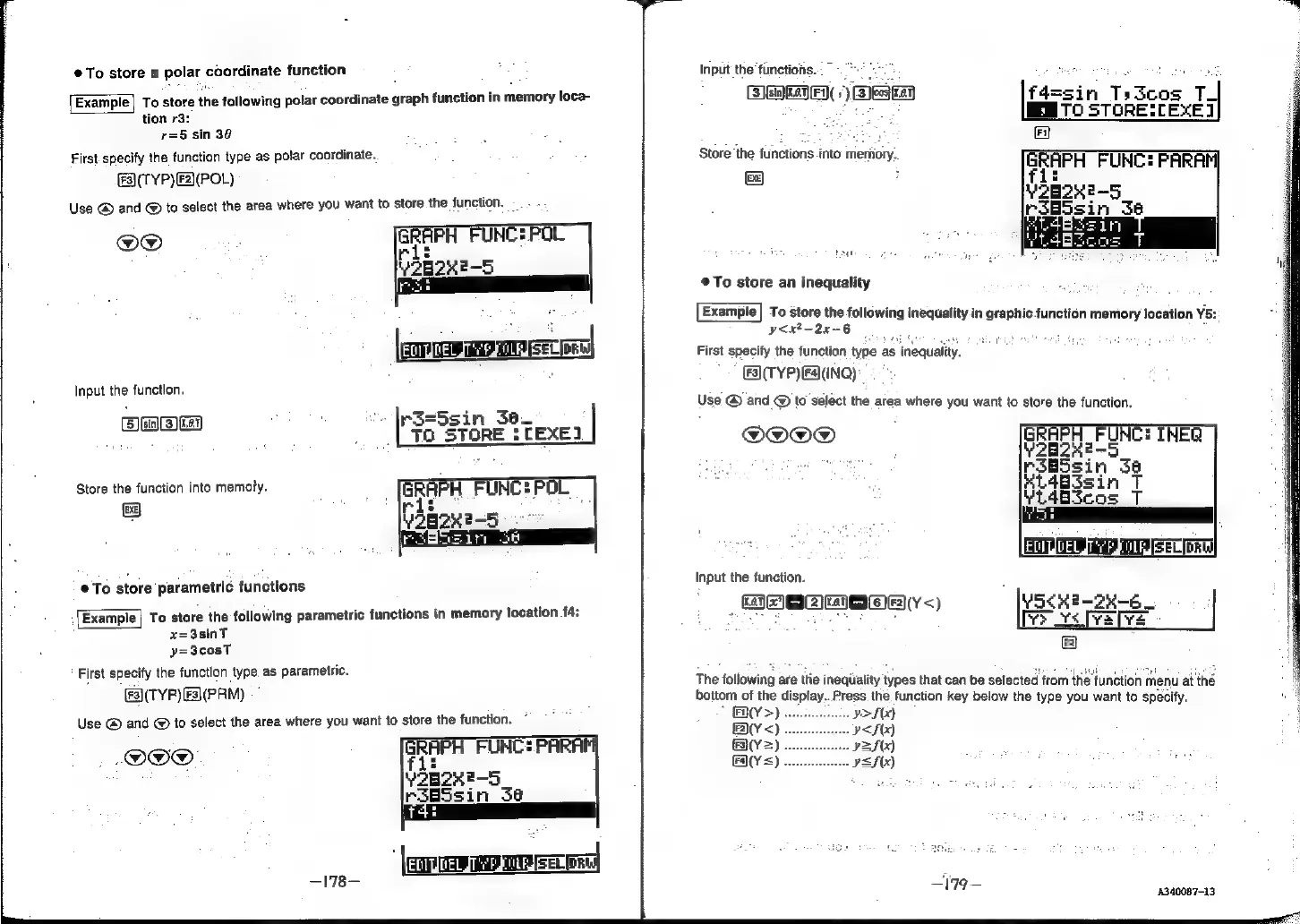
e@To
store
a
polar
eoorainate
function
Example|
To
store
the
following
polar
coordinate
éaph
function
in
memory
loca-
tion
r3:
r=5
sin
30
First-specify
the
function
type
as
polar
coordinate.
(FA(TYP)F2)(POL)
Use
@
and
@
to
select
the
area
where
you
want
to
store
the
function.
@O®
EO
QUeL
Tred
A
eSSO
ON
Input
the
function.
(3)
0:3)
|p3sSsin
3a_
i
a
8
:
TO
STORE
:
TEXE]
Store
the
function
into
memory.
©
@
To
store
parametric
functions
Example|
To
store
the
following
parametric
functions
in
memory
location
f4:
x=3sinT
y=3cosT
First
specify
the
function
type.
as
parametric.
(es\(TYP)
(F3)(PRM)
Use
@
and
@
to
select
the
area
where
you
want
to
store
the
function.
-OO®.
‘|r
RwUEEAE
—178—
Input
the
functions.
ENS
0
Gal
mes
9]
Ed
0.1]
Store
the
functions
into
memory,
EXE}
iii
@To
store
an
inequality
Example]
To
store
the
following
inequality
in
graphic
function
memory
location
Y5:
y<x?—-2x-6
,
First
specify
the
function
type
as
inequality.
F3](TYP)
[Fa]
(INQ)
Use
@
and
@
to
select
the
area
where
you
want
to
store
the
function.
@O@OO®
Input
the
function.
pce]
eae]
cane)
F2}
The
following
are
tlie
inequlality
types
that
can
be
selected
from
thie
function
menu
ai
the
bottom
of
the
display...
Press.
the
function
key
below
the
type
you
want
to
specify.
FX(Y>)
Y>S(x)
V<S(X)
2S
(x)
=f(x)
4340087-13