EasyManua.ls Logo

Casio CFX-9800G - Page 35

Casio CFX-9800G
206 pages
Print Icon
To Next Page IconTo Next Page
To Previous Page IconTo Previous Page
Loading...
4
-
ou.
,
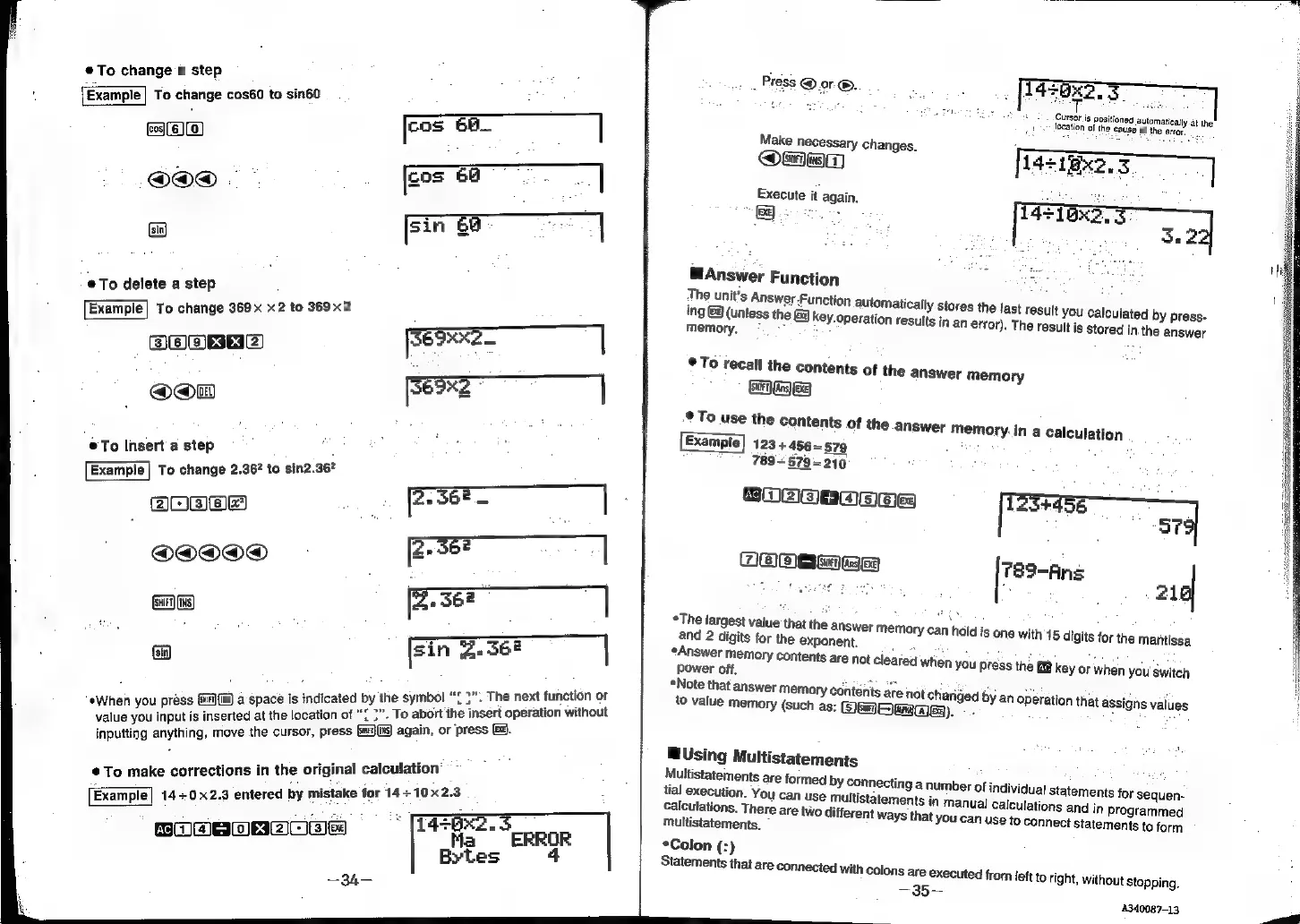
Press
@ar®.
T
450x2,
=
®To
change
a
step
:
De
:
‘Example
To
change
cos60
to
sin60
Mi
oe
SP
aa
ay.
Cursor
is
positioned
automatically.at
the:
t
Jocation
of
the
cause
of
the
error.
cos
6H
Make
necessary
changes.
z
eos
()(0)
@Omrma
:
z
cos
64
-
Execute
it
again.
ooo.
een
el
gett
_
Ere
|
sin
.
Se
:
@Answer
Function
:
The
unit's
Answer
Function
automatically
stores
the
last
result
you
calculated
by
press-
®@To
delete
a
step
;
ing
©
(unless
the
G3
key.operation
results
in
an
error).
The
Example]
To
change
369x
x2
to
369x
;
result
is
stored
in.the
answer
memory.
:
3HOXKe
_
eATHLEN)
x
x64)
Se
|
©
To
recall
the
contents
of
the
answer
GRE
oon
ee
|
©
To
use
the
contents
of
the
answer
me
he
,
123
+456~-579
©To
insert
a
step
789~
579-210
2
To
change
2.96*
to
sin2.36
CRNA
+
EWEN
CH=}
memory
mory
in
a
calculation
alee!
[cuales
789-Ans
os
q
The
largest
value
that
the
answer
memory
can
hold
is
one
with
15
digits
for
the
mantissa
and
2
digits
for
the
exponent.
Answer
memory
contents
are
not
cleared
when
you
press
the
key
or
when
you
switch
power
off,
wie
ta
Note
that
answer
memory
contents
are
not
chan
to
value
memory
(such
as:
Gem
aes).
ded
by
an
operation
that
assigns
values
¢When
you
pri
Gurl}
{iks)
a
Sp
in
led
by
mbo
.
The
next
function
or
Wh
ess
Gif
ace
is
indicated
by
the
symbol
hi
f
you
input
is
inserted
at
the
location
o'
‘o
abort
the
insert
operation
withou!
value
d
at
th
tt
if
bort
th
t
lhout
in,
or
‘press
Gz.
inputting
anything,
move
the
cursor,
press
[s)(ts)
again,
or
p!
BUsing
Multistatements
:
ake
corrections
in
the
original
calculation
Multistatements
are
formed
by
eTom
:
y
connecting
a
number
of
individual
statements
for
sequen-
tial
execution.
You
can
use
multistatements
in
manual
calculations
and
in
programmed
<p
nkatebee
di
+
2.3
i i
Example|
14+0x2.3
entered
by
mistake
for
14+10x
calculations.
There
are
two
different
ways
that
y
Ou
can use
to
connect
statements
to
form
.
-
multistatements.
ar
*
(14=6x2.3
384)
a"
ae
ERROR
*Colon
(:)
4
Statements
that
are
Connected
with
colons
are
executed
from
left
to
right,
without
stopping.
Bytes
pe
4340087-13

Related product manuals