EasyManua.ls Logo

Casio CFX-9800G - Page 37

Casio CFX-9800G
206 pages
Print Icon
To Next Page IconTo Next Page
To Previous Page IconTo Previous Page
Loading...
*After
you
press
—,
you
can
press
@
or.@
to
recall
previous
calculations
(up
to
255
bytes),
in
sequence
from
the
newest
to
the
oldest
(Multi-Replay
Function).
Once
you
recall
‘a
calculation,-you-can
use
@
and
@
to
move
the
cursor
around
the
calculation
and
make
changes
in
it
to‘create'a
new
calculation.
Note,
however,
that
multi-replay
memory
contents
are
cleared
whenever
you
change
to
another
menu,
or
when
you
enter
.the'S-
data
Mode
(STO
or
NON-(STO)).
:
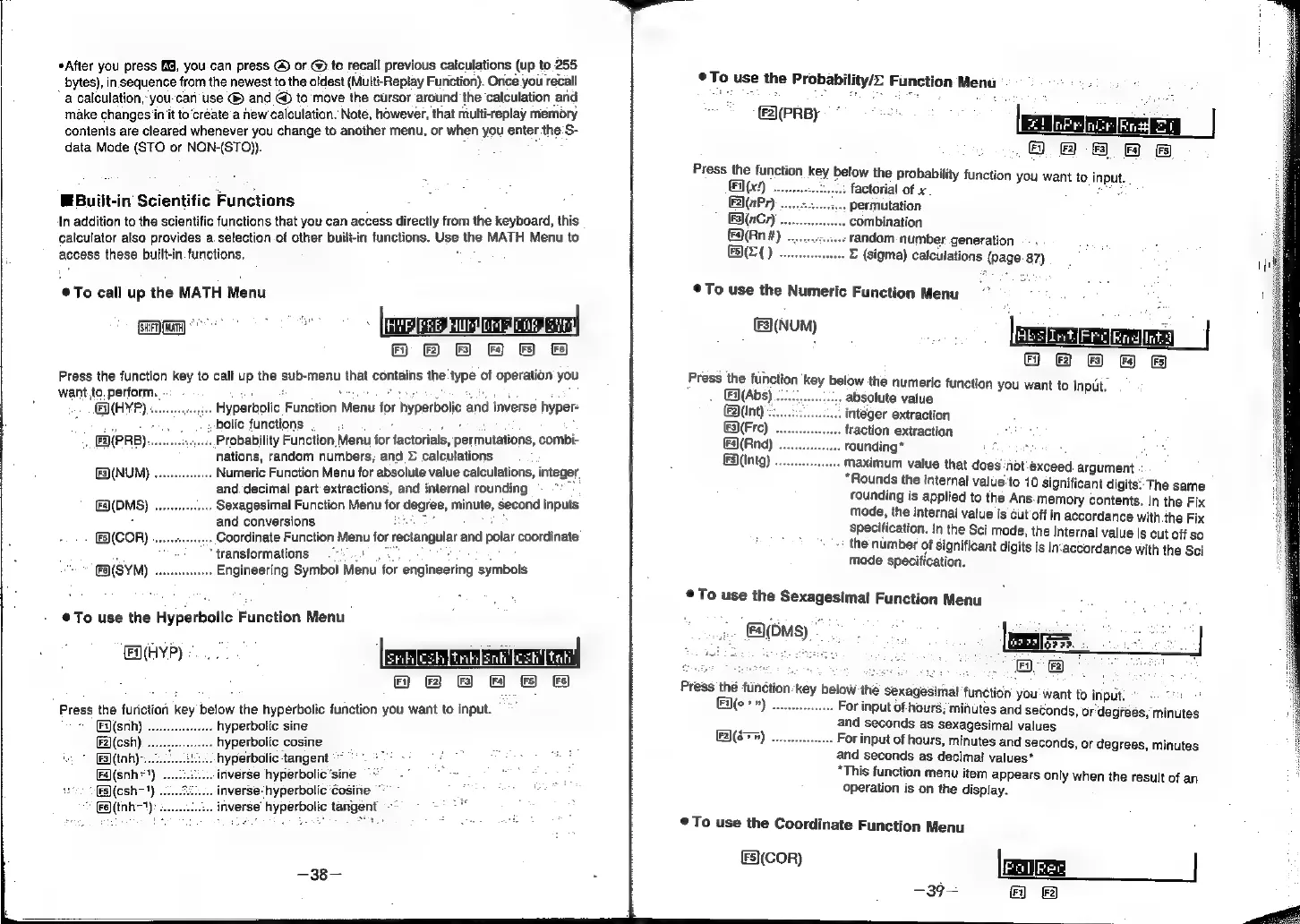
Built-in
Scientific
Functions
In
addition
to
the
scientific
functions
that
you
can
access
directly
from
the
keyboard,
this
calculator
also
provides
a.selection
of
other
built-in
functions.
Use
the
MATH
Menu
to
access
these
built-in
functions.
@To
call
up
the
MATH
Menu
WH
&
&)
Press
the
function
key
to
call
up
the
sub-menu
that
contains
the
type
of
operation
you
want,to.
perform.
-
:
sey
.
i
.
Hyperbolic
Function
Menu
for
hyperbolic
and
inverse
hyper-
GHYP)
..
te
si
bolic
functions
: -
.
.
-.
[F2(PRB)
..Probability
Function
Menu
for
factorials,
permutations,
combi-
nations,
random
numbers,
and
©
calculations
[9(NUM)
....
..
Numeric
Function
Menu
for
absolute
value
calculations,
integer
and.decimal
part
extractions,
and
internal
rounding
(DMS)
.
.
Sexagesimal
Function
Menu
for
degree,
minute,
second
inputs
and
conversions
:
....
Coordinate
Function
Menu
for
rectangular
and
polar
coordinate
(COR)
.....
e
5
“transformations
"8
(SYM)
....
..
Engineering
Symbol
Menu
for
engineering
symbols
@To
use
the
Hyperbolic
Function
Menu
aye)
eerleshTinmsnttcsh
tot
Fi}
6(F2}
(FS)
(Fa)
(FS)
(FS)
Press
the
furiction
key
below
the
hyperbolic
function
you
want
to
input.
Fi)(snh)
.
hyperbolic
sine
F2)(csh)
.
hyperbolic
cosine
F3)(tnh)-.
hyperbolic
tangent
*~
*
Fs](snh*')
iiverse
hyperbolic’sine
aes
“[Es)(esh-1)
inverse:
hyperbolic
‘Cosine
inverse’
hyperbolic
tangent
-
ye
(tah-1):
—38—
To
use
the
Probability/=
Function
Menu
é
Tyas
he
(\(PRBy
.08
82
8
ff
B
Press
the
function
key
below
the
probability
function
you
want
to
input.
Galt
629)
factorial
of
x
E2\(nPr)
.
permutation
F3)(nCr)
.
combination
(Rn
#)
-
random:
number
generation
Be).
E
(sigma)
calculations
(page.
87)
©
To
use
the
Numeric
Function
Menu
°
(NUM)
Press
the
function
key
below
the
numeric
function
you
want
to
input.
()(Abs)
absolute
value
(Int)
integer
extraction
(Fre)
fraction
extraction
(Rnd)
..
founding”
are
&5)(Intg)
..
Maximum
value
that
does
‘not:exceed
argument
“Rounds
the
internal
value'to
10
significant
digits:
The
same
rounding
is
applied
to
the
Ans.
memory
contents.
In
the
Fix
mode,
the
internal
vatue
is
cut
off
in
accordance
with
the
Fix
specification.
In
the
Sci
mode,
the
internal
value
is
cut
off
so
the
number
of
significant
digits
is
in‘accordance
with
the
Sci
mode
specification.
To
use
the
Sexagesimal
Function
Menu
»
€\OMs)
Press
thé
function:
key
below
the
sexagesimal
function
you'want
to
input.
Eq(o>»)
...
For
input
of-
hours;
minutes
and
seconds,
or'degfeés,
minutes
and
seconds
as
sexagesimal
values
For
input
of
hours,
minutes
and
seconds,
or
degrees,
minutes
and
seconds
as
decimal
values*
“This
function
menu
item
appears
only
when
the
result
of
an
operation
is
on
the
display.
feo]
}
—39-
a
8
©
To
use
the
Coordinate
Function
Menu
(cor)

Related product manuals