EasyManua.ls Logo

Casio CFX-9800G - Page 63

Casio CFX-9800G
206 pages
Print Icon
To Next Page IconTo Next Page
To Previous Page IconTo Previous Page
Loading...
Chapter
4
|||Complex
Numbers
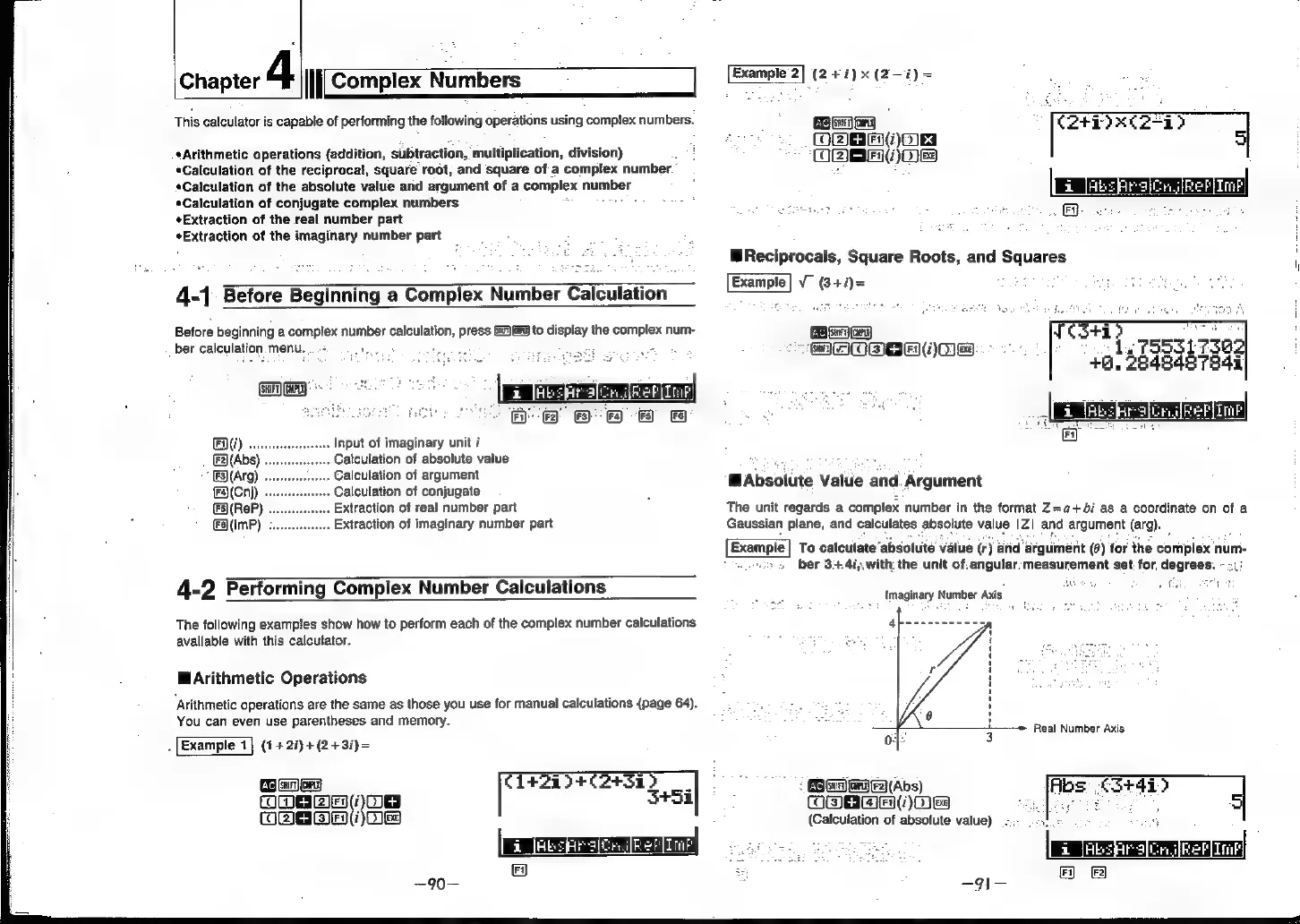
This
calculator
is
capable
of
performing
the
following
operations
using
complex
numbers.
Arithmetic
operations
(addition,
subtraction,
multiplication,
division)
Calculation
of
the
reciprocal,
square
root,
and
square
of
a
complex
number
*Caiculation
of
the
absolute
value
and
argument
of
a
complex
number
*Calculation
of
conjugate
complex
numbers
¢Extraction
of
the
real
number
part
eExtraction
of
the
imaginary
number
part
4-1
Before
Beginning
a
Complex
Number
Calculation
Before
beginning
a
complex
number
calculation,
press
Gu)
to
display
the
complex
num-
ber
calculation
menu,
o
te
(Guiry)
GaP)
*-
:
eee
7
Re
Ent)
..
Input
of
imaginary
unit
i
()(Abs
Calculation
of
absolute
value
(Arg)
Calculation
of
argument
{F(Cnj)
Calculation
of
conjugate
()(ReP)
Extraction
of
real
number
part
€@(ImP)
;
..
Extraction
of
imaginary
number
part
4-2
Performing
Complex
Number
Calculations
The
following
examples
show
how
to
perform
each
of
the
complex
number
calculations
available
with
this
calculator.
WArithmetic
Operations
‘Arithmetic
operations
are
the
same
as
those
you
use
for
manual
calculations
(page
64).
You
can
even
use
parentheses
and
memory.
.
Example
1}
(1+
2i)+(2+3i)=
Genoa
C1l4+200+02+31)
COMER
ZIEN()
S+5i
Ks
B)EN(Z)
Example
2|
(2
+7)
x
(2—i)
=
[ac]
Sie)
,
:
[Car
xe
2
(He
2
WReciprocals,
Square
Roots,
and
Saueres
Example]
V
(3+i)=
Sanwa
MAOSSH
Os
Absolute
Value
and.
Argument
The
unit
regards
a
complex
number
in
the
format
Z=a+bi
as
a
coordinate
on
of
a
Gaussian
plane,
and
calculates
absolute
value
1Z|
and
argument
(arg).
Example
|
To
calculate
%
absolute
value
(ea)
arid
‘argument
(6)
for
the
compiex
num-
/ >
ber
34.4i,.with
the
unit
of,
angular:measurement
set
for
degrees.
:
Imaginary
Number
Axis
Real
Number
Axis
:
Senay
F2}(Abs)
OBS
(jMes
(Calculation
of
absolute
value)