EasyManua.ls Logo

Casio CTK-530 - Technical Reference and Troubleshooting; Troubleshooting Common Issues; Keyboard Specifications

Casio CTK-530
26 pages
Print Icon
To Next Page IconTo Next Page
To Previous Page IconTo Previous Page
Loading...
~el@-m
Technical
Reference
M@
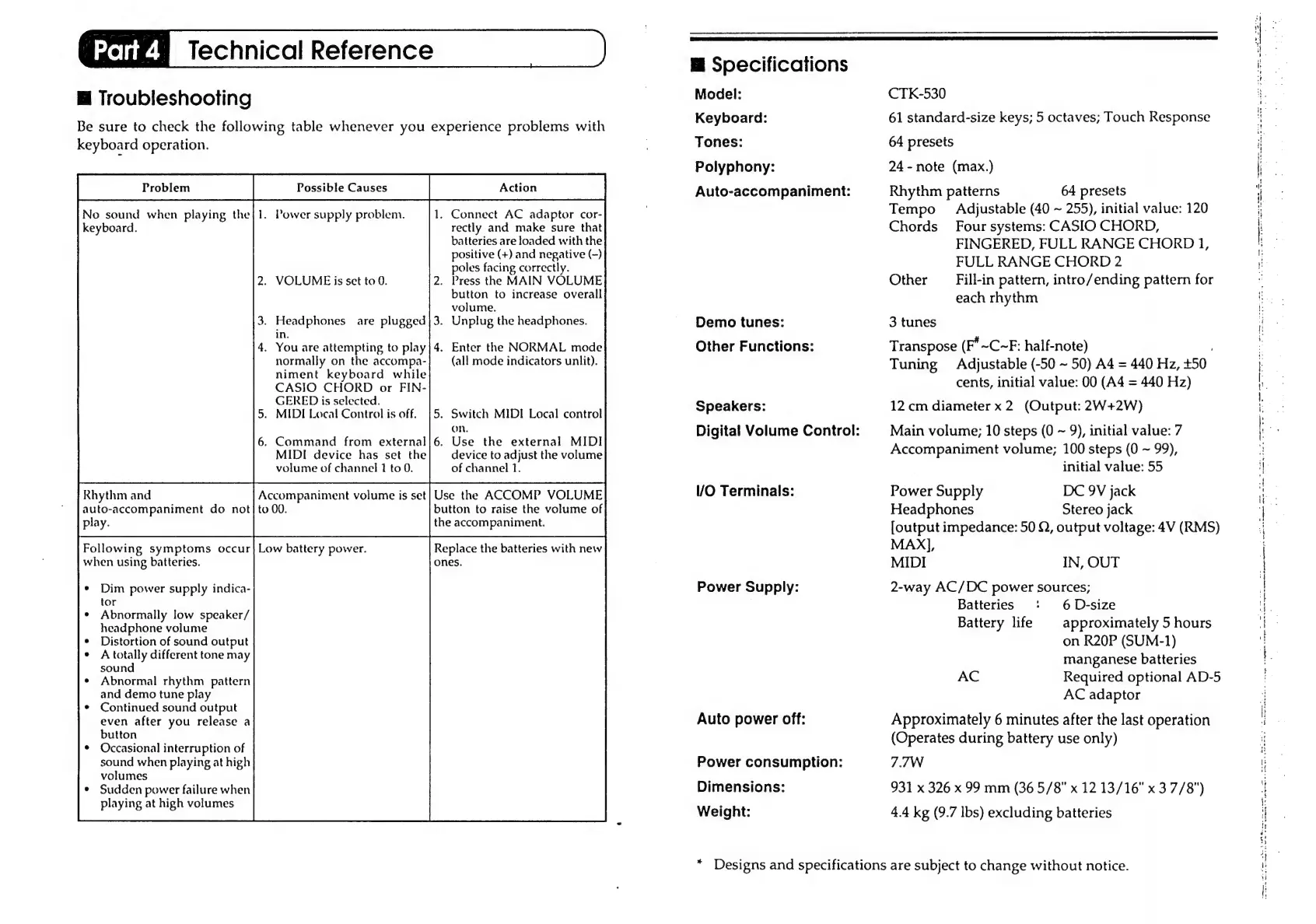
Troubleshooting
Be
sure
to
check
the
following
table
whenever
you
experience
problems
with
keyboard
operation.
No
sound
when
playing
the{1.
Power
supply
problem.
keyboard.
.
VOLUME
is
set
to
0.
.
Headphones
are
plugged
in.
.
You
are
attempting
to
play
normally
on
the
accompa-
niment
keyboard
while
CASIO
CHORD
or
FIN-
GERED
is
selected.
.
MIDI
Local
Control
is
off.
.
Command
from
external
MIDI
device
has
set
the
volume
of
channel
1
to
0.
.
Connect
AC
adaptor
cor-
rectly
and
make
sure
that
batteries
are
loaded
with
the
positive
(+)
and
negative
(-)
poles
facing
correctly.
.
Press
the
MAIN
VOLUME
button
to
increase
overall
volume.
.
Unplug
the
headphones.
.
Enter
the
NORMAL
mode
(all
mode
indicators
unlit).
.
Switch
MIDI
Local
control
On.
.
Use
the
external
MIDI
device
to
adjust
the
volume
of
channel
1.
m
Specifications
Model:
Keyboard:
Tones:
Polyphony:
Auto-accompaniment:
Demo
tunes:
Other
Functions:
Speakers:
Digital
Volume
Control:
CTK-530
61
standard-size
keys;
5
octaves;
Touch
Response
64
presets
24
-
note
(max.)
Rhythm
patterns
64
presets
Tempo
Adjustable
(40
~
255),
initial
value:
120
Chords
Four
systems:
CASIO
CHORD,
FINGERED,
FULL
RANGE
CHORD
1,
FULL
RANGE
CHORD
2
Other
Fill-in
pattern,
intro/ending
pattern
for
each
rhythm
3
tunes
Transpose
(F*
~C~F:
half-note)
)
Tuning
Adjustable
(-50
~
50)
A4
=
440
Hz,
+50
cents,
initial
value:
00
(A4
=
440
Hz)
12
cm
diameter
x
2
(Output:
2W+2W)
Main
volume;
10
steps
(0
~
9),
initial
value:
7
Accompaniment
volume;
100
steps
(0
~
99),
initial
value:
55
ee
ae
ee
en
Oe
S
See?
vera
nae
ee
ha,
ee
Oe
eke
a
eee
eee
ee
le
Rhythm
and
Accompaniment
volume
is
set}
Use
the
ACCOMP
VOLUME
VO
Terminals:
Power
Supply
DC
9V
jack
auto-accompaniment
do
not|to
00.
button
to
raise
the
volume
of
Headphones
Stereo
jack
play.
Phe
accompaniment
[output
impedance:
50
Q,
output
voltage:
4V
(RMS)
Following
symptoms
occur]
Low
battery
power.
Replace
the
batteries
with
new
MAX],
when
using
batteries.
ones.
MIDI
IN,
OUT
Dim
power
supply
indica-
tor
Abnormally
low
speaker/
headphone
volume
Distortion
of
sound
output
A
totally
different
tone
may
sound
Abnormal
rhythm
pattern
and
demo
tune
play
Continued
sound
output
even
after
you
release
a
button
Occasional
interruption
of
sound
when
playing
at
high
volumes
Sudden
power
failure
when
playing
at
high
volumes
Power
Supply:
Auto
power
off:
Power
consumption:
Dimensions:
Weight:
+
2-way
AC/DC
power
sources;
Batteries
‘+
6D-size
Battery
life
|
approximately
5
hours
on
R20P
(SUM-1)
manganese
batteries
AC
Required
optional
AD-5
AC
adaptor
Approximately
6
minutes
after
the
last
operation
(Operates
during
battery
use
only)
7.7W
931
x
326
x
99
mm
(36
5/8"
x
12
13/16"
x
3
7/8")
4.4
kg
(9.7
lbs)
excluding
batteries
Designs
and
specifications
are
subject
to
change
without
notice.
Fe
een
ny
ene
pee
eet
gees
een
Sag
ee
sae
We
eee
Reem
ee
eR