Music Presets
E-60
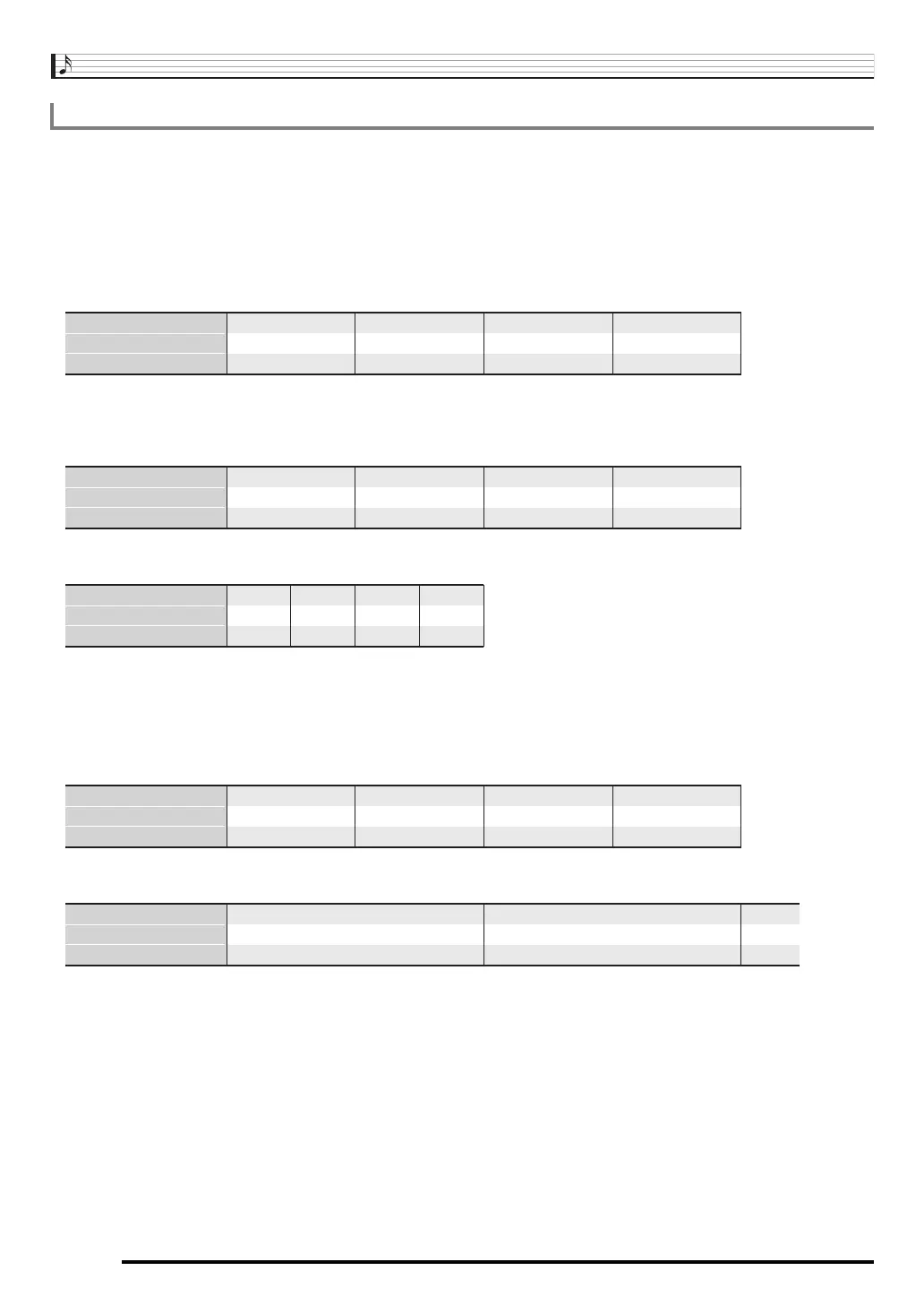
This section explains how chord progressions are played in accordance with the “Timing” (Timing set) settings in step 5 under “To
create and save a user preset” (page E-58). Note that this setting affects playback only. It does not change the chord progression
data.
•Normal
Plays chords at the same timing as the recording.
•Half
Plays chords measure-by-measure at a timing that is half that of the recording.
Example:
The following shows what happens when the “Half” setting is used to play back a user preset that was created based on a music
preset whose rhythm is a 4/4 time.
Half Playback when a 4/4 time rhythm is assigned to the user preset
Half Playback when a 2/4 time rhythm is assigned to the user preset
• Double
Plays chords measure-by-measure at a timing that is double that of the recording.
Playing back a chord progression like that shown for “Half” above while “Double” is specified results in the progression shown
below.
Double Playback when a 4/4 time rhythm is assigned to the user preset
Double Playback when an 8/4 time rhythm is assigned to the user preset
Timing Setting and Chord Progression Playback
1 2 3 4
Dm A7
1
1 2 3 4
Dm G7
2
1 2 3 4
C EM7
3
1 2 3 4
Am C7
4
Measure
Beat
Chord progression
1 2 3 4
Dm A7
1
1 2 3 4
Dm G7
2
1 2 3 4
C EM7
3
1 2 3 4
Am C7
4
Measure
Beat
Chord progression
1 2 1 2
Dm A7
1
1 2 1 2
C EM7Dm G7 Am C7
324
Measure
Beat
Chord progression
1 2 3 4
Dm
1
1 2 3 4
Dm
2
1 2 3 4
C
3
1 2 3 4
Am
4
Measure
Beat
Chord progression
1 2 3 4
Dm
1
5 6 7 8
A7
1 2 3 4
Dm
2
5 6 7 8
G7
1 2
C
3
Measure
Beat
Chord progression
CTK7300IN_e.book 60 ページ 2013年7月19日 金曜日 午後12時1分


 To Next Page