EasyManua.ls Logo

Casio DR-120LB - User Manual

Casio DR-120LB
14 pages
Print Icon
To Next Page IconTo Next Page
Loading...
R
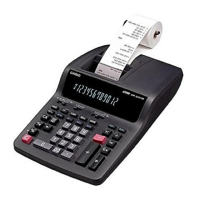
DR-120LB (ZX-517C)
DL-200L (ZX-517A)
DL-210L (ZX-517B)
DR-320B (ZX-517D)
JULY 1996
(without price)
DR-120LB DR-320B

Questions and Answers

  • B
    Brett OdomAug 6, 2025
    What to do if Casio DR-120LB has no print?
    • J
      Jennifer FrazierAug 6, 2025
      If your Casio Cash Register isn't printing, the issue might stem from poor voltage VM. Check if VM equals 11 V±5 % while printing. Another potential cause is a defective motor.
  • C
    Cassandra BradyAug 14, 2025
    What to do if Casio Cash Register does not work at all?
    • G
      Gina ColeAug 14, 2025
      If your Casio Cash Register isn't working, it could be due to a defective power transformer. Check the secondary voltage of the transformer. Alternatively, a defective LSI could be the cause, in which case you should check the waveforms of each pin.
  • J
    Jimmy PooleAug 21, 2025
    Why is the display poor on my Casio DR-120LB?
    • C
      Christina BellAug 21, 2025
      A poor display on your Casio Cash Register could be due to several reasons. It may be caused by a defective LSI or short or open circuits between digit signals and segment signals (check between LSI and display tube). A defective display tube could also be the reason.
  • B
    Brenda DouglasAug 30, 2025
    What to do if Casio DR-120LB has no display?
    • J
      Jamie SanfordAug 30, 2025
      If your Casio Cash Register has no display, it could be due to no voltage at VF1 and VF2, so check VF1 and VF2. If that's not the problem, it could be caused by no digit signal or no segment signal, so check the pulse signals from LSI. If VF1, VF2, Digit and Segment signals are OK, then the display tube may be defective.

Summary

Specifications

Block Diagram

CPU (MN158418 YCY) Pin Function

Diagnostic

Troubleshooting

Disassembly View

Schematic Diagrams

7-1. Main PCB

Main PCB schematic diagram illustrating component connections and layout.

7-2. Keyboard PCB

Keyboard PCB schematic showing key matrix and connections.

7-3. Slide Switch Board PCB

Slide switch board PCB schematic detailing switch configurations and signals.

7-4. Printer Pin Arrangement Diagram

Printer pin arrangement diagram showing connections and signal timing.

Parts List

Casio DR-120LB Specifications

General IconGeneral
BrandCasio
ModelDR-120LB
CategoryCash Register
LanguageEnglish

Related product manuals