EasyManua.ls Logo

Casio Edifice EFA-131BK-1AV - User Manual

Casio Edifice EFA-131BK-1AV
4 pages
Print Icon
To Next Page IconTo Next Page
Loading...
Operation Guide 5165
1
MO1006-EA
Getting Acquainted
Congratulations upon your selection of this CASIO watch. To get the most out of your
purchase, be sure to read this manual carefully.
About This Manual
Depending on the model of your watch, display text appears either as dark figures
on a light background or light figures on a dark background. All sample displays in
this manual are shown using dark figures on a light background.
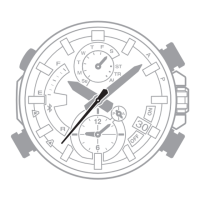
Button operations are indicated using the letters shown in the illustration.
Each section of this manual provides you with the information you need to perform
operations in each mode. Further details and technical information can be found in
the “Reference” section.
Alarm Mode
Countdown Timer Mode
World Time Mode
Stopwatch Mode
General Guide
Press C to change from mode to mode.
In any mode (except a setting mode), press B to illuminate the display.
Timekeeping Mode
Press C.
Timekeeping
You can adjust the Home Time city date and time in the Timekeeping Mode.
Pressing D in the Timekeeping Mode will toggle lower right display between the
screens shown below.
D
Home City Date Home City Time
Day of the week
Date
Seconds
PM indicator
Seconds
Hour : Minutes
Day of the week
To set the time and date
1. In the Timekeeping Mode, hold down A for about three
seconds until the city code flashes on the upper right
display. This is the setting mode.
2. Use D and B to select the city code you want.
Make sure you select your Home City code before
changing any other setting.
For full information on city codes, see the “City Code
Table”.
City code
PM indicator
Seconds
Hour :
Minutes
3. Press C to change the flashing screen content in the sequence shown below to
select the other setting.
Seconds
12/24-Hour
Format
Hour
Minutes
DST
Month
Year
City Code
Day
Illumination
Duration
4. When the timekeeping setting you want to change is flashing, use D or B to
change it as described below.
Change the city code
Toggle the DST setting between
Daylight Saving Time (
) and
Standard Time (
).
Use D (east) and B
(west).
Press D.
To do this: Do this:Screen:
5. Press A to exit the setting mode.
The day of the week is displayed automatically in accordance with the date (year,
month, and day) settings.
Toggle between 12-hour ( ) and
24-hour ( ) timekeeping
Reset the seconds to
Change the hour and minutes
Change the year, month, or day
Toggle the display illumination
duration between 1.5 seconds (
)
and three seconds (
)
Press D.
Press D.
Use D (+) and B (–).
Press D.
Daylight Saving Time (DST)
Daylight Saving Time (summer time) advances the time setting by one hour from
Standard Time. Remember that not all countries or even local areas use Daylight
Saving Time.
To change the Daylight Saving Time (summer time) setting
1. In the Timekeeping Mode, hold down A for about three
seconds until the city code flashes on the upper right
display. This is the setting mode.
2. Press C. This will display the DST setting screen.
3. Use D to toggle the DST setting on and off.
DST off ( ) DST on ( )
The default DST setting is OFF ( ).
4. When the setting you want is selected, press A to exit
the setting mode.
The DST indicator appears to indicate that Daylight
Saving Time is turned on.
DST indicator
12-hour and 24-hour timekeeping
With the 12-hour format, the P (PM) indicator appears above the hour digits for
times in the range of noon to 11:59 p.m. and no indicator appears for times in the
range of midnight to 11:59 a.m.
With the 24-hour format, times are displayed in the range of 0:00 to 23:59, without
the P (PM) indicator.
The 12-hour/24-hour timekeeping format you select in the Timekeeping Mode is
applied in all other modes.
Stopwatch
You can use the stopwatch to measure elapsed time, lap
times and split times. If you specify a distance value, the
stopwatch also will calculate and display speeds.
The digital display range of the stopwatch is 99 hours,
59 minutes, 59.999 seconds. The stopwatch continues
to run until you stop it. If it reaches the above limit, it will
restart the time measurement from zero.
The stopwatch operation continues even if you exit the
Stopwatch Mode. If you exit the Stopwatch Mode while a
stopwatch operation is in progress, the segments in the
1/10 seconds graphic will appear and disappear
sequentially as stopwatch seconds are counted. This is
to let you know that a stopwatch operation is in
progress.
All of the operations in this section are performed in the
Stopwatch Mode, which you enter by pressing C.
Speed hand
1/10 seconds graphic
Important!
Check to make sure that the speed hand is not moving before you perform any
Stopwatch Mode button operation.
Specifying a Distance Value
You can use the procedure below to specify a distance value, if you want. If you
specify a distance value, the watch will calculate and indicate speed for certain
stopwatch operations.
The distance value represents kilometers, miles, or any other distance unit you want.
Specifying a distance value of 10.0, for example, can mean 10.0 kilometers or 10.0
miles.
No speed calculation is performed when 0.0 is specified as the current distance
value.
For lap time readings, you can specify either the lap distance (when all the laps are
the same distance) or the total race distance.
For split time readings, you can specify the total race distance only. Though the
watch will indicate a speed each time you take a split reading, they will be based on
the total race distance, and so they will not indicate actual intermediate split speeds.
Question and Answer IconNeed help?

Do you have a question about the Casio Edifice EFA-131BK-1AV and is the answer not in the manual?

Overview

This document describes the operation and features of a CASIO watch, model 5165.

Function Description

The CASIO watch, model 5165, is a multi-functional timepiece offering various modes and features for timekeeping, measurement, and alerts.

Timekeeping Mode: This is the primary mode for displaying the current time and date. Users can adjust the Home Time city, date, and time. The lower right display can toggle between showing the date and the hour/minutes/seconds. It supports both 12-hour and 24-hour timekeeping formats. The 12-hour format displays a "P" (PM) indicator for times between noon and 11:59 p.m., while the 24-hour format displays times from 0:00 to 23:59 without a PM indicator. The watch's built-in full automatic calendar accounts for different month lengths and leap years from 2000 to 2099.

Daylight Saving Time (DST): The watch allows users to enable or disable Daylight Saving Time (summer time), which advances the time setting by one hour from Standard Time. The DST indicator appears when DST is turned on. DST can be set individually for each city code, except UTC. Turning on DST for the Home City also applies it to normal timekeeping.

Stopwatch Mode: This mode allows for measuring elapsed time, lap times, and split times. It can also calculate and display speeds if a distance value is specified. The stopwatch has a digital display range of 99 hours, 59 minutes, 59.999 seconds and continues to run even if the mode is exited. A 1/10 seconds graphic indicates ongoing stopwatch operations.

Countdown Timer Mode: Users can set a countdown timer with a start time ranging from one minute to 24 hours. An alarm sounds when the countdown reaches zero. An auto-repeat function can be enabled, which automatically restarts the countdown from the original value. The countdown timer operation continues even if the mode is exited.

World Time Mode: This mode displays the current time in one of 48 cities (29 time zones) around the world. The times are synchronized with the Timekeeping Mode and are based on UTC offsets. Users can scroll through available city codes, view the date for a selected city, and toggle between Standard Time and Daylight Saving Time for each city code. A unique feature allows swapping the Home City with the currently selected World Time City, which is useful for frequent travelers.

Alarm Mode: The watch features five alarms: four daily alarms (AL1, AL2, AL3, AL4) and one snooze alarm (SNZ). An Hourly Time Signal (SIG) can also be activated, causing the watch to beep twice every hour on the hour. Alarm tones sound for 10 seconds at the preset time, regardless of the current mode. The snooze alarm repeats seven times, every five minutes. Alarm and Hourly Time Signal operations are based on the Home City time.

Illumination: The watch incorporates an LED (light-emitting diode) to illuminate the display for easy reading in the dark. The illumination duration can be set to either 1.5 seconds (LT1) or 3 seconds (LT3).

Important Technical Specifications

  • Accuracy: ±30 seconds per month at normal temperature.
  • Digital Timekeeping: Hour, minutes, seconds, p.m. (P), month, day, day of the week.
  • Time Format: 12-hour and 24-hour.
  • Calendar System: Full Auto-calendar pre-programmed from 2000 to 2099.
  • Home City Code: Assignable from 48 city codes.
  • Analog Timekeeping: Hour, minutes (hand moves every 20 seconds).
  • Stopwatch:
    • Measuring Unit: 1/1000 second.
    • Measuring Capacity: 99:59'59.999".
    • Measuring Modes: Elapsed time, Lap time, Split time.
  • Countdown Timer:
    • Measuring Unit: 1 second.
    • Input Range: 1 minute to 24 hours (1-minute increments).
    • Other: Auto-repeat timing.
  • World Time: 48 cities (29 time zones).
  • Alarms: Four daily alarms, one snooze alarm, Hourly Time Signal.
  • Illumination: LED (light-emitting diode), Selectable illumination duration (1.5 or 3 seconds).
  • Battery: One lithium battery (Type: CR1220).
  • Approximate Battery Life: 3 years (based on ten seconds of alarm operation per day, one illumination operation (1.5 seconds) per day).

Usage Features

  • Mode Navigation: Pressing the "C" button changes between modes.
  • Illumination Activation: Pressing the "B" button illuminates the display in any mode (except a setting mode).
  • High-Speed Movement: Holding down the "A" or "B" buttons in various setting modes initiates high-speed changes to settings.
  • Auto Return Features: The watch automatically exits setting modes if no operation is performed for two or three minutes. It also returns to the Timekeeping Mode automatically if no operation is performed for two or three minutes in the Alarm Mode.
  • Initial Screens: When entering Stopwatch, World Time, or Alarm Mode, the data last viewed in that mode will be displayed first.
  • Speed Hand Indication: The speed hand indicates speeds from 0 to 100, while the hundreds digit indicates 0 to 400. If speed exceeds 498, the speed hand points to "OVER".
  • Best Lap Indicator: In Stopwatch Mode, the "BEST" indicator flashes if the displayed lap time reading is the best of all lap readings taken during the current elapsed time measurement.

Maintenance Features

  • Hand Home Position Correction: The watch allows for manual adjustment of the speed hand and hour/minute hands if they become misaligned due to strong magnetism or impact. This ensures accurate analog time display. The process involves entering a home position adjustment mode and using specific buttons to align the hands to their correct 12 o'clock positions.

Illumination Precautions:

  • Illumination may be difficult to see under direct sunlight.
  • Illumination turns off automatically when an alarm sounds or after the set duration.
  • Frequent use of illumination can reduce battery life.
  • Users are advised to be in a safe place when reading the display, especially during activities that could lead to accidents, as sudden or unintended light can be a distraction.

Casio Edifice EFA-131BK-1AV Specifications

General IconGeneral
BrandCasio
ModelEdifice EFA-131BK-1AV
CategoryWatch
LanguageEnglish

Related product manuals