EasyManua.ls Logo

Casio EDIFICE ECB-S100D-2A - User Manual

Casio EDIFICE ECB-S100D-2A
29 pages
Print Icon
To Next Page IconTo Next Page
Loading...
Contents
Precautions
Operating Precautions
User Maintenance
Battery
Mobile Link Precautions
Before Getting Started...
General Guide
Watch Face and Display Indicators
Navigating Between Modes
Cycling Between Timekeeping Mode Digital
Display Contents
Shifting Hands to Read the Digital Display
Charging
Viewing the Face in the Dark
Useful Features
Linking with a Phone
Getting Ready
Auto Time Adjustment
Viewing Stopwatch Data
Configuring World Time Settings
Adjusting Hand Alignment
Phone Finder
Configuring Watch Settings
Changing the Home City Summer Time Setting
Checking the Watch Charge Level
Recording Your Current Location (TIME &
PLACE)
Connection
Connecting with a Phone
Disconnecting from Your Phone
Unpairing
If you purchase another phone
Time Adjustment
Using Watch Operations to Adjust the Time
Setting
Using the Watch in a Medical Facility or
Aircraft
World Time
Using CASIO WATCHES to Configure World
Time City Settings
Checking World Time
World Time City Setting
Swapping Your Home Time and World Time
Alarm
Using CASIO WATCHES to Configure Alarm
Settings
Configuring Alarm Settings
Enabling the Hourly Time Signal
Turning Off an Alarm or the Hourly Time Signal
Alarm Countdown Indication
Moving to Another Time Zone
Stopwatch
Split Times and Lap Times
Measuring Elapsed Time
Measuring a Split Time
Measuring Lap Times
Timer
Using CASIO WATCHES to Configure Timer
Settings
Setting the Countdown Start Time
Using the Timer
Timer Countdown Indication
Hand Alignment Adjustment
Using CASIO WATCHES to Adjust Hand
Alignment
Adjusting Hand Alignment
Other Settings
Specifying the Day of the Week Language
Disabling the Countdown Start Tone
Enabling the Button Operation Tone
Configuring Power Saving Function Settings
Resetting Watch Settings
Other Information
City Table
Summer Time Table
Supported Phones
Specifications
Copyrights and Registered Copyrights
Troubleshooting
Watch Operation Guide 5658
1
MA2307-ED
OPUM-F
© 2021 CASIO COMPUTER CO., LTD.

Table of Contents

Question and Answer IconNeed help?

Do you have a question about the Casio EDIFICE ECB-S100D-2A and is the answer not in the manual?

Overview

This document describes the operation and features of a CASIO watch, model 5658, which includes various timekeeping, alarm, stopwatch, timer, and connectivity functions.

Function Description

The CASIO 5658 is a multi-functional timepiece designed for everyday use, offering a wide range of features beyond basic timekeeping. It can display the current time (hour, minute, second), day of the week, and date. The watch supports World Time, allowing users to view the current time in 38 time zones around the globe, with automatic updates when connected to a smartphone.

It includes multiple alarm functions: five daily alarms and an hourly time signal. The alarms can be configured to sound at specific times, and the hourly time signal provides a chime every hour on the hour. A stopwatch function is integrated, capable of measuring elapsed time in 1/100-second units for up to 24 hours, with split time and lap time recording capabilities. A countdown timer is also available, allowing users to set a countdown from 1 second up to 60 minutes, with an audible alert when the countdown ends.

A key feature of the 5658 is its smartphone link capability via Bluetooth. By connecting to the "CASIO WATCHES" app, the watch can automatically adjust its time settings (including Home City, World Time, and summer time) and perform hand alignment. The app also facilitates configuring watch settings, such as alarms, timers, and stopwatch data transfer. This connectivity enhances convenience and accuracy.

The watch incorporates a Tough Solar power system, which converts light into energy to power the watch and recharge its battery. This eliminates the need for regular battery replacement. A power saving function is included to conserve energy when the watch is left in darkness for extended periods, stopping hand movement and disabling certain functions.
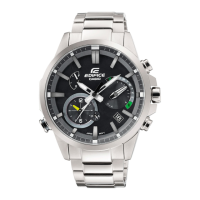
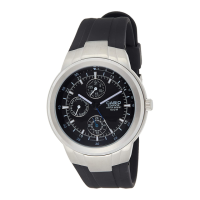
Important Technical Specifications

  • Timekeeping: Hour, minute, second, day of the week, date. Full auto-calendar (2000 to 2099). 12/24-hour timekeeping.
  • World Time: 38 time zones (38 cities + Coordinated Universal Time), summer time auto/manual switching, Home City/World Time city swapping.
  • Alarms: 5 daily alarms, hourly time signal. Alarm duration: 10 seconds.
  • Stopwatch: 1/100-second unit, measuring capacity: 23 hours 59 minutes 59 seconds. Measurement functions: elapsed time, split times, lap times.
  • Timer: Measuring unit: 1 second, countdown range: 60 minutes. Countdown start time setting range: 1 second to 60 minutes.
  • Bluetooth®: Frequency band: 2400MHz to 2480MHz. Maximum transmission: 0 dBm (1 mW). Communication range: up to 2 meters (depends on environment).
  • Power Source: Solar panel and one rechargeable battery. Battery operating time: approximately 7 months (without further exposure to light after full charge) or 18 months (when stored in total darkness with power saving function ON after full charge).
  • Light Source: Double LED light (super illuminator) for face and digital display. Afterglow: 1.5 seconds or 3 seconds.
  • Water Resistance: 10 BAR (100 meters).
  • Other: Hand alignment adjustment, button tone on/off, low battery alert.

Usage Features

  • Time Adjustment: The watch can automatically adjust its time by connecting to a smartphone via Bluetooth. Manual time adjustment is also possible for Home City, World Time, and summer time settings.
  • World Time: Easily view the current time in different cities globally. The "CASIO WATCHES" app allows for quick configuration and swapping of Home City and World Time.
  • Alarms: Set up to five daily alarms for reminders or wake-up calls. The hourly time signal can be enabled or disabled.
  • Stopwatch: Use for timing events with precision, including split and lap times. Stopwatch data can be transferred to the smartphone app for detailed analysis.
  • Timer: A convenient countdown timer for various activities, from cooking to exercise.
  • Hand Alignment Adjustment: If the hands become misaligned due to strong magnetism or impact, they can be manually adjusted to ensure accurate time display.
  • Power Saving: An automatic feature that conserves battery power by stopping hand movement and disabling certain functions when the watch is in darkness.
  • Illumination: Double LED light provides clear visibility of both the analog and digital displays in low-light conditions.
  • Connectivity with a Phone: The "CASIO WATCHES" app offers a user-friendly interface for configuring watch settings, managing time adjustments, and transferring data. It supports automatic time adjustment, Home City/World Time settings, and various other watch functions.
  • User Interface: The watch features multiple buttons (A, B, C, D) for navigating modes and adjusting settings. The crown (if applicable) may also be used for certain adjustments.

Maintenance Features

  • Tough Solar Power System: The watch is powered by light, eliminating the need for frequent battery changes. Regular exposure to light is crucial for maintaining a full charge.
  • Charging: Keep the watch exposed to light to ensure it remains charged. A low battery indicator will appear when the charge is low. The manual provides guidelines for approximate charging times under various light conditions.
  • Water Resistance: The 10 BAR water resistance allows for use during swimming and showering, but it is not suitable for scuba diving. Avoid operating buttons underwater.
  • Cleaning: Regularly clean the watch with a soft cloth to remove dirt and moisture. For resin bands, use a soft toothbrush and mild soap. For metal bands, use a soft toothbrush and a neutral detergent. Avoid using harsh chemicals.
  • Resin Components: Resin components can deteriorate over time due to exposure to sunlight, chemicals, or moisture. Regular cleaning and proper storage can extend their lifespan.
  • Leather Band: Leather bands are susceptible to discoloration and damage from moisture, sweat, and direct sunlight. Avoid prolonged exposure to these elements and clean with a soft, dry cloth.
  • Metal Components: Metal components can corrode or discolor if exposed to sweat or moisture. Clean regularly with a soft cloth and mild detergent.
  • Battery Life: The rechargeable battery has a long lifespan, but its capacity may decrease over time. If the watch stops functioning or has a significantly reduced operating time, it may indicate battery degradation.
  • Magnetic Fields and Impact: Avoid exposing the watch to strong magnetic fields or severe impacts, as these can cause hand misalignment or other malfunctions.
  • Temperature Extremes: Do not leave the watch in extremely hot or cold environments, as this can affect battery performance and display readability.
  • Smartphone App Updates: Keep the "CASIO WATCHES" app updated to ensure compatibility and access to the latest features and bug fixes.
  • Troubleshooting: The manual provides a comprehensive troubleshooting guide for common issues, such as alarms not sounding, hands not moving, or connectivity problems. For issues not covered, users are directed to the CASIO support website.

Casio EDIFICE ECB-S100D-2A Specifications

General IconGeneral
BrandCasio
ModelEDIFICE ECB-S100D-2A
CategoryWatch
LanguageEnglish

Related product manuals