EasyManua.ls Logo

Casio FR-1011S - Page 11

Casio FR-1011S
14 pages
Print Icon
To Next Page IconTo Next Page
To Previous Page IconTo Previous Page
Loading...
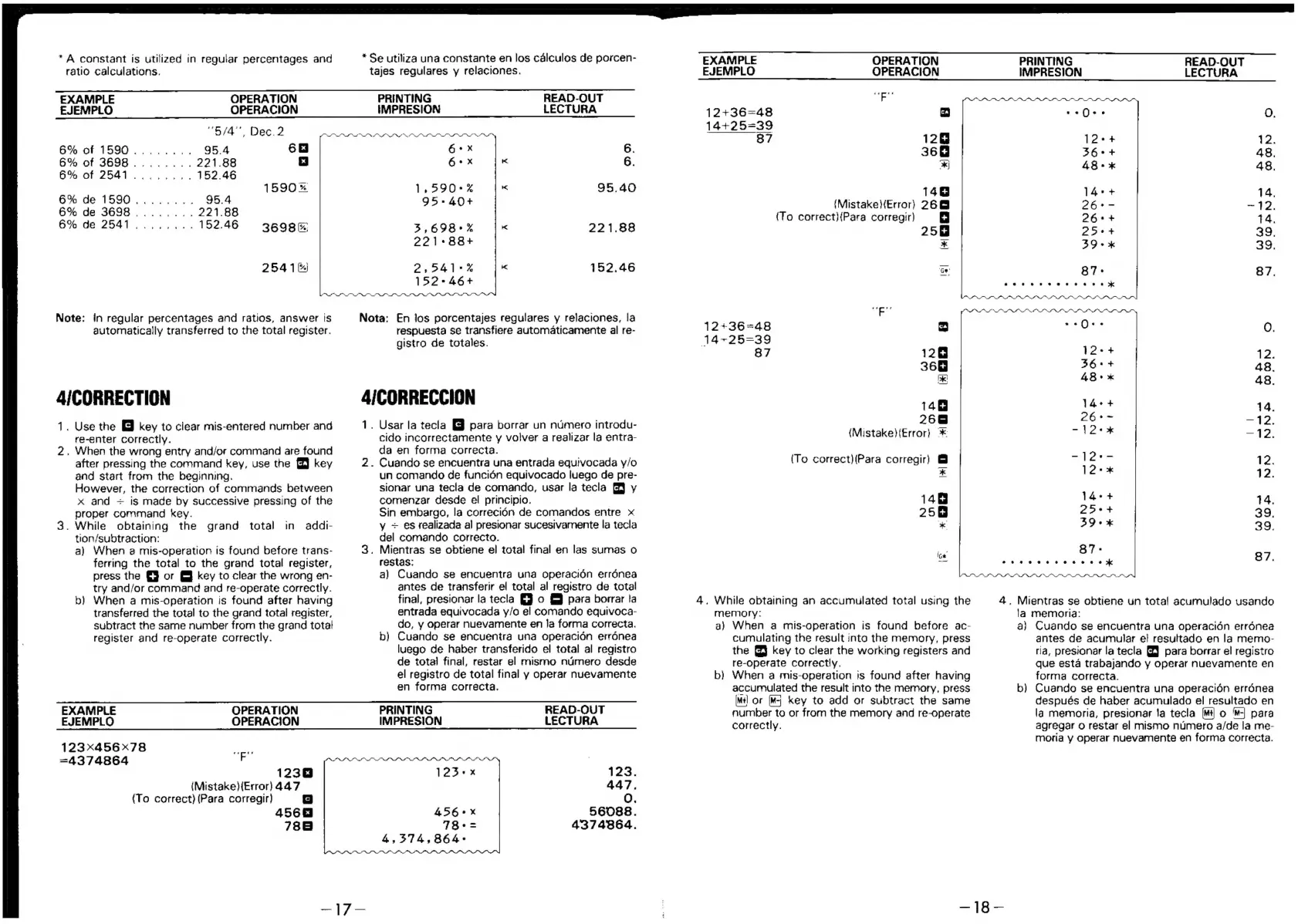
*
A
constant
is
utilized
in
regular
percentages
and
ratio
calculations.
tajes
regulares
y
relaciones.
*
Se
utiliza
una
constante
en
los
calculos
de
porcen-
EXAMPLE
OPERATION
PRINTING
READ-OUT
EJEMPLO
OPERACION
IMPRESION
LECTURA
“5/4”
Dec.
2
Ala
6%
of
1590.....
95.4
6
6+
x
6.
6%
of
3698.....
221.88
x
|
G*x
6.
6%
of
2541.....
152.46
1590%
1,590+4
95.40
6%
de
1590.....
95.4
95+-40+
6%
de
3698
.....
221.88
6%
de
2541....,
152.46
3698%
3,698+%
221.88
221*88+
2541)
341°%
152.46
Note:
in
regular
percentages
and
ratios,
answer
is
automatically
transferred
to
the
total
register.
4/CORRECTION
.
Use
the
&
key
to
clear
mis-entered
number
and
re-enter
correctly.
,
When
the
wrong
entry
and/or
command
are
found
after
pressing
the
command
key,
use
the
§
key
and
start
from
the
beginmng.
However,
the
correction
of
commands
between
x
and
+
is
made
by
successive
pressing
of
the
proper
command
key.
.
While
obtaining
the
grand
total
in
addi-
tion/subtraction:
a)
When
2
mis-operation
is
found
before
trans-
ferring
the
total
to
the
grand
total
register,
press
the
or
@
key
to
clear
the
wrong
en-
try
and/or
command
and
re-operate
correctly.
b)
When
a
mis-operation
is
found
after
having
transferred
the
total
to
the
grand
total
register,
subtract
the
same
number
from
the
grand
totat
152+46+
Nota:
En
Jos
porcentajes
regulares
y
relaciones,
ja
respuesta
se
transfiere
automaticamente
al
re-
gistro
de
totales.
4/CORRECCION
1.
Usar
la
tecla
para
borrar
un
numero
introdu-
cido
incorrectamente
y
volver
a
realizar
la
entra-
da
en
forma
correcta.
.
Cuando
se
encuentra
una
entrada
equivocada
y/o
un
comando
de
funci6én
equivocado
luego
de
pre-
sionar
una
tecla
de
comando,
usar
la
tecla
J
y
comenzar
desde
el
principio.
Sin
embargo,
la
correci6n
de
comandos
entre
x
y
~
es
realizada
al
presionar
sucesivamente
la
tecla
del
comando
correcto.
.
Mientras
se
obtiene
el
total
final
en
las
suras
o
restas:
a)
Cuando
se
encuentra
una
operacién
errénea
antes
de
transferir
el
total
al
registro
de
total
final,
presionar
la
tecla
o
&
para
borrar
!a
entrada
equivocada
y/o
el
comando
equivoca-
do,
y
operar
nuevamente
en
la
forma
correcta.
EXAMPLE
EJEMPLO
12+36=48
14+25=39
87
12+36=48
14+25=39
87
memory:
OPERATION
OPERACION
vip
ca
128
368
*
146
{Mistake}{Error)
26@
(To
correct}{Para
corregir)
258
*
128
368
148
268
(Mistake}(Error)
>
(To
correct)(Para
corregir)
&
|
.
While
obtaining
an
accumulated
total
using
the
PRINTING
READ-OUT
IMPRESION
LECTURA
ss
@
0
*
¢€
O.
12++
12.
260+
48.
48+%
48.
14+
+
14,
26°-
~
12.
26+
+
74.
25+
39.
39+
39.
87s
87.
aeeve
eevee
eae
a
a}
When
a
mis-operation
is
found
before
ac-
cumulating
the
result
into
the
memory,
press
the
@
key
to
clear
the
working
registers
and
register
and
re-operate
correctly.
b)
Cuando
se
encuentra
una
operacién
errénea
luego
de
haber
transferido
el
total
al
registro
de
total
final,
restar
el
mismo
numero
desde
el
registro
de
total
final
y
operar
nuevamente
en
forma
correcta.
EXAMPLE
OPERATION
PRINTING
READ-OUT
EJEMPLO
OPERACION
IMPRESION
LECTURA
123
<x456x78
et
=4374864
F
1238
123°x
123.
(Mistake){Error)
447
447.
(To
correct)
(Para
corregir)
O.
4568
456°**x
56088.
788
78+=
4374864.
4,374,864->
re-operate
correctly.
b)
When
a
mis-operation
is
found
after
having
accumulated
the
result
into
the
memory,
press
[Mtl
or
[M-|
key
to
add
or
subtract
the
same
number
to
or
from
the
memory
and
re-operate
correctly.
0,
l2-+
12:
S6s+
48.
aos
48.
rake
14.
oe
—412.
~
120%
2,
lens
12.
lee
12.
14+
+
14.
2>et
39.
39+
39.
Aoweeuuee
ee
87.
4.
Mientras
se
obtiene
un
tota!
acumulado
usando
la
memoria:
a}
Cuando
se
encuentra
una
operacidn
errénea
antes
de
acumular
el
resultado
en
la
memo-
ria,
pres:onar
la
tecla
GJ
para
borrar
el
registro
que
esta
trabajando
y
operar
nuevamente
en
forma
correcta.
b)
Cuando
se
encuentra
una
operacién
errénea
Gespués
de
haber
acumulado
el
resultado
en
la
memoria,
presionar
Ja
tecla
o
'-|
para
agregar
o
restar
el
mismo
numero
a/de
la
me-
moria
y
operar
nuevamente
en
forma
correcta.

Related product manuals