EasyManua.ls Logo

Casio FR-1011S - Page 6

Casio FR-1011S
14 pages
Print Icon
To Next Page IconTo Next Page
To Previous Page IconTo Previous Page
Loading...
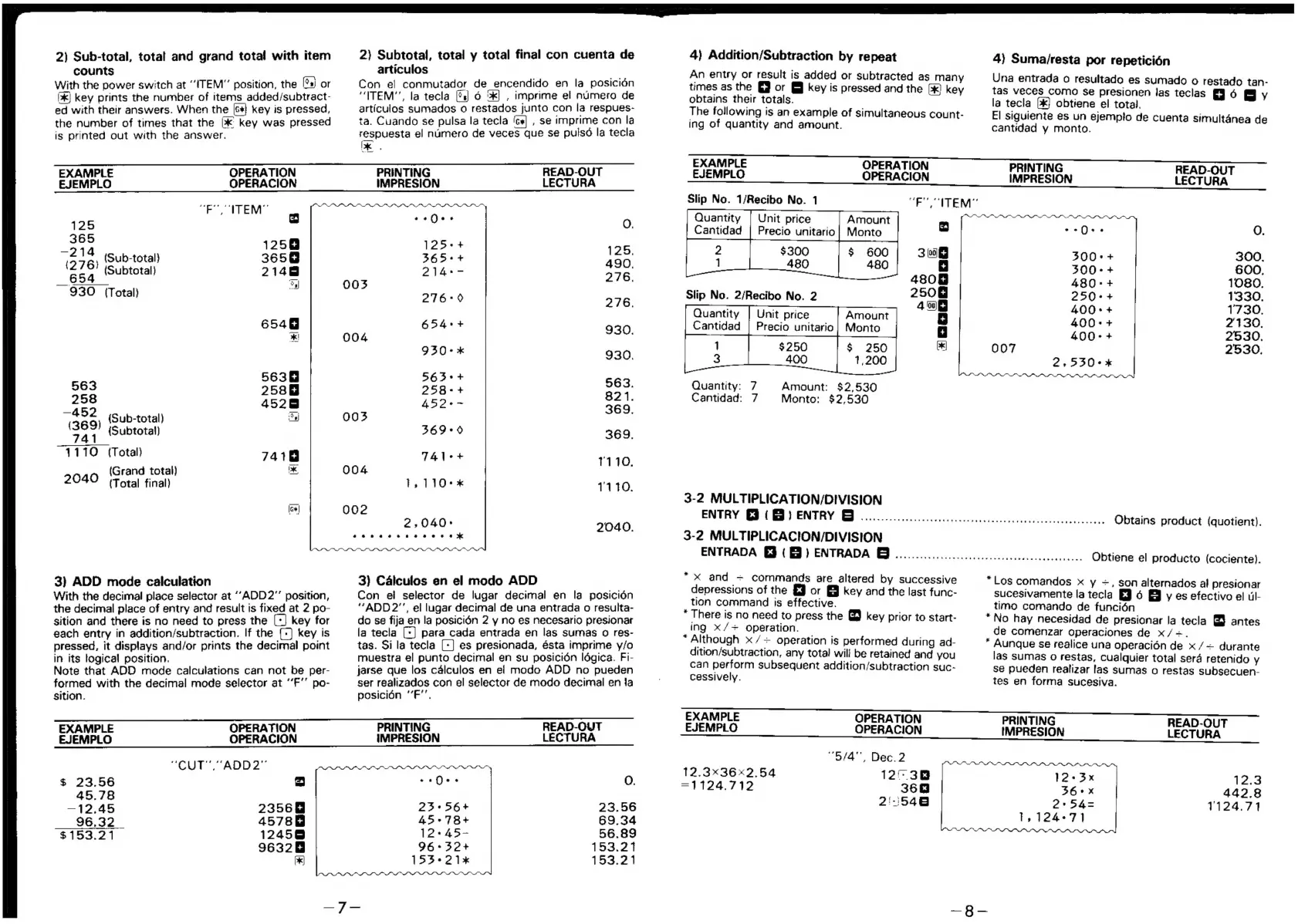
2)
Sub-total,
total
and
grand
total!
with
item
counts
With
the
power
switch
at
“ITEM”
position,
the
[°s)
or
Ik)
key
prints
the
number
of
items
added/subtract-
ed
with
their
answers.
When
the
[s*}
key
is
pressed,
the
number
of
times
that
the
>k
key
was
pressed
is
printed
out
with
the
answer.
EXAMPLE
OPERATION
EJEMPLO
OPERACION
“EO
ITEM”
125
=
314
125
(576)
(Sub-total)
365@
(Subtotal)
2148
_
654
a
930
(Total)
i.
6548
*!
25388
258
=
4528
iG
69)
(Sub-total)
a
541
{Subtotal)
1110
(Total)
7418
(Grand
total)
x
2040
(Total
final)
[cw|
3)
ADD
mode
calculation
With
the
decimal
place
selector
at
‘“ADD2"’
position,
the
decimal
place
of
entry
and
result
is
fixed
at
2
po-
sition
and
there
is
no
need
to
press
the
[+]
key
for
each
entry
in
addition/subtraction.
If
the
(-]
key
is
pressed,
it
displays
and/or
prints
the
decimal
point
in
its
logical
position.
Note
that
ADD
mode
calculations
can
not
be
per-
formed
with
the
decimal
mode
selector
at
‘‘F’’
po-
sition.
EXAMPLE
OPERATION
EJEMPLO
OPERACION
“CUT”,
“ADD2”
$
23.56
es)
45.78
—~12.45
2356@
96.32
45788
$153.21
12458
9632
P|
2}
Subtotal,
total
y
total
final
con
cuenta
de
articulos
Con
el
conmutador
de
encendido
en
la
posicién
“ITEM’',
la
tecla
(s)
6
2k)
,
imprime
el
numero
de
articulos
sumados
o
restados
junto
con
la
respues-
ta.
Cuando
se
pulsa
la
tecla
‘cs
,
se
imprime
con
la
respuesta
el
numero
de
veces
que
se
puls6
la
tecla
Ie.
O04
002
PRINTING
READ-OUT
IMPRESION
LECTURA
«¢6¢
0
es
¢
O.
125++
125.
365++
raed
490,
14>
276.
276-9
276.
654°+
930.
930-x
930,
267°
+
563.
258<+
Geo
821.
369.
369*0
369,
es
1110.
1,110-*
1110.
2,040:
2040.
oem
aeeneaeaee
es
3)
Calculos
en
el
modo
ADD
Con
ei
selector
de
lugar
decimal
en
la
posicién
“ADD
2"’,
el
lugar
decimal
de
una
entrada
o
resulta-
do
se
fija
en
la
posicién
2
y
no
es
necesario
presionar
la
tecla
[+]
para
cada
entrada
en
las
sumas
o
res-
tas.
Sila
tecla
[+]
es
presionada,
ésta
imprime
y/o
muestra
el
punto
decimal
en
su
posicidén
ldgica.
Fi-
jarse
que
los
calculos
en
ei
modo
ADD
no
pueden
ser
realizados
con
el
selector
de
modo
decimal
en
fa
posicién
“’F’’.
PRINTING
READ-OUT
IMPRESION
LECTURA
icn(hes
0.
23+56+
23.56
45°78+
69.34
12+45-
56.89
96+32+
153.21
153-21
153.21
4)
Addition/Subtraction
by
repeat
An
entry
or
result
is
added
or
subtracted
as
many
times
as
the
Gj
or
§@
key
is
pressed
and
the
[&)
key
obtains
their
totals.
The
following
is
an
example
of
simultaneous
count-
ing
of
quantity
and
amount.
EXAMPLE
OPERATION
EJEMPLO
OPERACION
Slip
No.
1/Recibo
No.
1
“FU
CITEM”
Quantity
|
Unit
price
Amount
Cantidad
|
Precio
unitario
|
Monto
$300
$
§00
480
480
Slip
No.
2/Recibo
No.
2
Unit
price
Amount
Precio
unitario|
Monto
$
250
1,200
$250
400
Amount:
$2,530
Quantity:
7
Monto:
$2,530
Quantity
Cantidad
Cantidad:
7
3-2
MULTIPLICATION/DIVISION
ENTRY
€3
(&)
entry
G)
.................0.........
3-2
MULTIPLICACION/DIVISION
ENTRADA
€3
(3)
ENTRADA
@....................
*
x
and
+
commands
are
altered
by
successive
depressions
of
the
£9
or
§§
key
and
the
last
func-
tion
command
is
effective.
*
There
is
no
need
to
press
the
@
key
prior
to
start-
ing
X/~+
operation.
“Although
x
/+
operation
is
performed
during
ad-
dition/subtraction,
any
total
will
be
retained
anc
you
can
perform
subsequent
addition/subtraction
suc-
cessively.
EXAMPLE
OPERATION
EJEMPLO
OPERACION
“6/4”,
Dec.
2
12.3x36x2,.54
12):
38
=1124.712
36
2:
546
4)
Suma/resta
por
repeticién
Una
entrada
o
resultado
es
sumado
o
restado
tan-
tas
veces
como
Se
presionen
las
teclas
6
y
la
tecla
[k}
obtiene
el
total.
Ges
El
siguiente
es
un
ejempto
de
cuenta
simultanea
de
cantidad
y
monto.
PRINTING
5
IMPRESION
tECTURA.
©-Q--
O.
300°-+
300.
300
a+
600,
480-+
1080.
250++
1330.
400
«+
1730.
400-+
2130,
400-+
2530,
2530.
2,530+x
Siac
ili
wot
eepsletak
oe
ee
Obtains
product
(quotient).
ee
eae
aid
ES
Obtiene
el
producto
(cociente).
“Los
comandos
x
y
~,
son
alternados
al
presionar
sucesivamente
la
tecla
£3
6
B
y
es
efectivo
el
ul-
timo
comando
de
funcién
*
No
hay
necesidad
de
presionar
la
tecla
&
antes
de
comenzar
operaciones
de
x/-=.
*
Aunque
se
realice
una
operacién
de
x
/~
durante
las
sumas
o
restas,
cualquier
total
sera
retenido
y
se
pueden
realizar
fas
sumas
o
restas
subsecuen-
tes
en
forma
sucesiva.
PRINTING
READ-
IMPRESION
LECTURA.
12+
3x
12.3
36°x
442.8
54=
1124.71
1,
124+71

Related product manuals