EasyManua.ls Logo

Casio fx-83GT PLUS - Page 17

Casio fx-83GT PLUS
32 pages
Print Icon
To Next Page IconTo Next Page
To Previous Page IconTo Previous Page
Loading...
°,
',
9:
These
functions
specify
the
angle
unit.
°
specifies
degrees,
radians,
and
9
grads.
Input
a
function
from
the
menu
that
appears
when
you
perform
the
following
key
operation:
[S4F
(ars)(DRGP).
See
3.
10".
a
Exponential
functions.
Note
that
the
input
method
is
different
depending
upon
whether
you
are
using
Natural
Display
or
Linear
Display.
See
#4.
log:
Logarithmic
function.
Use
the
key
to
input
log,b
as
log
(a,
b).
Base
10
is
the
default
setting
if
you
do
not
input
anything
for
a.
The
key
also
can
be
used
for
input,
but
only
while
Natural
Display
is
selected.
In
this
case,
you
must
input
a
value
for
the
base.
See
VAS
In:
Natural
logarithm
to
base
e.
See
Ze.
x7, x3,
x",
Vm,
9m,
"Va,
x7':
Powers,
power
roots,
and
reciprocals.
Note
that
the
input
methods
for
x",
Vm,
°Vm,
and
"Vo
are
different
depending
upon
whether
you
are
using
Natural
Display
or
Linear
Display.
See
VAR
Note:
The
following
functions
cannot
be
input
in
consecutive
sequence:
x’,
x8,
x",
x’.
If
you
input
2G
4,
for
example,
the
final
will
be
ignored.
To
input
92”,
input
2(%],
press
the
@
key,
and
then
press
(|
(EZZMG]).
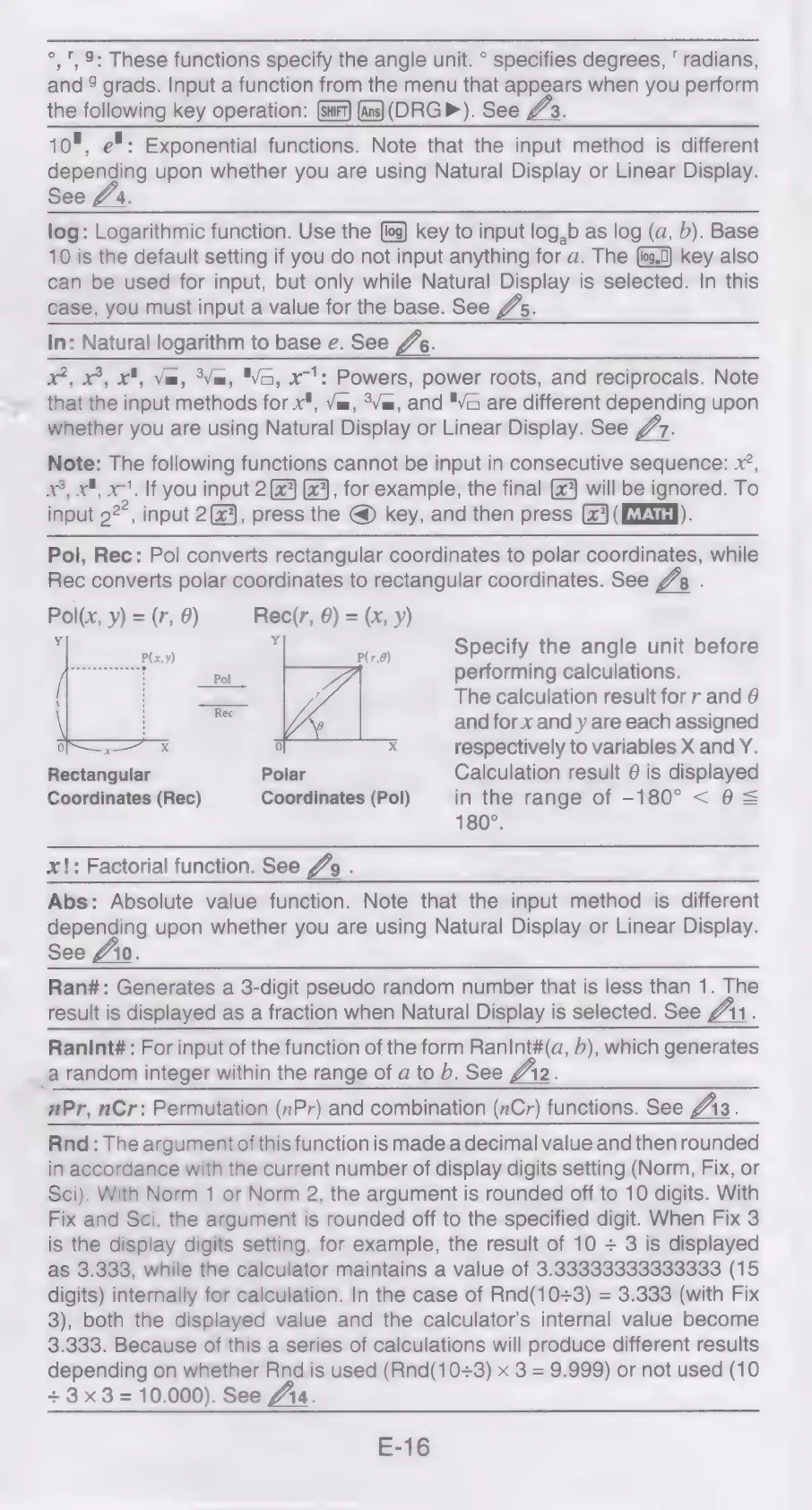
Pol,
Rec:
Pol
converts
rectangular
coordinates
to
polar
coordinates,
while
Rec
converts
polar
coordinates
to
rectangular
coordinates.
See
VA:
:
Pol(x,
y)=(r,
0)
Rec(r,
6)
=
(x,
y)
s
aed
Specify
the
angle
unit
before
Pol
performing
calculations.
The
calculation
result
for
r
and
@
and
for
x
and
y
are
each
assigned
0
x
respectively
to
variables
X
and
Y.
Rectangular
Polar
Calculation
result
6
is
displayed
Coordinates
(Rec)
Coordinates
(Pol)
in
the
range
of
-180°
<
0S
180°.
x!:
Factorial
function.
See
Jo
.
Abs:
Absolute
value
function.
Note
that
the
input
method
is
different
depending
upon
whether
you
are
using
Natural
Display
or
Linear
Display.
See
#10.
Ran#:
Generates
a
3-digit
pseudo
random
number
that
is
less
than
1.
The
result
is
displayed
as
a
fraction
when
Natural
Display
is
selected.
See
VAN
:
Ranint#
:
For
input
of
the
function
of
the
form
RanInt#(a,
b),
which
generates
_a
random
integer
within
the
range
of
a
to
b.
See
Jr2.
Pr,
nCr:
Permutation
(nPr)
and
combination
(nCr)
functions.
See
Js.
Rnd:
The
argument
of
this
function
is
made
a
decimal
value
and
then
rounded
in
accordance
with
the
current
number
of
display
digits
setting
(Norm,
Fix,
or
Sci).
With
Norm
1
or
Norm
2,
the
argument
is
rounded
off
to
10
digits.
With
Fix
and
Sci,
the
argument
is
rounded
off
to
the
specified
digit.
When
Fix
3
is
the
display
digits
setting,
for
example,
the
result
of
10
+
3
is
displayed
as
3.333,
while
the
calculator
maintains
a
value
of
3.33333333333333
(15
digits)
internally
for
calculation.
In
the
case
of
Rnd(10+3)
=
3.333
(with
Fix
3),
both
the
displayed
value
and
the
calculator’s
internal
value
become
3.333.
Because
of
this
a
series
of
calculations
will
produce
different
results
depending
on
whether
Rnd
is
used
(Rnd(10+3)
x
3
=
9.999)
or
not
used
(10
+3x3=
10.000).
See
fia.
E-16

Related product manuals