EasyManua.ls Logo

Casio fx-85WA - Technical Information and Troubleshooting; Sexagesimal Calculations and Problem Solving

Casio fx-85WA
18 pages
Print Icon
To Next Page IconTo Next Page
To Previous Page IconTo Previous Page
Loading...
•
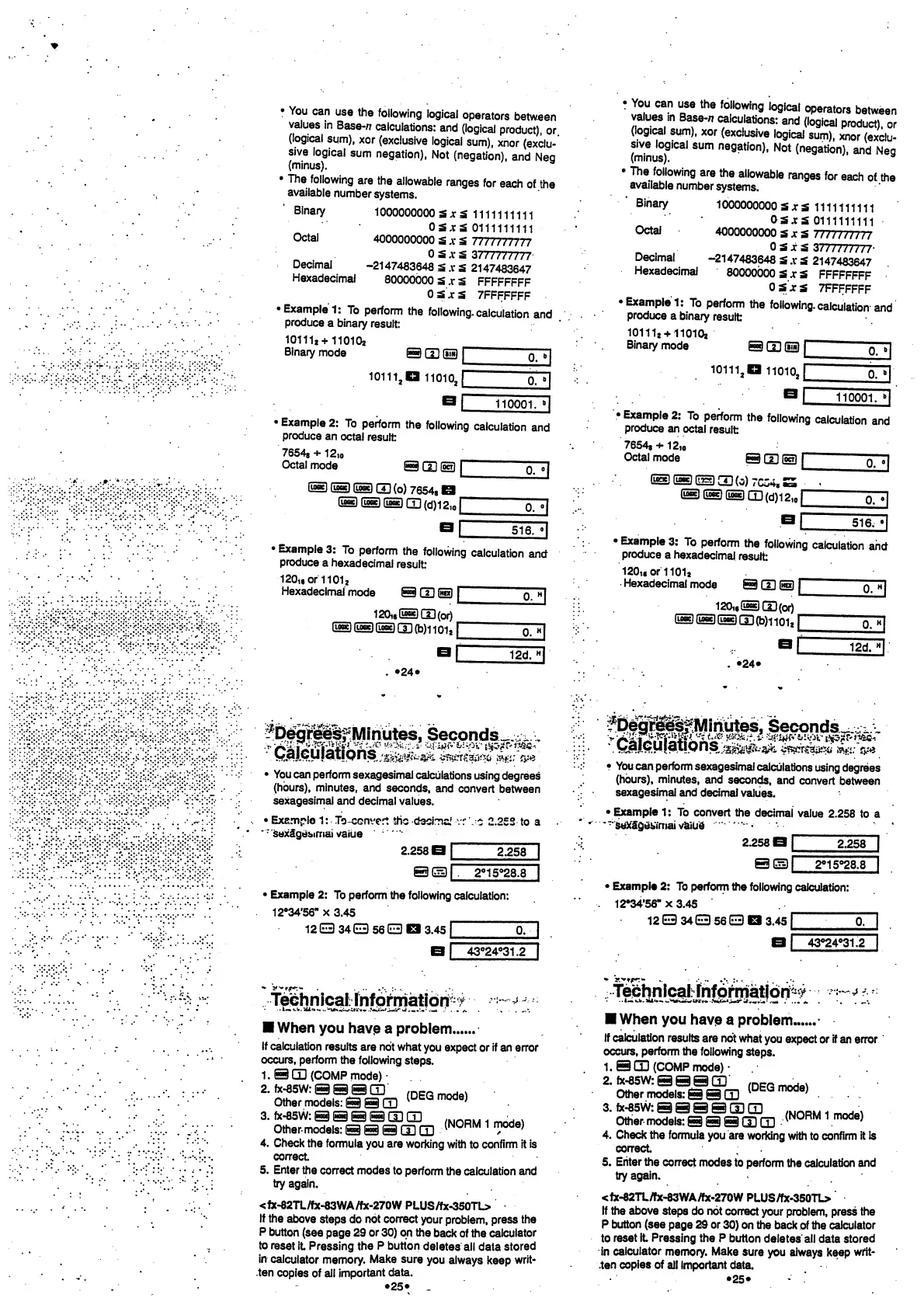
You
can
use
the
following
logical
operators
between
values
in
Base-/?
calculations:
and
(logical
product),
or
(logical
sum),
xor
(exclusive
logical
sum),
xnor
(exclu-
sive
logical
sum
negation),
Not
(negation),
and
Neg
(minus).
• The
following
are
the
allowable
ranges
for
each
of.
the
available
number
systems.
Binary
1000000000
Sjc£
1111111111
0S.rS
0111111111
Octal
4000000000
S .v
S
7777777777
0
5
x
S
3777777777
Decimal
-2147483648
5 .v
3
2147483647
Hexadecimal
80000000
3 .r
£
FFFFFFFF
OSjtS
7FFFFFFF
•
Example
1:
To
perform
the
following,
calculation
and
produce
a
binary
result:
101112+110102
Binary
mode
©
S3
S3
|
p
b|
10111.D
11010,
110001.
"|
• Example
2:
To
perform
the
following
calculation
and
produce
an
octal
result
76548 +
12,o
Octal
mode
©GO
(22)
I
®@®(i](o)
7654,
B
®®@(I](d)12J
0.
°|
516.
«|
• Example
3:
To
perform
the
following
calculation
ancf
produce
a
hexadecimal
result:
120u
of
11
01
a
Hexadecimal
mode
seas
I
120i«G2SsDCD(or)
(SSS(!3(b)iioi
a
|
•24
•
12d.
"|
•
You
can
use
the
following
logical
operators
between
values
in
Base-*
calculations:
and
(logical
product),
or
(logical
sum),
xor
(exclusive
logical
sum),
xnor
(exclu-
sive
logical
sum
negation),
Not
(negation),
and
Neg
(minus).
a
• The
following
are
the
allowable
ranges
for
each
of
the
available
number
systems.
"Binary
1000000000
SxS
1111111111
0S.r5
0111111111
Octal
4000000000
SjcsS
7777777777
^
.
OsSxjS
3777777777-
Decimal
-2147483648
£ .v
5
2147483647
Hexadecimal
80000000
S .r3
FFFFFFFF
OSjtS
7FFFFFFF
•Example
!:
To
perform
the
following.
calculation
and
produce
a
binary
result
10111
8
+110102
_______
Binary
mode
@
CD
(_)
|
o~7]
10111.
1
1101oJ
0.
110001.
>|
•
Example
2:
To
perform
the
following
calculation
and
produce
an
octal
result
7654a
+
1
2,o
Octal
mode
9
CD
Ss)
r~"
~"
(__}
(__)
d_]
(3)
7CC4
8
.
®®(__CD(d)12,
0
n
0.
o|
516.
• Example
3:
To
perform
the
following
calculation
and
produce
a
hexadecimal
result
120,
f
or1101a
Hexadecimal
mode
9
CD
(jj5)
JT
120i,l_S(_)(or)
(_£)i_i)@(l](b)iioiJ
12d.
•24*
-Degreesf
Seconds^,
^
'
.
^Ml^i^MP^j&^M^^
zz&tf&Wi
sag;
•
You
can perform
sexagesimal
calculations
using
degrees
(hours),
minutes,
and
seconds,
and
convert
between
sexagesimal
and decimal
values.
•
Exemplo
1:
To-ccnvert
the
dscrna' vr
V.c 2.253 to a
"
•"
sex'a*ges»»rnai
vaiue
'
:
"
2.258 O
I
2.258
2°15°28.8
•
Example
2: To perform
the
following
calculation:
12*34*56"
x
3.45
12 EE)
34
B
56
OP
3.45
|
0.
43°24°31.2
Technical^
-J
When
you
have
a problem
If
calculation
results
are not
what
you expect
or
if
an
error
occurs, perform
the
following
steps.
1.9CD(COMPmode)-
2.
fx-85W:
S
S
9CD
mcrn,^
Other.models:eam
^
mode)
3
'
oS
(N0RM
1 m0de)
4. Check
the
formula
you are
working
with
to
confirm it
is
correct
5.
Enter
the
correct modes to
perform
the
calculation and
try
again.
<fx-82TL/fx-83WA/fx-270W
PLUS/fx-350TL>
If the
above
steps do
not
correct
your
problem,
press
the
P
button
(see
page
29
or
30)
on
the
back of
the
calculator
to
reset
it
Pressing
the
P button
deletes
all data
stored
in
calculator
memory.
Make sure
you
always
keep
writ-
ten
copies
of all
important
data.
•25
•
.
Wg^JS^Minutes,
Seconds^
i
•
You can perform
sexagesimal
calculations
using degrees
(hours), minutes,
and
seconds,
and
convert
between
sexagesimal
and
decimal
values.
•
Example
1:
To
convert
the
decimal
value
2.258 to a
*
T
*'sex"Sgei7maivaiud
2.258
B I
2.258
em
2°15°28.8
Example
2: To perform
the following
calculation:
12°34*56"
x
3.45
12E3
34(E)
56E3Q
3.45
f
1
1
43°24°31.2
When
you
have
a
problem..
If
calculation
results
are
not
what
you expect
or
if
an error
occurs, perform
the
following
steps.
1. 9(13
(COMP
mode)
•
2.
fx-85w:eaam'
,
DEQmode)
Other models:
Sail]
<
DfcGmod8)
. .
.
.
3.
k-85w:
a
aaacs
cd
„ ^ \
Other models:
a3
a
CD
CD
<N0RM 1 mode)
4.
Check
the
formula
you are
working
with
to
confirm
it is
correct
5.
Enter
the
correct
modes to
perform
the calculation
and
try again.
<fx-82TL/fx-83WA/fx-270W
PLUS/fx-350TL>
If the above
steps do
not
correct
your problem, press
the
P button (see
page 29
or
30)
on the back
of
the
calculator
to
reset it
Pressing
the
P
button
deletes all
data
stored
in
calculator
memory.
Make
sure
you always keep
writ-
ten
copies
of
all important data.
•25«
-