EasyManua.ls Logo

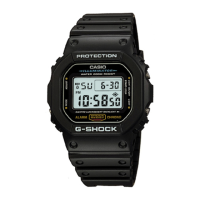
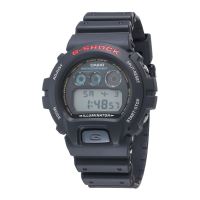
Casio G-SHOCK DW6900 - User Manual

Casio G-SHOCK DW6900
3 pages
Print Icon
To Next Page IconTo Next Page
Loading...
Operation Guide 3230/3232
E-9
To switch the backlight function on and off
In the Timekeeping Mode, hold down E for about two seconds to switch the backlight
function on and off. When you switch the backlight function on, an indicator appears
on the display as shown.
Backlight function on indicator
The backlight function indicator remains on the display in all modes until you switch x
the backlight function off.
The above operation controls operation of the backlight function only. It does not x
affect operation of audible tones and signals.
E-8
About the backlight
When you switch the backlight function on, the backlight of the watch fl ashes
whenever alarm (page E-10), countdown timer or hourly time signal is sounding.
Pressing x D in any mode illuminates the display, regardless of the backlight’s on/
off setting.
The backlight of this watch employs an electro-luminescent (EL) light, which loses its x
illuminating power after very long term use.
Frequent use of the backlight shortens the battery life. x
The watch will emit an audible sound whenever the display is illuminated. This is x
caused by a transistor that vibrates when the EL panel lights up. It does not indicate
malfunction of the watch.
The illumination provided by the backlight may be hard to see when viewed under x
direct sunlight.
The backlight automatically stops illuminating whenever an alarm sounds. x
E-7
While any other digits (besides seconds) are selected (fl ashing), press 4. E to
increase the number. Holding down E changes the number at high speed.
x To switch between the 12-hour and 24-hour formats, press
D
while some
digits are fl ashing.
After you set the time and date, press 5. A to return to the Timekeeping Mode.
The day of the week is automatically set in accordance with the date. x
The date can be set within the range of January 1, 2000 to December 31, 2099. x
If you do not operate any button for a few minutes while a selection is fl ashing, the x
ashing stops and the watch goes back to the Timekeeping Mode automatically.
E-6
Timekeeping
To set the time and date
Press 1. A while in the Timekeeping Mode. The seconds
digits fl ash on the display because they are selected.
Press 2. C to change the selection in the following
sequence.
Minutes
Seconds
Year
Hour
MonthDay
While the seconds digits are selected (fl ashing), press 3.
E to reset the seconds to “00”. If you press E while the
seconds count is in the range of 30 to 59, the seconds
are reset to “00” and 1 is added to the minutes. If the
seconds count is in the range of 00 to 29, the minutes
count is unchanged.
Day of week
Month
Day
Hour : Minutes Seconds
PM indicator
E-5
Press x C to change from mode to mode. After you perform an operation in any
mode, pressing C returns to the Timekeeping.
Press x D in any mode to illuminate the display. Illumination turns off about two
seconds after you release D.
Stopwatch
Countdown Timer
E-4
General Guide
All of the illustrations in this manual show Module 3230. x
Timekeeping Alarm
Press C.
E-3
Procedure Lookup
The following is a handy reference list of all the operational procedures contained in
this manual.
To set the time and date ......................................................................................... E-6
To switch the backlight function on and off ......................................................... E-9
To set the alarm time ............................................................................................. E-12
To stop the alarm .................................................................................................. E-13
To switch an alarm and Hourly Time Signal on and off ..................................... E-13
To set the countdown time ................................................................................... E-14
To use the countdown timer ................................................................................. E-15
To switch auto repeat timing on and off ............................................................. E-16
To measure elapsed time ...................................................................................... E-17
To record split times ............................................................................................ E-18
To time fi rst and second place fi nishes .............................................................. E-18
E-2
Contents
General Guide .......................................................................................................... E-4
Timekeeping ............................................................................................................. E-6
Alarm ...................................................................................................................... E-10
Countdown Timer .................................................................................................. E-14
Stopwatch .............................................................................................................. E-17
Specifi cations ........................................................................................................ E-19
E-1
About This Manual
Depending on the model of your watch, display text appears either as dark fi gures x
on a light background or light fi gures on a dark background. All sample displays in
this manual are shown using dark fi gures on a light background.
Button operations are indicated using the letters shown in the illustration. x
[Module 3230] [Module 3232]
MA1010-EA
Question and Answer IconNeed help?

Do you have a question about the Casio G-SHOCK DW6900 and is the answer not in the manual?

Summary

General Guide

Timekeeping and Backlight

Setting Time and Date

Instructions for setting the watch's time and date, including seconds, hours, minutes, month, and year.

Backlight Function

Information on the watch's electro-luminescent backlight, its operation, and limitations.

Switching Backlight On and Off

Procedure to enable or disable the watch's backlight function, indicated by an icon.

Alarm and Hourly Time Signal

Alarm Types Overview

Explanation of different alarm settings: daily, date, 1-month, and monthly alarms.

Setting the Alarm Time

Step-by-step guide to setting the hour, minutes, month, and day for the alarm.

Stopping the Alarm

How to stop the alarm sound once it begins to sound.

Managing Alarm and Hourly Time Signal

Instructions to switch the alarm and hourly time signal functions on or off.

Countdown Timer Operations

Setting the Countdown Time

Procedure to set the countdown duration, from 1 second up to 24 hours.

Using the Countdown Timer

How to start, stop, and reset the countdown timer, including alarm behavior.

Configuring Auto Repeat

How to enable or disable the auto repeat function for the countdown timer.

Stopwatch Functions

Measuring Elapsed Time

How to start, stop, and resume stopwatch measurement for elapsed time.

Recording Split Times

Procedure to record split times during stopwatch measurement.

Timing First and Second Place Finishes

How to time the first and second place finishers in a race.

Specifications and Battery

Watch Specifications

Details on accuracy, timekeeping format, calendar, alarm, timer, and stopwatch capabilities.

Battery Information

Details about the watch battery type, expected life, and notes on backlight use.

Summary

General Guide

Timekeeping and Backlight

Setting Time and Date

Instructions for setting the watch's time and date, including seconds, hours, minutes, month, and year.

Backlight Function

Information on the watch's electro-luminescent backlight, its operation, and limitations.

Switching Backlight On and Off

Procedure to enable or disable the watch's backlight function, indicated by an icon.

Alarm and Hourly Time Signal

Alarm Types Overview

Explanation of different alarm settings: daily, date, 1-month, and monthly alarms.

Setting the Alarm Time

Step-by-step guide to setting the hour, minutes, month, and day for the alarm.

Stopping the Alarm

How to stop the alarm sound once it begins to sound.

Managing Alarm and Hourly Time Signal

Instructions to switch the alarm and hourly time signal functions on or off.

Countdown Timer Operations

Setting the Countdown Time

Procedure to set the countdown duration, from 1 second up to 24 hours.

Using the Countdown Timer

How to start, stop, and reset the countdown timer, including alarm behavior.

Configuring Auto Repeat

How to enable or disable the auto repeat function for the countdown timer.

Stopwatch Functions

Measuring Elapsed Time

How to start, stop, and resume stopwatch measurement for elapsed time.

Recording Split Times

Procedure to record split times during stopwatch measurement.

Timing First and Second Place Finishes

How to time the first and second place finishers in a race.

Specifications and Battery

Watch Specifications

Details on accuracy, timekeeping format, calendar, alarm, timer, and stopwatch capabilities.

Battery Information

Details about the watch battery type, expected life, and notes on backlight use.

Overview

This document describes the operation of a CASIO watch, specifically models 3230 and 3232. The manual provides a comprehensive guide to the watch's various functions, how to set them, and general maintenance considerations.

General Functionality

The watch features several modes: Timekeeping, Alarm, Countdown Timer, and Stopwatch. Navigation between these modes is achieved by pressing the 'C' button. After performing an operation in any mode, pressing 'C' returns the watch to the Timekeeping Mode. The display can be illuminated in any mode by pressing the 'D' button, with the illumination turning off approximately two seconds after the button is released.

Timekeeping Mode

The Timekeeping Mode displays the current time, including hours, minutes, seconds, month, day, and day of the week. It supports both 12-hour and 24-hour formats, which can be switched while setting the time.

  • Setting the Time and Date: To set the time and date, you enter the Timekeeping Mode and press the 'A' button. The seconds digits will flash, indicating they are selected. Pressing 'C' cycles through the selection sequence: seconds, hour, minutes, month, day, year.
    • While the seconds digits are flashing, pressing 'E' resets them to "00". If the seconds count is between 30 and 59, resetting adds 1 to the minutes. If the count is between 00 and 29, minutes remain unchanged.
    • For other flashing digits (hour, minutes, month, day, year), pressing 'E' increases the number. Holding down 'E' changes the number at high speed.
    • The day of the week is automatically set based on the date. The date range supported is from January 1, 2000, to December 31, 2099.
    • If no button is operated for a few minutes while a selection is flashing, the watch automatically exits the setting mode and returns to Timekeeping Mode.

Alarm Mode

The Alarm Mode allows you to set an alarm with hour, minutes, month, and day. When the alarm is active, it sounds for 20 seconds at the preset time. The watch also features an Hourly Time Signal, which beeps every hour on the hour when activated.

  • Alarm Types: The watch supports four types of alarms:
    • Daily Alarm: Set the hour and minutes, and set "-" for the month and "--" for the day. The alarm will sound every day at the set time.
    • Date Alarm: Set the month, day, hour, and minutes. The alarm will sound at the specific time on the specific date.
    • 1-Month Alarm: Set the month, hour, and minutes, and set "--" for the day. The alarm will sound every day at the set time, but only during the specified month.
    • Monthly Alarm: Set the day, hour, and minutes, and set "-" for the month. The alarm will sound every month at the set time on the specified day.
  • Setting the Alarm Time: In Alarm Mode, press 'A' until the hour digits flash. This automatically switches the alarm on. Press 'C' to cycle through the selection sequence: hour, minutes, month, day. Press 'E' to increase the selected digits, holding it down for high-speed changes. The alarm time format (12-hour or 24-hour) matches the normal timekeeping format. After setting, press 'A' to return to Alarm Mode. If inactive for a few minutes, the watch automatically returns to Alarm Mode.
  • Stopping the Alarm: Press any button to stop the alarm once it starts sounding.
  • Switching Alarm and Hourly Time Signal On/Off: In Alarm Mode, press 'E' to cycle through the alarm and hourly time signal statuses: Both ON, Both OFF, Alarm Only, Hourly Time Signal only. An indicator on the display shows when the alarm or hourly time signal is active.

Countdown Timer Mode

The Countdown Timer can be set for a duration ranging from 1 second to 24 hours. An alarm sounds for 10 seconds when the countdown reaches zero, or until any button is pressed.

  • Setting the Countdown Time: In Countdown Timer Mode, press 'A' until the hours digit flashes. Press 'C' to cycle through the selection sequence: hours, minutes, seconds. Press 'E' to increase the selected number, holding it down for high-speed changes. To set a 24-hour countdown, set the time to 0:00'00. After setting, press 'A' to return to Countdown Timer Mode. Inactivity for a few minutes will also return the watch to Countdown Timer Mode.
  • Using the Countdown Timer: Press 'E' in Countdown Timer Mode to start the timer. Press 'E' again to stop it. You can resume the timer by pressing 'E' again. To reset the timer to its starting value, stop it and then press 'A'.
  • Auto Repeat Timing: When auto repeat is on, the alarm sounds at the end of the countdown, but the timer automatically resets to the starting value and restarts. You can stop timing by pressing 'E' and manually reset it to the starting time by pressing 'A'. To switch auto repeat on/off, in Countdown Timer Mode, with the hours digit flashing, press 'E'. An indicator on the display shows when auto repeat is active.

Stopwatch Mode

The Stopwatch Mode allows for measuring elapsed time, split times, and first and second place finishes. The stopwatch has a range of 23 hours, 59 minutes, 59 seconds.

  • Measuring Elapsed Time: Press 'E' to start the stopwatch. Press 'E' again to stop it. You can resume measurement by pressing 'E' again. Press 'A' to clear the stopwatch to all zeros. The display shows minutes, seconds, and 1/100 second for the first 60 minutes, then switches to hours, minutes, and seconds after 60 minutes.
  • Recording Split Times: Press 'E' to start. Press 'A' to display the current split time while timing continues internally. Press 'A' again to clear the split time and continue measurement. You can repeat this as needed. Press 'E' to stop the measurement, then 'A' to clear the stopwatch.
  • Timing First and Second Place Finishes: Press 'E' to start. Press 'A' when the first finisher crosses the line and record the time. Press 'E' when the second finisher crosses the line. Press 'A' to display the second finisher's time. Press 'A' again to clear the stopwatch.

Backlight Function

The watch features an electro-luminescent (EL) backlight.

  • Switching Backlight On/Off: In Timekeeping Mode, hold down 'D' for about two seconds to switch the backlight function on or off. When on, an indicator appears on the display and remains visible in all modes until switched off. This operation only controls the backlight function and does not affect audible tones or signals.
  • Backlight Flash: When the backlight function is on, the backlight flashes whenever an alarm, countdown timer, or hourly time signal sounds.
  • Illumination: Pressing 'D' in any mode illuminates the display, regardless of the backlight's on/off setting. Illumination turns off after about two seconds.
  • Automatic Stop: The backlight automatically stops illuminating whenever an alarm sounds.

Maintenance Features

  • EL Light Characteristics: The EL light loses its illuminating power over very long-term use.
  • Battery Life: Frequent use of the backlight shortens the battery life.
  • Audible Sound During Illumination: The watch emits an audible sound when the display is illuminated. This is a normal characteristic caused by a transistor vibrating when the EL panel lights up and does not indicate a malfunction.
  • Visibility in Sunlight: The illumination provided by the backlight may be difficult to see under direct sunlight.

Casio G-SHOCK DW6900 Specifications

General IconGeneral
ModelDW6900
BrandCasio
SeriesG-SHOCK
Water Resistance200 meters
Shock ResistanceYes
Battery LifeApprox. 2 years on CR2016
Case MaterialResin
Band MaterialResin
Display TypeDigital
IlluminationElectro-luminescent backlight
Stopwatch1/100 second stopwatch
Countdown TimerYes
World TimeNo
Case Diameter53.2 mm
Case Thickness16.3 mm
FunctionsFlash alert
AlarmMulti-function alarm
Weight67 g

Related product manuals