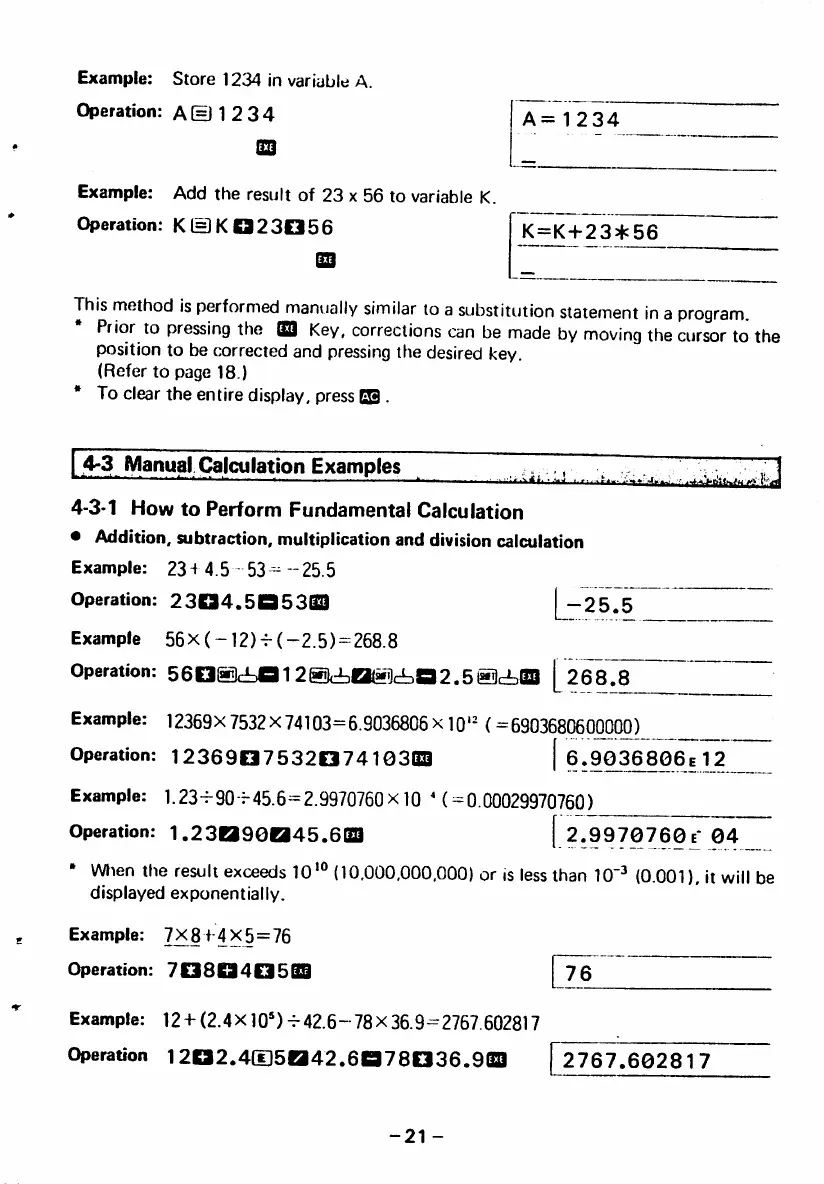
Example: Store 1234 in variable A.
Operation: A(=J 1 2 34
Example: Add the result of 23 x 56 to variable K.
Operation: K©K8323056
A = 1 2 3 4
K=K+23*56
This method is performed manually similar to a substitution statement in a program.
Prior to pressing the GQ| Key, corrections can be made by moving the cursor to the
position to be corrected and pressing the desired key.
(Refer to page 18.)
• To clear the entire display, press IS .
4 " 3 M a n u a l C a l c u l a t i o n E x a m p l e s :
4-3-1 How to Perform Fundamental Calculation
• Addition, subtraction, multiplication and division calculation
E x a m p l e : 2 3 + 4 . 5 5 3 - - 2 5 . 5
Operation: 2304.506303 -25.5
Example 56x (-12)+■ (-2.5)-268.8
Operation: 56a®d=01 2@(iO®c!Da2.5®<i0B [2^78
Example: 12369X7532x74103-6.9036806x10'^ (=690368060^0^
Operation: 123690753207410303 | 6.9036806e
Example: 1.23+-90+-45.6=2.9970760X10 M = 0.00029970760)
Operation: 1.23090045.603 [ 2.9970760 e*
Wlten the result exceeds lO'® (10.000,000,000) or is less than 10"^ (0.001).
displayed exponentially.
Example: 7X8+4X5=76
O p e r a t i o n : 7 0 8 Q 4 0 5 B S 7 6
Example: 12 -h (2.4 X10')+- 42.6 - 78 X 36.9=2767.602817
Operation 1202.4(I]5042.6078036.903 [2767.60281
it will be
-21 -



 To Next Page