Chapter 1
i m 1 ® 1 G 3 | G D | ( X 3 — ^
cp~c|D
CdOta "kjp io »n» «n' ooio w imin mri
(X)CIDC^CD(i)CBI)CDCpCp®
_ a — ± . — - 2 . — - m — n z
i t t U M M i T O P f N O o e « i a u N L f i i 5 — m
CDCIDCcDCDCIDCEICO^ClDCID
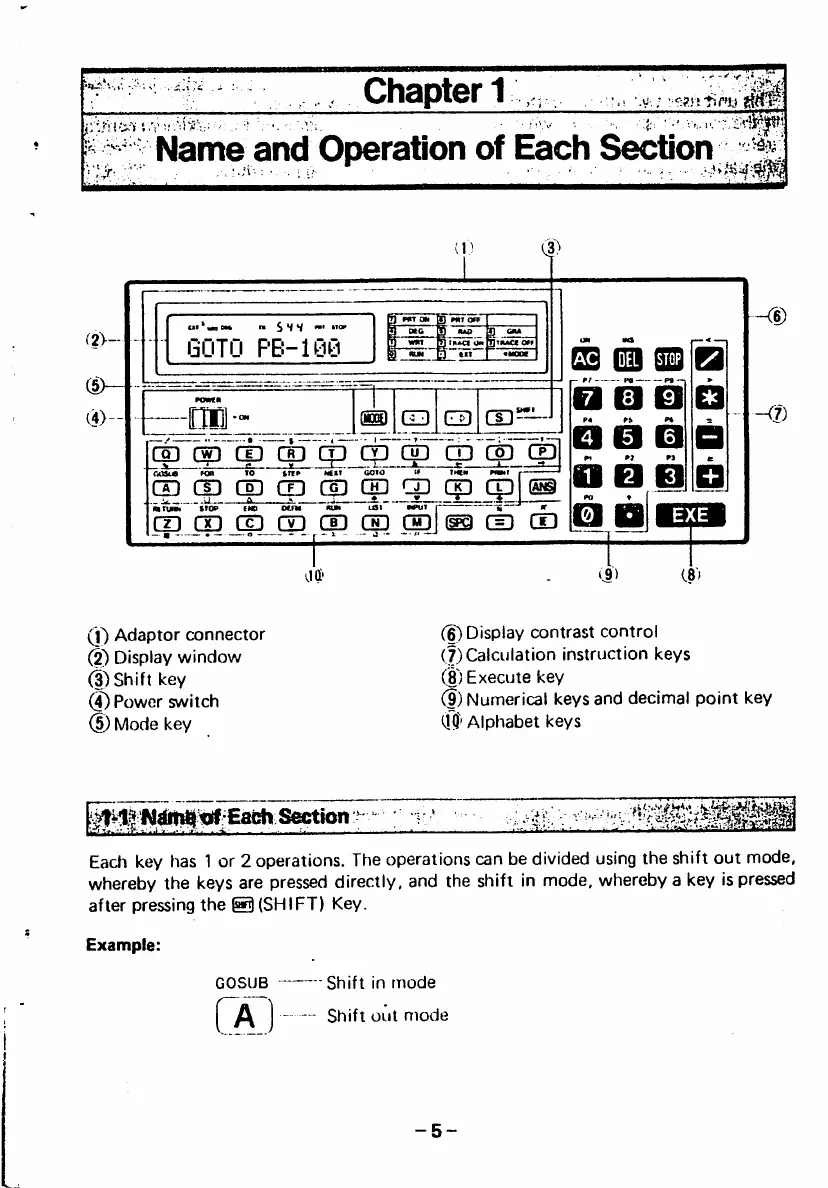
0 Adaptor connector
(2) Display window
0 Shift key
(|) Power switch
d) Mode key
(6) Display contrast control
(7) Calculation instruction keys
(8) Execute key
(|) Numerical keys and decimal point key
m)' Alphabet keys
Each key has 1 or 2 operations. The operations can be divided using the shift out mode,
whereby the keys are pressed directly, and the shift in mode, whereby a key is pressed
after pressing the ® (SHIFT) Key.
G O S U B S h i f t i n m o d e
Shift out mode



 To Next Page