— 9 —
5-4. HOW TO CHECK TILT SENSOR
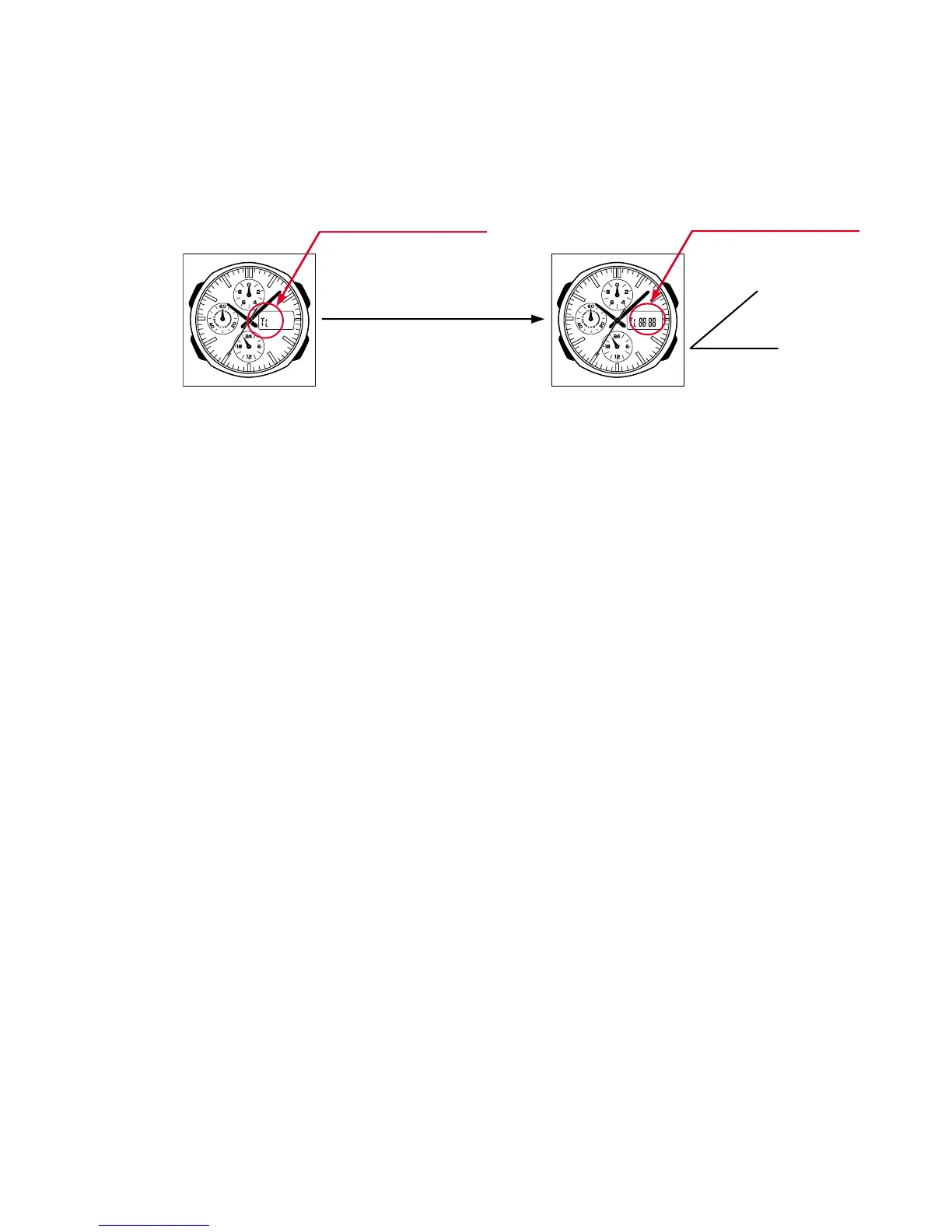
1) Press A, D and C buttons at the normal timekeeping mode.
2) Check the display indicates as figure 4.
3) Tilt the watch towards you more than 40 degrees.
4) Check the display indicates as figure 5.
5-5. TIME CALIBRATION SIGNAL TEST MODE
1) Press B, C and D button at the same time to enter the test mode.
2) Press A button to switch from one signal source to another.
J40: Fukushima, Japan (Call Sign: JJY, Frequency: 40kHz)
J60: Fukuoka/Saga, Japan (Call Sign: JJY, Frequency: 60kHz)
W60
: Fort Collins, Colorado (Call Sign: WWVB, Frequency: 60kHz)
3) Press B button to start signal reception.
Figure 4 Figure 5
Tilt the watch towards you
more than 40°
More than 40°
Appear "TL" on display.
Appear "8888" on display.


 To Next Page