6
4.3 Tare Function
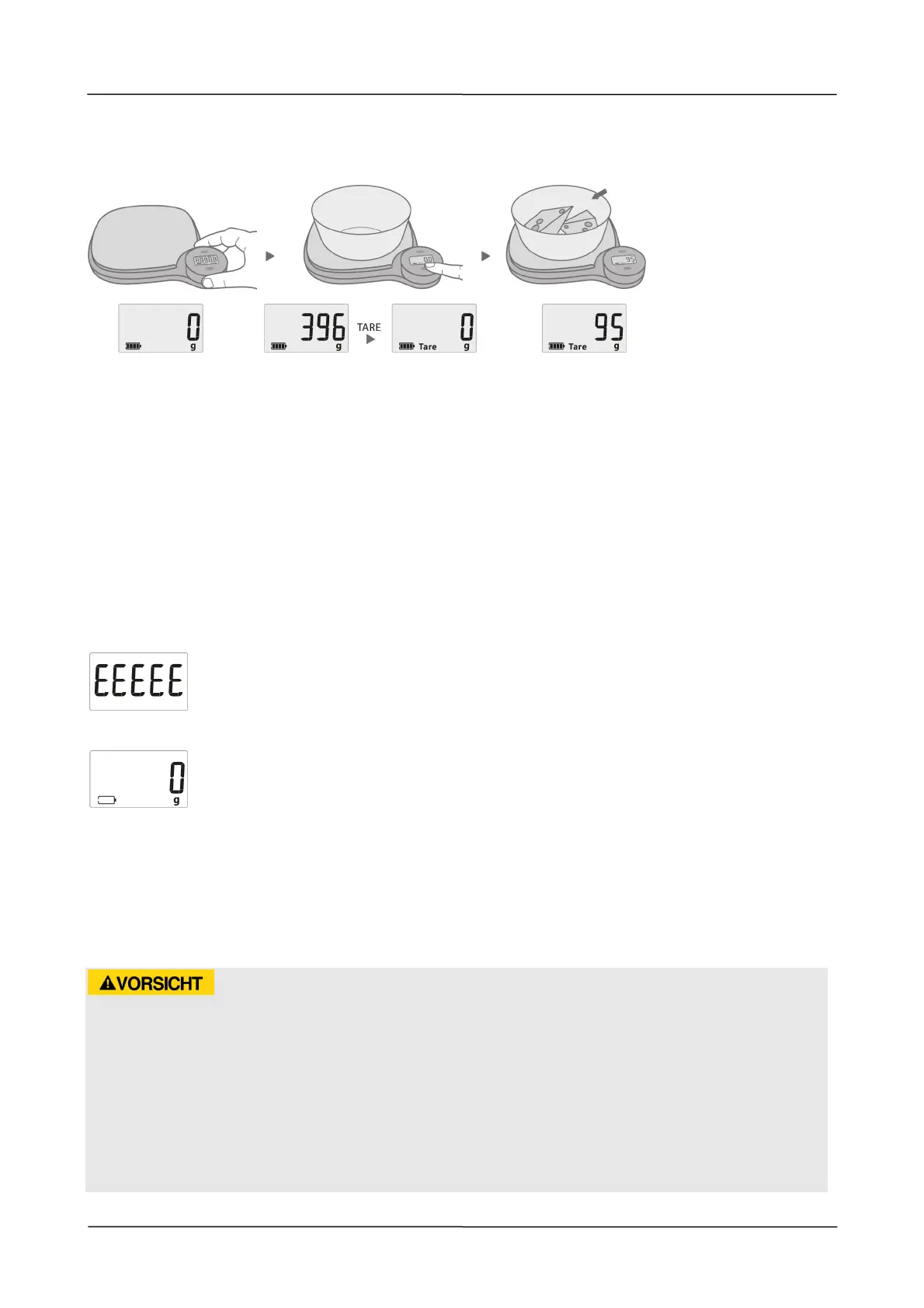
Place an empty container on the scale. The display will now show the weight of the
container.
Touch the TARE
button and the display shows zero “0” and clears the weight of container.
Next put the food into the container on the scale. The weight of the food only will appear
on the display. Remove the container and the scale will show the negative weight. Press
TARE and after 2 seconds the display shows zero again.
4.4 Selection of the weight and size units
Press the UNIT button to interchange the unit between g, oz, Water ml, Milk ml.
4.5 Switch off
The scale switches off automatically.
4.6 Error codes
Over Load Indicator
When the scale is overloaded the display will show the error code “EEEEE“
screen.
Low loading of capacitor
When the screen indicates this, it will turn off automatically after 30
seconds.
5 Cleaning and Maintenance
This chapter provides important information on properly cleaning and maintaining your
scale.
5.1 Safety information
Attention
Please observe the following safety notices, before cleaning the scale :
► Clean the device after every use. Failure to clean the device regularly can lead to
potential malfunctions, as well as safety and health risks.
► Never immerse the scale into water or other liquid
► Do not put it in the dishwasher.
► If moisture penetrates the unit’s housing, it can damage the electronic components.
Please ensure that no moisture enters the device.


 To Next Page