EasyManua.ls Logo

Cassida Zeus - User Manual

Cassida Zeus
22 pages
Print Icon
To Next Page IconTo Next Page
Loading...
®
USER MANUAL
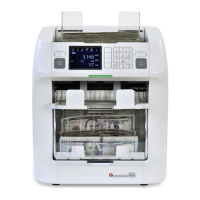
Zeus 2-Pocket Currency Discriminator

Other manuals for Cassida Zeus

Question and Answer IconNeed help?

Do you have a question about the Cassida Zeus and is the answer not in the manual?

Summary

Safety Warnings and Precautions

Battery Warning

Warning regarding child safety, swallowing, and disposal of batteries.

California Proposition 65 Warning

Warning about chemicals causing cancer, birth defects, or reproductive harm.

Important Safety Instructions

General Safety Guidelines

Instructions for safe operation, including avoiding liquids, heat, and proper ventilation.

Handling and Maintenance Safety

Precautions for handling moving parts, foreign objects, and servicing the unit.

Initial Operation Steps

Getting Started

Initial steps for powering on and preparing the Zeus for operation.

Control Panel Functions

Control Panel Layout and Keys

Description of the keys and their functions on the Zeus control panel.

Loading Bills into the Zeus

Counting Modes Overview

MIX Mode Operation

Details the MIX mode for counting mixed denominations without sorting.

Advanced Counting Modes

SORT Mode Description

Explains how to sort bills by a single denomination or for rogue/stranger checking.

COUNT Mode Functionality

Describes the COUNT mode for counting physical pieces, disabling counterfeit detection.

FACE Mode Sorting

Details the FACE mode for sorting bills to face up or face down orientation.

ORIENTATION Mode Sorting

Explains the ORIENTATION mode for sorting bills by their physical orientation.

Specialized Counting Modes

VALUSORT Mode Procedure

Describes the VALUSORT mode for quickly sorting mixed bills by denomination.

Strapping and Batching Bills

Strapping Options

Denomination Strapping Options

Denomination Strap - Multiple Bills

Sorts mixed bills into a single strap of mixed denominations based on selected counts.

Denomination Strap - Single Bill

Sorts mixed bills into multiple straps of a single denomination.

Post-Count Totals and Reports

Post-Count Reporting

Menu Settings and Descriptions - Part 3

Counterfeit Detection Settings

Provides access to enable/disable Magnetic, Infrared, and Ultraviolet counterfeit detection.

Report Formatting and Setup

Advanced User Settings

Optional Features - Part 1

Optional Features - Part 2

Error Messages and Troubleshooting

Reject Reasons Explained

Lists error messages related to suspect bills and reasons for rejection.

Operational Error Solutions

Provides solutions for operational errors like jams, door openings, and motor issues.

Maintenance, Contacts, and Specifications

Summary

Safety Warnings and Precautions

Battery Warning

Warning regarding child safety, swallowing, and disposal of batteries.

California Proposition 65 Warning

Warning about chemicals causing cancer, birth defects, or reproductive harm.

Important Safety Instructions

General Safety Guidelines

Instructions for safe operation, including avoiding liquids, heat, and proper ventilation.

Handling and Maintenance Safety

Precautions for handling moving parts, foreign objects, and servicing the unit.

Initial Operation Steps

Getting Started

Initial steps for powering on and preparing the Zeus for operation.

Control Panel Functions

Control Panel Layout and Keys

Description of the keys and their functions on the Zeus control panel.

Loading Bills into the Zeus

Counting Modes Overview

MIX Mode Operation

Details the MIX mode for counting mixed denominations without sorting.

Advanced Counting Modes

SORT Mode Description

Explains how to sort bills by a single denomination or for rogue/stranger checking.

COUNT Mode Functionality

Describes the COUNT mode for counting physical pieces, disabling counterfeit detection.

FACE Mode Sorting

Details the FACE mode for sorting bills to face up or face down orientation.

ORIENTATION Mode Sorting

Explains the ORIENTATION mode for sorting bills by their physical orientation.

Specialized Counting Modes

VALUSORT Mode Procedure

Describes the VALUSORT mode for quickly sorting mixed bills by denomination.

Strapping and Batching Bills

Strapping Options

Denomination Strapping Options

Denomination Strap - Multiple Bills

Sorts mixed bills into a single strap of mixed denominations based on selected counts.

Denomination Strap - Single Bill

Sorts mixed bills into multiple straps of a single denomination.

Post-Count Totals and Reports

Post-Count Reporting

Menu Settings and Descriptions - Part 3

Counterfeit Detection Settings

Provides access to enable/disable Magnetic, Infrared, and Ultraviolet counterfeit detection.

Report Formatting and Setup

Advanced User Settings

Optional Features - Part 1

Optional Features - Part 2

Error Messages and Troubleshooting

Reject Reasons Explained

Lists error messages related to suspect bills and reasons for rejection.

Operational Error Solutions

Provides solutions for operational errors like jams, door openings, and motor issues.

Maintenance, Contacts, and Specifications

Cassida Zeus Specifications

General IconGeneral
Stacker Capacity200 notes
Display TypeLCD
BatchingYes
Add FunctionYes
Power Supply50/60Hz
Detection FeaturesUV, MG, IR

Related product manuals