EasyManua.ls Logo

Castel XELL IP Series - User Manual

Castel XELL IP Series
12 pages
Print Icon
To Next Page IconTo Next Page
Loading...
AUDIO VIDEO IP WITH 1-6 PB DOOR ENTRY STATION
Range: INTERCOM OVER IP
Series:
Presentation Versions Options Connection Installation Use
Maintenance Functions Technical characteristics
Technical data sheet no. 604-0090I
www.castel.fr
Page 13 / 24
PRESENTATION
Product references: 590.0000 (XE AUDIO 1B) - 590.2000 (XE VIDEO 1B) - 590.0100 (XE AUDIO 2B) - 590.2100
(XE VIDEO 2B) - 590.0200 (XE AUDIO 3B) - 590.2200 (XE VIDEO 3B) - 590.0300 (XE AUDIO 4B) - 590.2300 (XE
VIDEO 4B) - 590.0400 (XE AUDIO 6B) - 590.2400 (XE VIDEO 6B) - 590.9920 (XE AUDIO 1B HELP) - 590.9910 (XE
AUDIO 2B HELP) - 591.0000 (XE AUDIO 1B DO) - 591.2000 (XE VIDEO 1B DO) - 591.2100 (XE VIDEO 2B DO) -
591.2200 (XE VIDEO 3B DO) - 591.0300 (XE AUDIO 4B DO) - 591.2300 (XE VIDEO 4B DO) - 590.9930 (XE AUDIO
1B S) - 590.9940 (XE AUDIO 1B LIAISON)
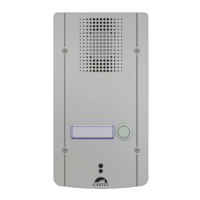
The door entry station is a SIP intercom which integrates the following functions (depending on the version):
Establish an audio / video communication with the other devices from the Castel IP
intercom range, softphones, or any other equipment compatible with the SIP
standard:
By peer to peer
By registering on a SIP server with the capacity to configure up to 2 backups
servers and multiple SIP account
Establish an audio communication with the other devices from the Castel digital and
analog intercom range (requires the use of an additional M-HYB-IP gateway)
Full HD wide-angle camera, protected by a removable window (depending on
model)
1 to 6 programmable buttons to configure actions of your choice
2 "All or Nothing" inputs
2 dry contacts to control a strike or any other equipment
Complies with the "Disability accessibility law": workstations equipped with
pictograms, colored LED, voice synthesizers, an integrated magnetic induction loop
Profile management, selectable by time slot or via automation
Management of advanced automation (logical and time relationships) on its
interfaces
Self-tests that can be performed automatically or on demand
ONVIF (Open Network Video Interface Forum) compatibility
Integration of RTSP (Real Time Streaming Protocol)
Integration of SNMP (Simple Network Management Protocol)
Integration of an ASCII string notification protocol
QRCode and barcode reading for automation
Management of two 10/100/1000MB Ethernet port with bridge function (allows
connection of another IP system) or independent interfaces
PoE (Power Over Ethernet), PoE+ (Power Over Ethernet Plus)
VLAN support
Securing Ethernet connections via the 802.1X protocol (RADIUS)
Supported languages: French/English/Spanish/Polish
Thanks to its embedded Web server, it can be configured, tracked and operated
from any browser
VERSIONS
AUDIO version with 1, 2, 3, 4 or 6 PB version: audio only
VIDEO version with 1, 2, 3, 4 or 6 PB version: audio and video
HELP version with 1 or 2 PB: audio only, illuminated call button and SOS braille inscription
DO version with 1, 2, 3 or 4 PB: audio and video, opening detection sensor
S version with 1 PB: audio only, no color LED
LIAISON version with 1 PB: audio only, only one colored LED
Question and Answer IconNeed help?

Do you have a question about the Castel XELL IP Series and is the answer not in the manual?

Overview

The device is a SIP intercom, the XELLIP Audio Video IP with 1-6 PB Door Entry Station, designed for communication within an IP intercom range, with softphones, SIP phones, or other compatible equipment. It can also establish audio communication with Castel digital and analog intercoms, requiring an additional M-HYB-IP gateway.

Function Description:

The door entry station offers a range of functions depending on the version. It facilitates audio/video communication with other Castel IP intercom devices, softphones, or SIP-compatible equipment. This can be done peer-to-peer or by registering on a SIP server with support for up to two backup servers and multiple SIP accounts. For communication with Castel digital and analog intercoms, an M-HYB-IP gateway is required. Video versions include a Full HD wide-angle camera, protected by a removable window. The station features 1 to 6 programmable buttons for user-defined actions, two "All or Nothing" inputs, and two dry contacts for controlling strikes or other equipment. It complies with "Disability accessibility law" requirements, featuring pictograms, colored LEDs, voice synthesizers, and an integrated magnetic induction loop. The device supports profile management, selectable by time slot or automation, and advanced automation logic based on time relationships on its interfaces. Self-tests can be performed automatically or on demand. It is ONVIF compatible and integrates RTSP (Real Time Streaming Protocol) and SNMP (Simple Network Management Protocol). An ASCII string notification protocol is also integrated, along with QRCode and barcode reading for automation. It manages two 10/100/1000MB Ethernet ports with bridge functionality, allowing connection to another IP system or independent interfaces. Power is supplied via PoE (Power Over Ethernet) or PoE+ (Power Over Ethernet Plus). VLAN support is included, and Ethernet connections are secured via the 802.1X protocol (RADIUS). Supported languages include French, English, Spanish, and Polish. Configuration, tracking, and operation are possible from any browser via its embedded Web server.

Versions:

  • AUDIO version: Available with 1, 2, 3, 4, or 6 push buttons (PB), audio only.
  • VIDEO version: Available with 1, 2, 3, 4, or 6 PB, audio and video.
  • HELP version: With 1 or 2 PB, audio only, illuminated call button, and SOS braille inscription.
  • DO version: With 1, 2, 3, or 4 PB, audio and video, includes an opening detection sensor.
  • S version: With 1 PB, audio only, no color LED.
  • LIAISON version: With 1 PB, audio only, only one colored LED.

Important Technical Specifications:

  • Power Supply: 20-30VDC, or PoE/PoE+.
  • Ethernet: 10/100/1000 Mbits, RJ45 link, 2 available ports (1 PoE/PoE+, 1 non-PoE compatible).
  • 0dB Output: Differential output for external amplifier (software version 1.5.0 and above).
  • Magnetic Loop Output: For magnetic induction loop connection.
  • RS485 Bus: Configurable with CASTELSuite, connects to VDIP RS485 devices (VD4S, VD8EI, VDLECT). Max length 1 km, requires 120Ω resistor at each end.
  • Digital Inputs (IN1/IN2/0V): Two inputs for dry contacts (no voltage applied), activated by grounding. Can be deported up to 1 km.
  • Relay Outputs (RL1/RL2): Two 3-point terminal blocks (Common, Rest, Work) for controlling AC/DC strikes (non-polarized 58V diode supplied).
  • Mounting: Flush, surface, or post mounting options.
  • IP Address: DHCP by default; fixed IP 169.254.xx.xx if no DHCP server. Discoverable via CastellPSearch, CastelServeur, or ONVIF discovery software.
  • Factory Settings: First programmable button announces IP address. Soft Reset button announces IP address (brief press) or bridges IP interfaces with fixed IP 192.168.49.251 (press >3 seconds).
  • Reset: Soft Reset button pressed >20 seconds restarts and resets to factory settings. Hard Reset button restarts instantly.
  • Audio: Max sound power 1W (PoE), 6W (PoE+), 10W (external power). Sampling frequency 16KHz. Codecs: G711 Ulaw/Alaw, GSM, G722, G729.
  • Video: 1/4" Full HD 1920x1080 CMOS sensor, 170° wide angle, 5 Lux minimum at 80cm low light vision. Resolutions: QCIF/QVGA/CIF/VGA/HD/Full HD. Codecs: H264, VP8, H263-1998, H263 (communication); H264, MJPEG (surveillance).
  • DTMF: RFC-2833, SIP INFO.
  • Ethernet: 10/100/1000 Mbit, PoE class0 (IEEE 802.3af), PoE+ (IEEE 802.3at).
  • Security: Secure Ethernet via 802.1X, SNMP v1/v2c. Required ports: 443 (https), 5060 (sip), 10800-10801 (audio), 10802-10803 (video). Additional ports: 22 (ssh), 80 (http), 123 (ntp), 161-162 (snmp), 554 (rtsp), 3702 (ws-discovery).
  • Environmental: Operating temperature -20° to +50°C, storage -20° to +70°C, relative humidity <90% (non-condensing).
  • Mechanical: IK09 vandal resistant (EN 62262), IP65 (EN 60529). 316L stainless steel front panel. Flush ABS base. Dimensions (intercom + bottom): H280mm x W145mm x D63mm (1.5Kg); (intercom + bottom + belt): H283mm x W148mm x D78mm (2.62Kg); (intercom + bottom + cap): H282mm x W149mm x D85.5mm (1.8Kg).
  • Compliance: 2001/95/EC (Safety), 2014/30/UE (EMC), 2017/2102/EU (RoHS 3), 2014/35/EU (Low voltage). EN 55032/55035/55024/61000-6-1/61000-6-3 (EMC), EN 62368-1 (Electrical safety).

Usage Features:

  • Web Server Access: Log in using a web browser (Chrome, Edge, Firefox) by typing https://[station_ip_address]. Default login/password: castel. Online help is available.
  • Configuring Relations: The Web server allows for configuring automatic, time-controlled, or counter-based actions. Logical conditions (AND, OR, NOT, XOR) can be used to trigger actions. Counters can be set to update based on events and trigger actions when thresholds are met.
  • User Management: Create, modify, or delete users, set their login, password, and operating language.
  • Profile Configuration: Define station profiles for different operating modes according to time slots.
  • ONVIF Integration: Compatible with ONVIF Forum, allowing discovery and configuration.
  • RTSP Integration: Supports RTSP client for audio/video streaming, with authentication and password protection.
  • SNMP Integration: SNMP agent for queries and notifications (TRAPS). Manage network, system data, and notifications. Supports SNMPv1 and SNMPv2c.
  • ASCII Notification: Integrates an ASCII string notification mechanism. Configure parameters for TCP server connection and specify characteristics of the connection. Configure events to send ASCII frames.
  • QRCode and Barcode Reading: Supports QRCode and barcode reading for automation, with configurable parameters.
  • Self-Test Function: HP/MIC self-test checks microphone and speaker. Mechanical button self-test verifies button functionality. Self-tests can be initiated via Web server or SNMP command.
  • Backup and Recovery: Full backup or recovery of station parameters (configuration, profiles, relations, directory). Factory reset by pressing the reset button for 10 seconds.
  • Station Update: Update software via file transfer.
  • Backup on Power Outage: Saves configuration, history, and interface states.
  • Accessibility Features: Visual and audible signals for call status, opening detection, and relay activation. Magnetic induction loop for hearing aid users.

Maintenance Features:

  • Cleaning: Use only a mild cleaning product (water or soapy water) that is non-abrasive, non-foaming, and free from solvents or alcohol. For regular maintenance, use only water without detergent.
  • Prohibited Cleaning Methods: Jet cleaning, abrasive sponges, and cloths with aggressive surfaces are prohibited.

Castel XELL IP Series Specifications

General IconGeneral
BrandCastel
ModelXELL IP Series
CategoryIntercom System
LanguageEnglish

Related product manuals