EasyManua.ls Logo

Castle Creations Phoenix-80 - User Manual

Castle Creations Phoenix-80
6 pages
Print Icon
To Next Page IconTo Next Page
Loading...
PHO
PHOPHO
PHOENIX
ENIXENIX
ENIX-
--
-80
8080
80
By
Castle Creations
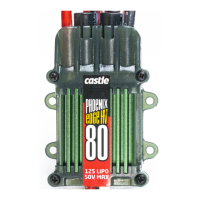
80 amp Brushless Sensorless Speed Control
PHOENIX-80™ User Guide Page 1 of 6 Rev 6-date 09/01/04
This document, Phoenix-80™ software, and Phoenix-80™ PCB layout are all Copyright 2002-2003 by Patrick del Castillo and
Castle Creations
Warning!
High power motor systems can be very dangerous! High currents can heat wires and
batteries, causing fires and burning skin. Follow the wiring directions carefully! Model aircraft
equipped with high power motors can kill. Always fly at a sanctioned field. Never fly over or near
spectators. Even though this controller is equipped with a safety arming program, you should still use
caution when connecting the main battery.
1.0 Features of the Phoenix-80™:
Extremely Low Resistance (.001 ohms)
High rate adjustable switching (PWM)
Up to 80 Amps continuous current with proper air flow, 120
amps surge
Five to ten cells with four micro servos
Up to twelve cells with three micro servos
Twenty cells MAX (with BEC disabled)
Dynamic braking ensures folding props fold promptly
BEC (3A) provides power to receiver and servos -
eliminates separate receiver battery
User Programmable Features:
Low-voltage cutoff
Over-current Protection
Brake Type
Throttle Range – fixed/self-adjusting/governor
Timing Advance
Cutoff Type
Soft Start ramp up
Switching Frequency
Runs motor in forward OR reverse
Auto Motor Cutoff with Reset
Safe “power on” arming program ensures motor will not
accidentally turn on
Low torque “soft start” prevents damage to fragile
gearboxes
Auto shut down when signal is lost or radio interference
becomes severe
2.0 Wiring Your Phoenix-80™:
Tools required:
Wire cutters Wire strippers (optional) Soldering Iron (25-40)
Parts required:
Solder (rosin core “electronic” solder) Battery connector
2.1 Servo Ratings with BEC Enabled
Servo Type 5-6 cells 7-8 cells 9-10 cells 11-12 cells
Standard (micro) servos 5 5 4 3
High Torque servos 4 4 3 2
2.2 Adding the Battery Connector
The battery connector is attached to the side of the controller that has only two power wires, and also has the
radio connector. Cut the wires to the length you require on the battery side. Strip off of the wire insulation to
expose just enough wire to attach the battery connector. (Note: if you do not have a pair of wire strippers,
you can use a modeling knife to carefully cut through the insulation around the wire. Then the insulation
should easily pull off the wire.) Attach the battery connector to the wires ENSURING THAT THE
POLARITY (red wire to battery red wire, black wire to battery black wire) IS CORRECT, following the
instructions for the battery connector.
IMPORTANT NOTE: YOU MUST BE SURE THAT THE POLARITY IS CORRECT WHEN
CONNECTING THE SPEED CONTROLLER. Incorrect polarity could permanently damage the controller.
2.3 Connecting the Motor
The motor is connected to the side of the controller that has THREE power wires. Cut the wires to the length
you require on the motor side. DO NOT CUT the wires leading from the motor. Strip the wire insulation to
expose just enough wire to solder the wires to the motor terminals. There should be three wires extending
from the motor. Connect the three speed control wires to the three motor wires. Align the wires carefully
and solder to the motor wires. Ensure that all connections (battery and motor) are correctly polarized.
2.4 Reversing Rotation
Bench test the motor connections noting the rotation of the motor. To change the rotation of the motor, swap
ANY two motor wire connections.
Battery Connector Phoenix-80™ Motor
Fig 1: Motor wiring diagram
2.5 Connecting the Receiver
Connect the receiver lead (the three color twisted wires with a connector on the end) to the throttle channel
on your receiver (usually channel 3). Do not connect a battery to the receiver, as the Phoenix-80™ will
supply power to the receiver and servos through the receiver connector. If you are using more than ten cells,
you must use a separate receiver battery. See the section 4.0 (under the heading BEC) for instructions on
disabling the BEC to use a separate receiver battery.
Older AirTronics systems require a minor change to the wiring in the receiver connector supplied with the
speed controller. Reverse the red (power) and brown (ground) wires in the connector plug so that the plug is
orange/brown/red. Use a knife blade to lift the retention tabs on the connector plug to remove the red and
brown wires. Insert the wires back into the plug and press down the retention tab.
3.0 Flying with Your Phoenix-80™:
ALWAYS PERFORM A RANGE CHECK BEFORE FLYING WITH ANY NEW SPEED
CONTROLLER! PERFORM YOUR RANGE CHECK AT FULL THROTTLE, HALF THROTTLE
AND NO THROTTLE.
Initialization sequence:
1. Connect the speed controller receiver connector to the proper channel on your receiver (usually channel 3)
2. Turn on your transmitter.
3. Connect the main power battery to the speed controller.
4. The speed controller will remain disarmed (will not operate) until it sees more than four seconds of
“brake” throttle. Move the throttle arm to the lowest position on your transmitter, wait at least four
seconds, and then test the controller to make sure that the throttle operates.
5. Go fly!
6. If the BEC cutoff occurs before you land, you may restart the motor and use low throttle if necessary by
moving the throttle stick all the way down (to the brake position) and then throttling back up. BEC cutoff
Phoenix-80™
Question and Answer IconNeed help?

Do you have a question about the Castle Creations Phoenix-80 and is the answer not in the manual?

Summary

Wiring Your Phoenix-80

Servo Ratings with BEC Enabled

Details servo compatibility based on cell count and BEC usage.

Adding the Battery Connector

Instructions for connecting the battery connector to the speed controller.

Connecting the Motor

How to connect the motor wires to the speed controller.

Reversing Motor Rotation

Method to change motor rotation direction by swapping wires.

Connecting the Receiver

How to connect the receiver lead to the throttle channel.

Using the Features of Your Phoenix-80

BEC Functionality

Explanation of BEC power supply and how to disable it.

Brake Operation

How the brake function is activated via the throttle stick.

Motor Cutoff Conditions

Details on motor cutoff due to low voltage or signal loss.

Safe Power Up Feature

Describes the safety feature preventing accidental motor start-up.

LED Indicator Functionality

Function of the LED for programming and full throttle indication.

Troubleshooting

Throttle Unresponsive or Not Arming

Troubleshooting steps when the throttle is unresponsive or the controller won't arm.

Motor Cuts Off Frequently

Diagnosing motor cutoff issues, often related to battery voltage.

Entering Programming Mode

Verify Normal Operation

Verifying normal operation before entering programming mode.

Steps to Enter Programming Mode

Step-by-step instructions to enter the programming mode.

Programming the Phoenix-80

Setting 1: Cutoff Voltage

Guide to setting the low-voltage cutoff for the battery.

Setting 2: Current Limiting

Configuration of the controller's reaction to over-current conditions.

Setting 3: Brake Type

Selection of different brake types and their applications.

Setting 4: Throttle Type

Options for throttle control modes, including governor.

Setting 5: Electronic Timing Advance

Adjusting electronic timing for motor performance and efficiency.

Setting 6: Cutoff Type

Choosing between hard or soft motor cutoff upon voltage issues.

Setting 7: Soft Start

Setting the initial motor spool-up speed for smoother acceleration.

Setting 8: PWM Switching Rate

Selecting the PWM switching frequency for motor operation.

Overview

The Phoenix-80™ is an 80-amp brushless sensorless speed control designed for model aircraft. It offers a range of features for precise motor control and user customization, while also incorporating safety mechanisms to prevent accidental operation and damage.

Function Description

The primary function of the Phoenix-80™ is to regulate the speed of a brushless sensorless motor in model aircraft. It achieves this through high-rate adjustable switching (PWM), allowing for efficient power delivery. The device is capable of handling continuous currents up to 80 Amps with adequate airflow and surge currents up to 120 Amps. It supports a wide range of battery configurations, from 5 to 20 cells, with varying servo support depending on the cell count. For setups exceeding 10 cells, disabling the internal Battery Eliminator Circuit (BEC) and using a separate receiver battery is recommended.

The Phoenix-80™ includes a BEC that provides 3 Amps of power to the receiver and servos, eliminating the need for a separate receiver battery in most configurations. This integrated power supply simplifies wiring and reduces overall weight.

A key feature is its user-programmable settings, which allow for extensive customization to suit different aircraft types and flying styles. These settings include:

  • Low-voltage cutoff: Protects batteries from over-discharge by shutting down the motor when the voltage drops below a programmed threshold.
  • Over-current protection: Prevents damage to the controller and motor by limiting current draw during excessive loads.
  • Brake type: Offers options for dynamic braking, ensuring folding props fold promptly and providing different levels of braking power (soft, hard, delayed, or disabled) for various applications, including direct drive and competition use.
  • Throttle range: Can be set to fixed, self-adjusting, or governor mode. Governor mode is particularly useful for collective pitch helicopters, maintaining a constant head speed regardless of load changes.
  • Timing advance: Allows adjustment of motor timing for optimal power and efficiency, with options for high, standard, or low advance. The controller can automatically sense motor type and adjust maximum advance accordingly.
  • Cutoff type: Offers both hard (immediate motor shutdown) and soft (throttle down at low voltage or over-current) cutoff options.
  • Soft Start ramp up: Provides a gentle motor startup, preventing damage to fragile gearboxes and offering different spool-up speeds (very soft, soft, or fast start) suitable for various applications, including governor mode.
  • Switching frequency (PWM rate): Adjustable to 11 KHz, 22 KHz, or 41 KHz, optimizing performance for different motor inductance types (brushless, low inductance, very low inductance).

The Phoenix-80™ also features an auto motor cutoff with reset, allowing the motor to be restarted at low throttle after a cutoff event. A "safe power on" arming program prevents accidental motor startup, requiring the transmitter stick to be held at the "Brake" position for at least four seconds before the controller arms. This ensures the motor will not turn on inadvertently. An LED indicator provides visual feedback for programming and indicates when full throttle has been reached.

Usage Features

Connecting the Phoenix-80™ involves three main steps: motor connection, battery connection, and receiver connection.

  • Motor Connection: The motor connects to the side of the controller with three power wires. Users should cut the motor wires to the required length, strip insulation, and solder them to the controller's motor terminals, ensuring correct polarity. To reverse motor rotation, any two motor wires can be swapped.
  • Battery Connection: The battery connector attaches to the side of the controller with two power wires and the radio connector. Wires should be cut to length, stripped, and soldered to the battery connector, again ensuring correct polarity (red to red, black to black).
  • Receiver Connection: The receiver lead (three twisted wires with a connector) plugs into the throttle channel (usually channel 3) of the receiver. The Phoenix-80™ supplies power to the receiver and servos, so a separate receiver battery is generally not needed unless using more than ten cells. Older AirTronics systems may require a minor wiring change to the receiver connector.

Before flying, a range check is crucial, performed at full throttle, half throttle, and no throttle. The initialization sequence involves connecting the receiver, turning on the transmitter, connecting the main battery, and then moving the throttle arm to the lowest position for at least four seconds to arm the controller. The controller will remain disarmed until it detects this "brake" throttle position.

Programming the Phoenix-80™ is an interactive process guided by the LED. The controller flashes a setting number, followed by possible setting values. Users respond by moving the transmitter stick to "yes" (full "On" throttle) or "no" (full "Off" throttle) for about 2 seconds. The LED flashes rapidly to confirm acceptance of the answer. After the rapid flash, the throttle stick is moved to the middle position to confirm readiness for the next question. Users can choose to program only specific features by disconnecting power after making desired changes; remaining settings will retain their previous values.

Maintenance Features

The Phoenix-80™ is designed for durability, but proper usage and care are essential for its longevity.

  • Wiring: Always ensure correct polarity when connecting the battery and motor to prevent permanent damage to the controller.
  • Over-current Protection: While the controller has over-current protection, users are warned that damage resulting from over-current is not covered by the warranty. Experienced modelers should exercise caution when adjusting current limiting settings. Using a smaller prop or higher-rated batteries can help prevent excessive current draw if the motor frequently cuts off with fresh batteries.
  • Low-voltage Cutoff: The low-voltage cutoff protects batteries, but repeated motor restarts after a cutoff can drain the battery to a point where the radio receiver stops operating, leading to loss of control. Users should be mindful of battery voltage and avoid excessive restarts.
  • Signal Loss: The controller will shut down if the transmitter signal is lost or if radio noise becomes excessive. Re-establishing connection and moving the throttle to the braking position for one second can restart the motor.
  • Range Check: Performing a range check before every flight, especially with a new speed controller, is a critical safety measure.
  • Troubleshooting: If the throttle does not work, users should check that the controller is arming correctly (four seconds of "dead space" at low throttle), ensuring the throttle stick and trim are fully down. Reversing the throttle control on the transmitter or adjusting endpoint settings may be necessary. If the receiver and servos are dead, all connections and polarity should be checked. If issues persist, contacting Castle Creations is recommended.

The manual emphasizes that high-power motor systems can be very dangerous, capable of causing fires, burns, and even fatalities. Users are advised to follow wiring directions carefully, fly at sanctioned fields, and never fly over or near spectators. Despite the safety arming program, caution is always necessary when connecting the main battery.

Castle Creations Phoenix-80 Specifications

General IconGeneral
TypeBrushless ESC
Continuous Current80A
Low Voltage CutoffAdjustable
Thermal ProtectionYes
Burst Current100A
Input Voltage2-6S LiPo
BEC Current5A
ProgrammingCastle Link
PWM Frequency8 kHz

Related product manuals