EasyManua.ls Logo

Castle Creations SIDEWINDER MICRO 2 - User Manual

Castle Creations SIDEWINDER MICRO 2
2 pages
Print Icon
To Next Page IconTo Next Page
Loading...
GETTING STARTED
1. Solder a high quality battery connector to the ESC (see Drivers Ed Guide,
“Connectors and Power Wiring” – page 6).
2. Mount the ESC and motor into the vehicle.
3. Connect motor to the ESC (see Driver’s Ed Guide, “Motor Wiring” – page 7)
4. Plug the RX wire into the throttle (#2) channel on your receiver.
5. Calibrate your ESC to your radio (see Drivers Ed Guide, “How to Calibrate the
ESC” – page 13)
YOU ARE NOW READY TO GO!
Revised 01/2016 Copyright 2016 © Castle Creations, Inc. P/N:095-0308-00
ABOUT THE SIDEWINDER MICRO 2
Motors
Please note that while Sidewinder Micro 2 is capable of handling
incredible amounts of power, your motor must also be up for the
task. Always run your motor within the manufacturer’s specs.
Monitor motor, battery, and controller temps carefully and never
let the motor get above 180º F. Excessive heat in the motor can
damage the motor, the Sidewinder Micro 2, and your batteries.
Gearing
Always start with stock gearing. If you wish to change the gearing,
motor, or battery, you must check your motor temperature
frequently on the first run. If the motor gets too hot, reduce the
pinion size, increase the spur size, or reduce the pack voltage.
Additional information about gearing can be found in the Gearing
Chart enclosed or available online at www.castlecreations.com/
sidewindermicro2gearing.
Programming
Sidewinder Micro 2 is programmable via your transmitter,
Windows® based PC and a Castle Link USB adapter (purchased
separately), or a Field Link card (purchased separately). See the
enclosed Drivers’ Ed Guide for more instructions on transmitter
programming and the Castle Link system (“Transmitter
Programming”- page 23, and “Tuning with Castle Link”- page 21).
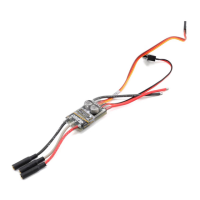
Positive Battery
Wire
RX Wire
Negative Battery
Wire
Motor Wires
On/O
Switch
Question and Answer IconNeed help?

Do you have a question about the Castle Creations SIDEWINDER MICRO 2 and is the answer not in the manual?

Summary

About the Sidewinder Micro 2

Motor Operation and Limits

Details motor specifications, temperature monitoring, and operating limits for the Sidewinder Micro 2.

Gearing and Temperature Management

Advises on changing gearing, motor, or battery, emphasizing temperature checks and available resources.

Programming Options

Explains programming methods for the Sidewinder Micro 2, including transmitter, PC, and Field Link systems.

Getting Started

Sidewinder Micro 2 Specifications

Application Guidelines

Outlines suitability for 1:18th scale RC hobby vehicles weighing up to 2 lbs.

Input Voltage Range

Specifies the minimum and maximum input voltage, including LiPo cell counts and voltage limits.

BEC Specifications

Details the BEC output voltage options and peak current rating.

Product Use Statement

Provides usage terms, battery recommendations, connector details, and warranty implications.

Transmitter Programming Reference

Brake;Reverse Type Options

Lists available settings for brake and reverse functionality.

Voltage Cutoff Options

Describes voltage cutoff modes, including automatic LiPo detection and disabling.

Brake Amount Settings

Details adjustable brake force percentages available for programming.

Drag Brake Settings

Presents configurable drag brake levels, from disabled to full-on.

Motor Type Configuration

Specifies supported motor types, including brushless and brushed configurations.

Audible Alert Reference

Alert Indicators

Explains audible alert patterns (dots and dashes) corresponding to ESC status and errors.

Contact Information

Overview

The Sidewinder Micro 2 is an electronic speed controller (ESC) designed for 1:18th scale RC hobby vehicles weighing up to 2 lbs. It is capable of handling significant power, but users must ensure their motor is also up to the task and operated within manufacturer's specifications.

Function Description:

The Sidewinder Micro 2 manages the power delivery to the motor, allowing for precise control of the vehicle's speed and direction. It supports both brushless and brushed motor types, offering versatility for different setups. The ESC is programmable, allowing users to customize various parameters to suit their driving style and vehicle requirements.

Important Technical Specifications:

  • Application Guidelines: Designed for 1:18th scale RC hobby vehicles weighing up to 2 lbs.
  • Input Voltage Range: Minimum 2S LiPo, Maximum 3S LiPo, 12.6V. Applying voltages higher than 12.6V will cause irreparable damage and void the warranty.
  • BEC Specifications: Adjustable to 5.5V or 7.5V (2A Peak), with a default setting of 5.5V.
  • Battery Connectors: The motor wires have 3.5mm bullet connectors. The battery input wires are bare, requiring the user to add their preferred high-current connector, rated for at least 40 amps.
  • Recommended Battery Capacity: For 1:18th scale vehicles, a minimum of 1500mAh is recommended. Users should use 30C continuous discharge or higher LiPo batteries (or high-quality 25C batteries such as Traxxas® Power Cell).

Usage Features:

  • Gearing: Users should always start with stock gearing. When changing gearing, motor, or battery, frequent monitoring of motor temperature is crucial during the first run. If the motor gets too hot (above 180° F), the pinion size should be reduced, the spur size increased, or the pack voltage reduced. Additional gearing information is available online at www.castlecreations.com/sidewindermicro2gearing.
  • Programming Options: The Sidewinder Micro 2 is highly programmable. It can be programmed via:
    • The user's transmitter.
    • A Windows® based PC with a Castle Link USB adapter (purchased separately).
    • A Field Link card (purchased separately).
    • Detailed instructions for transmitter programming and the Castle Link system can be found in the enclosed Drivers' Ed Guide ("Transmitter Programming" - page 23, and "Tuning with Castle Link" - page 21).
  • Transmitter Programming Reference:
    • 1. Brake/Reverse Type:
      • Option 1: With Reverse (Default)
      • Option 2: Without Reverse
      • Option 3: Crawler Reverse
    • 2. Voltage Cutoff:
      • Option 1: Auto-LiPo (Default)
      • Option 2: None
    • 3. Brake Amount:
      • Option 1: 25%
      • Option 2: 50% (Default)
      • Option 3: 75%
      • Option 4: 100%
    • 4. Drag Brake:
      • Option 1: Disabled (Default)
      • Option 2: 10%
      • Option 3: 20%
      • Option 4: 30%
      • Option 5: Crawler Full On
    • 5. Motor Type:
      • Option 1: Brushless (Default)
      • Option 2: Brushed Reversing
      • Option 3: Brushed High Power
  • Getting Started Guide:
    1. Solder a high-quality battery connector to the ESC (refer to "Connectors and Power Wiring" - page 6 of the Driver's Ed Guide).
    2. Mount the ESC and motor into the vehicle.
    3. Connect the motor to the ESC (refer to "Motor Wiring" - page 7 of the Driver's Ed Guide).
    4. Plug the RX wire into the throttle (#2) channel on the receiver.
    5. Calibrate the ESC to the radio (refer to "How to Calibrate the ESC" - page 13 of the Driver's Ed Guide).
  • Audible Alert Reference: The ESC provides audible alerts for various conditions:
    • Start Fail
    • Voltage Cutoff
    • Radio Glitch
    • Over-Temperature
    • Over-Current
    • Excessive Load

Maintenance Features:

  • Temperature Monitoring: It is crucial to monitor motor, battery, and controller temperatures carefully. The motor temperature should never exceed 180° F. Excessive heat can damage the motor, the Sidewinder Micro 2, and the batteries.
  • Warranty: Failure to adhere to the Product Use Statement (e.g., applying voltages higher than 12.6V) constitutes a violation of the warranty agreement and will result in non-warranty service fees for repair or replacement of damaged products.

Castle Creations SIDEWINDER MICRO 2 Specifications

General IconGeneral
BrandCastle Creations
ModelSIDEWINDER MICRO 2
CategoryControl Unit
LanguageEnglish

Related product manuals