Getting Started with Your Mobile Phone
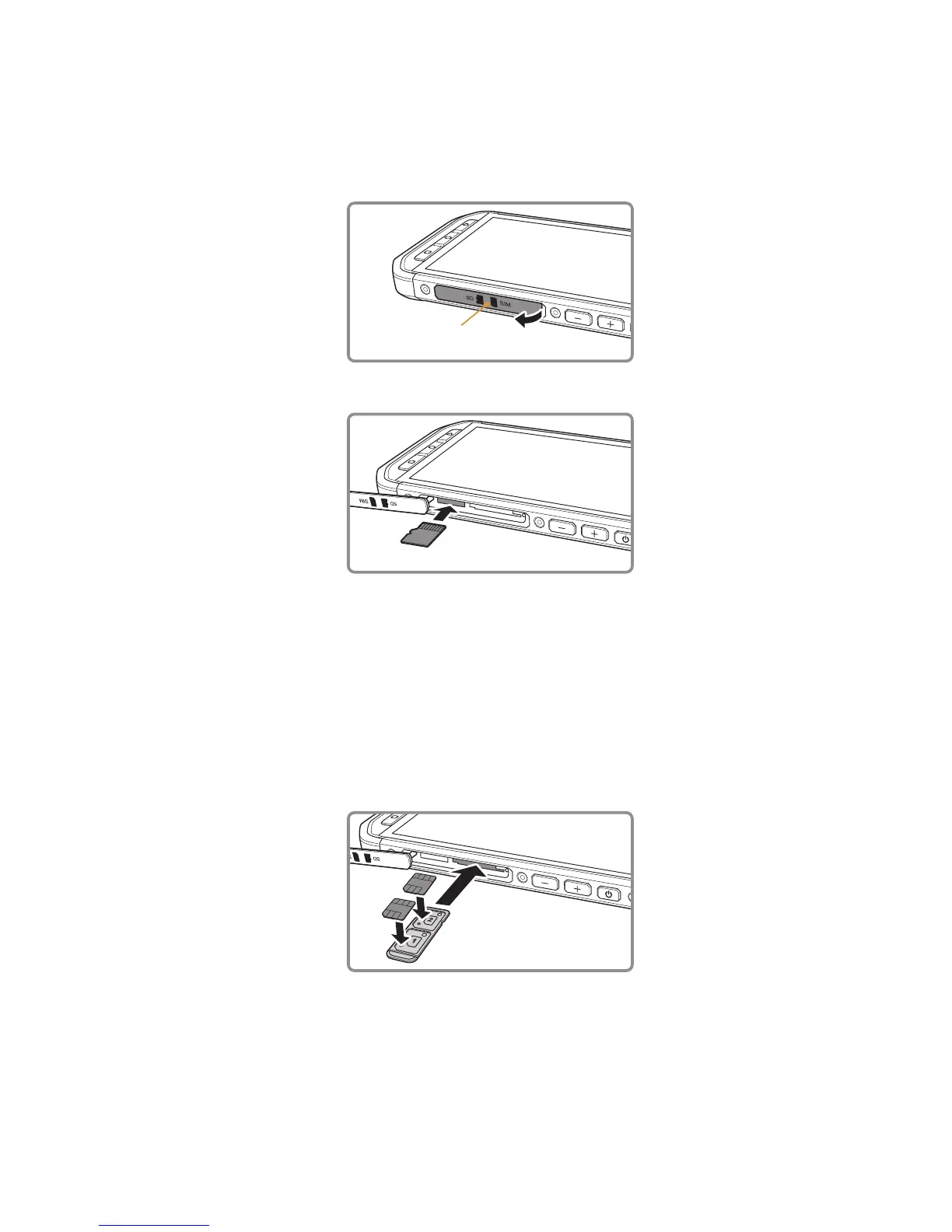
Installing a Memory Card
1. Open the side door.
Side door
2. Insert a microSD card as shown.
Note:
Insert the microSD card with the gold contacts facing up, push the memory card all the way until ∙
you hear a locking sound.
To remove the microSD card, press against the edge of the memory card and release it. ∙
Do not force the microSD card as this could damage the memory card or slot. ∙
Installing a nano SIM card(s)
1. Pull out the SIM tray.
2. Put the nano SIM card(s) in the SIM tray as indicated on the tray guide.
3. Insert the SIM tray into the SIM card slot.
Note:
Put the nano SIM card(s) in the SIM tray, with the card(s) gold contacts facing up, push the tray all ∙
the way until you hear a locking sound.
To remove the nano SIM card(s), press the tray inwards and release quickly and pull the tray out to ∙
remove. Then remove the nano SIM card(s).



 To Next Page