EasyManua.ls Logo

Cata ISB 3002 BK - Page 6

Cata ISB 3002 BK
14 pages
Print Icon
To Next Page IconTo Next Page
To Previous Page IconTo Previous Page
Loading...
   


       
 「   
「 
    
    
     



「  「




    


     


   
『


        



 


 
       



 
 
 
  
 
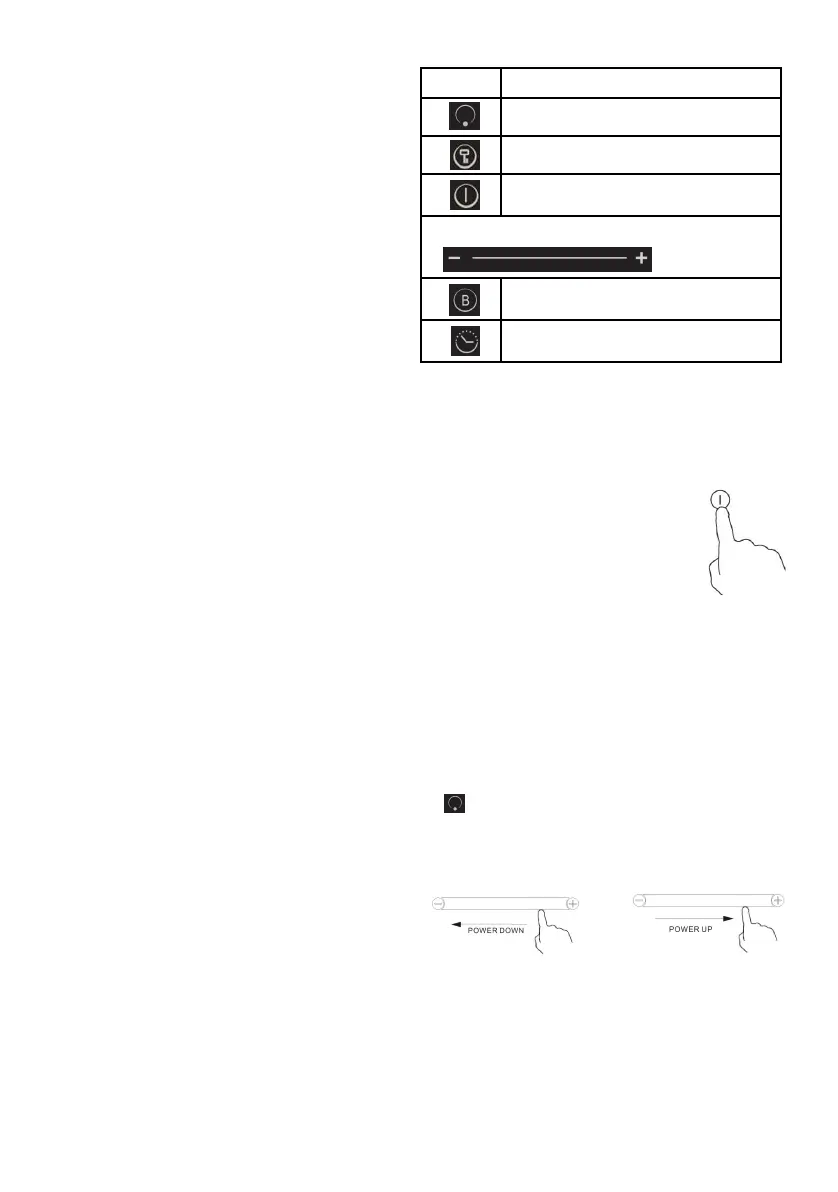
Reference Description
A Zone select key
B
Child lock key
C
ON/OFF key
D Power/Timer slider regulating key
E
Boost control key
F
Timer key





「




Using your Induction Hob To
start cooking
1. Touch the ON/OFF control.
After power on, the buzzer beeps once,
all displays show
“
–
“
, indicating that
the induction hob has entered the state
of standby mode.
2. Place a suitable pan on the cooking
zone that you wish to use.
•
Make sure the bottom of the pan
and the surface Of the cooking zone
are clean and dry.
3. According to the heating zone where the pan is
placed, select a relevant zone select key by pressing
“
”
key (A).The symbol 0. selected will stay fully it.
4. Adjust heat setting by touching the slider regulating
key(
D
) control.
• If you don’t choose
a heat setting within 1
minute, the Induction hob will
• You can modify the heat setting
at any time
during cooking.