Menu
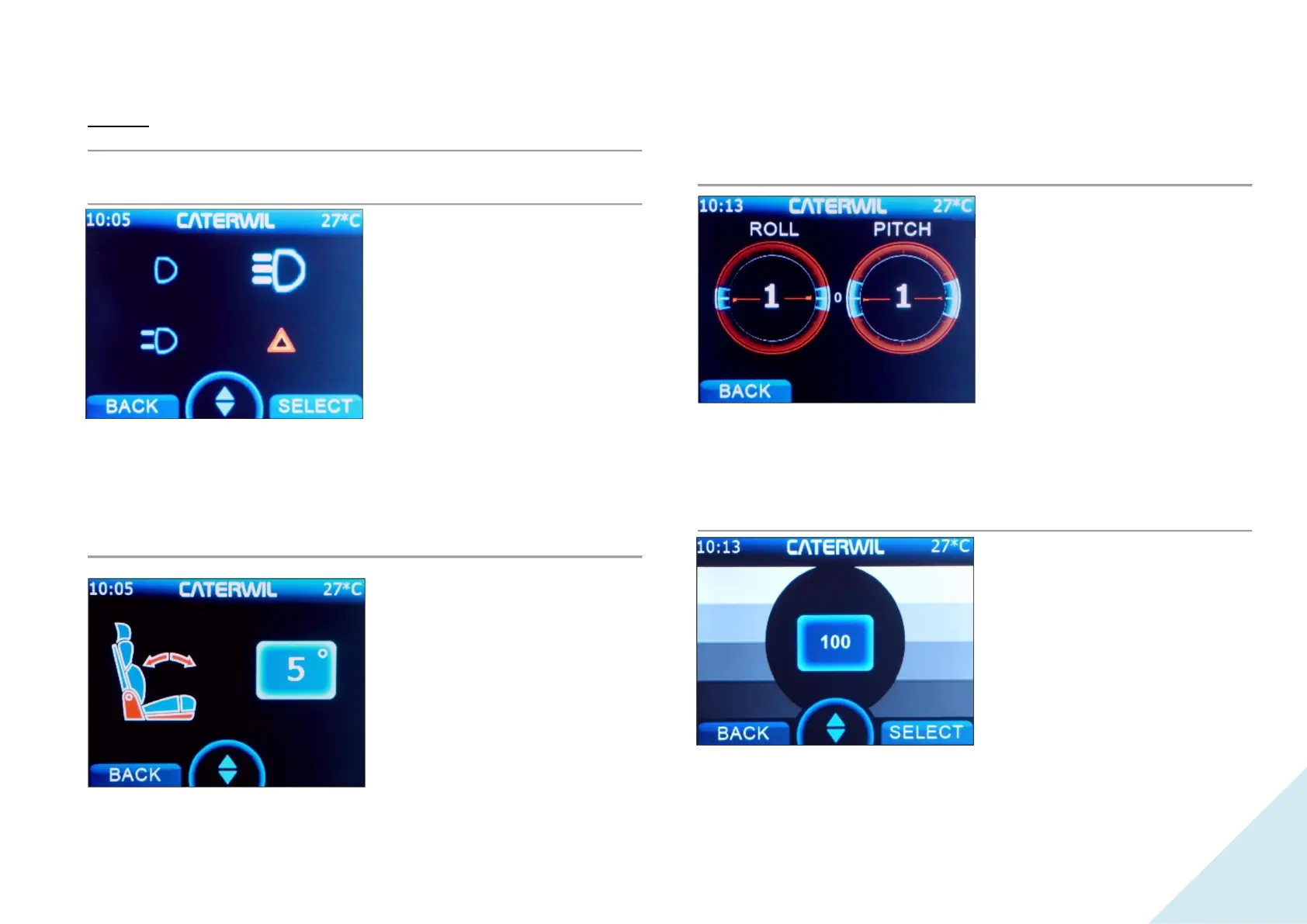
Headlight mode
On the page for selecting the
operating mode of the headlights
(Fig. 7.5) there are four items:
"Off", "Parking lights", "Light +
Parking lights ", "Hazard signal".
The selection is made using the
"Down" and "Up" buttons. The
selection of modes is repeated in a
circle.
Select "Back" to exit this point.
Seat setting
The seat setting only works when
the wheelchair is in the "On
wheels" or "Manual mode".
In the "On wheels" mode, you can
use the "Down" or "Up" buttons
to change the inclination of the
chair.
Select "Back" to exit the menu.
Wheelchair tilt
In this menu, you can get data
about the position of the
wheelchair relative to the horizon
(Fig. 7.7). This can be useful for
determining the angle of the ramp
the wheelchair is on.
Roll — this is tilt to the side.
Pitch — this is tilt forward and
back.
Select the Back button to exit.
Display setting
This menu item allows you to
adjust the brightness of the display
from 10 to 100% using the Down
and Up buttons.
Select "Back" to exit this point.


 To Next Page