23
23
ADDITIONAL FEATURES OF YOUR TEA MAKER TM 8010
8. Once the selected START TIME is reached,
the Tea Maker will automatically commence
the tea brewing or water heating cycle.
During this time, the AUTO START button
surround will no longer illuminate until the
cycle is complete.
Re-selecting the ‘Auto Start’ feature
using previous START TIME
1. Press the AUTO START button once. The HOT
WATER|Cancel and TEA|Cancel buttons will
ash.
2. Press either the HOT WATER|Cancel or
TEA|Cancel button to re-select the the de-
sired function. The ‘Auto Start’ feature has
now been re-set.
NOTE:
The ‘Auto Start’ feature can be canceled
anytime by pressing the AUTO START
button. The LCD screen will no longer
display the AUTO START symbol and
the AUTO START button surround will
cease to illuminate.
ANote on Standby Mode
When the Tea Maker is plugged into awall out-
let, the LCD screen will illuminate for 3 minutes
before entering standby mode. When in standby
mode, the LCD screen will cease to illuminate.
To re-activate the Tea Maker out of standby mode,
press any button, except the HOT WATER|Cancel
or TEA|Cancel button on the Power Base.
The LCD screen will re-illuminate.
Pressing either the HOT WATER|Cancel or
TEA|Cancel button will start the respective ope-
ration immediately.
Moving the Tea Basket when not in the
Brewing Cycle
After the brewing cycle is complete, you may wish
to lower the Tea Basket again for extra infusion to
produce astronger tasting tea. To do this, press and
hold the BASKET button for 2 seconds. The button
surround will ash and the Tea Basket will automat-
ically lower to the bottom of the Glass Jug.
Once the desired strength has been reached,
press and hold the BASKET button for 2 seconds.
The button surround will ash and the Tea Basket
will automatically rise to the top of the Glass Jug .
NOTE:
If the Glass Jug is removed from the
Power Base and the Tea Basket is in the
lowered position, it will automatically
return to the top upon return of the
Glass Jug to the Power Base.
ANote on Temperature Conversion
(°C to °F)
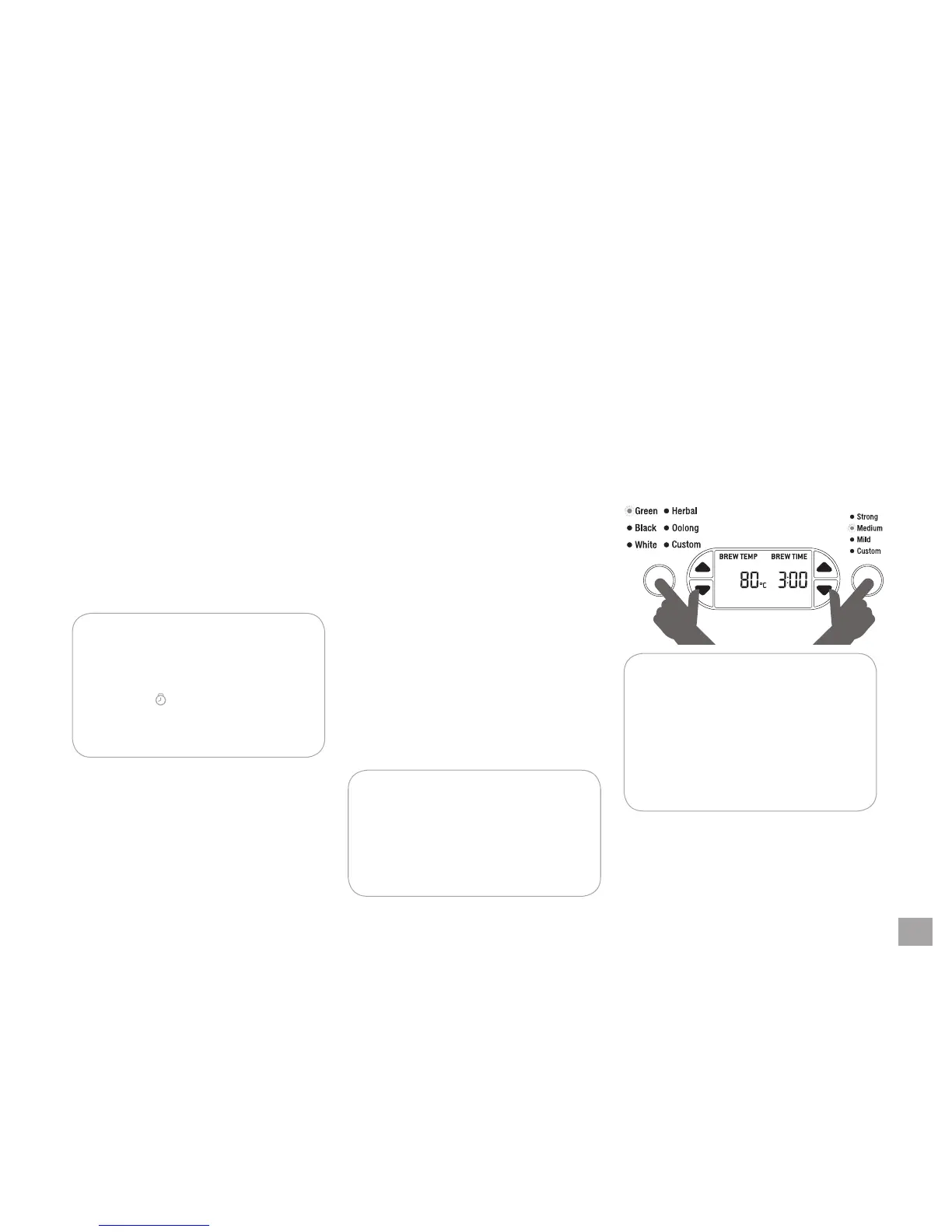
The temperature reading on the Tea Maker is
preset to Celsius but can be converted to Fah-
renheit.
Simultaneously press and hold the TEA TYPE and
TEA STRENGTH buttons for 2 seconds. The cor-
responding ‘°C’ or ‘°F’ symbol will be displayed on
the LCD screen.
PRESS & HOLD FOR
2 SECONDS
NOTE:
Once the Celsius default has been
changed to Fahrenheit and one tea
brewing or water heating cycle has
been activated, the Fahrenheit setting
will remain in the memory of the Tea
Maker until you change it.
To return to default settings, see Page 28.


 To Next Page