FUNCTIONAL DESCRIPTIONS AND SPECIFICATIONS CHAPTER 2
FRONT PANEL
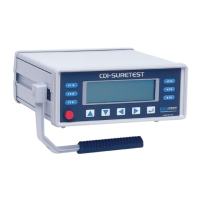
Figure 2-3: SURETEST Front Panel
A- Membrane Function ( F1, F2, F3, F4, F5, F6 ),
And Cursor/Selection (Up, Down, Left, Right and Enter ) Keys.
B- Soft Key Menu: Zero, # Data Stored, Setup, Send, Store, Clear, Escape, Format.
C- Real Time Clock. HH:MM:SS
D- Modes: Track, Peak Hold, First Peak and Power tools.
E- Maximum Range of Transducer.
F- Engineering Units : Nm, dNm, Ncm, mkg, cmkg, ft.lb, in.lb, in.oz
G- Power: On/Off
H- Scroll Bar Each dot represents 10% of Full scale.
I- Torque Reading: Full 5-digit reading Plus Sign (for direction)


 To Next Page