FUNCTIONAL DESCRIPTION AND SPECIFICATIONS CHAPTER 2
The SURETEST returns to the default menu from the measurements mode in the event there is no selection
/ input by the User for more than two minutes. This serves as a reminder for more (input) measurements.
Setup Mode
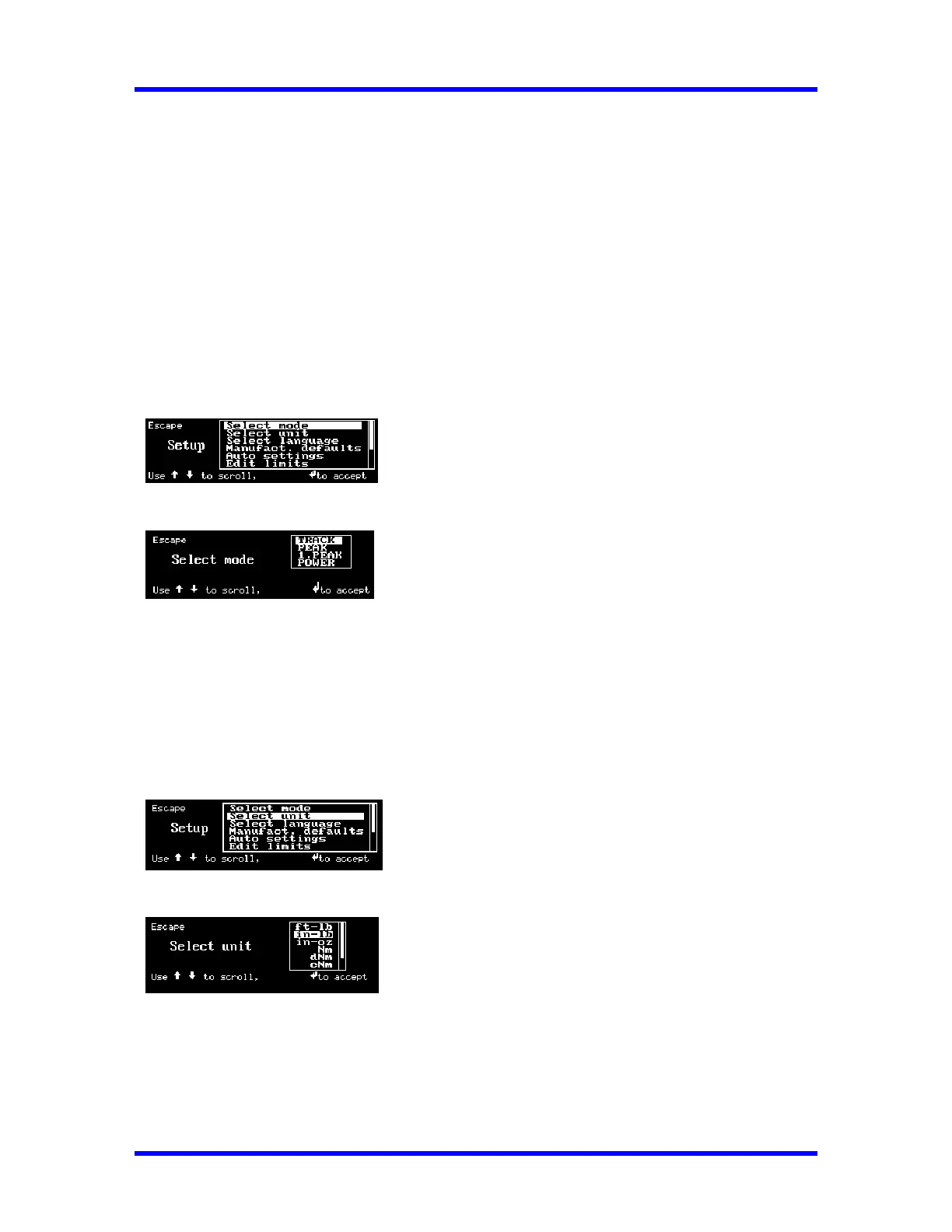
The following Selections are available:
1. SELECT MODE
2. SELECT UNIT
3. SELECT LANGUAGE
4. MANUFACTURER’S DEFAULTS
5. AUTO SETTINGS
6. EDIT LIMITS
7. CLOCK ADJUST
8. CALIBRATION
9. EDIT PARAMETERS
10. INTERNAL DIAGNOSTIC
11. ABOUT
1. Select Mode
Selects either TRACK, PEAK HOLD, FIRST PEAK, or POWER mode.
• TRACK : continually makes Torque Measurements.
• PEAK : makes Torque Measurement at the Highest Peak.
• 1.PEAK : makes Torque Measurement at the First Peak.
• POWER : makes Torque Measurement at the Highest Peak at a faster rate.
2. Select Unit
Selects the following Torque units on LCD display:
Nm, dNm, cNm, mkg, cmkg, ft. lb., in. lb., in. oz.
2-4



 To Next Page