CALIBRATION CHAPTER 5
Press Unit (F2) key and select the desired torque unit.
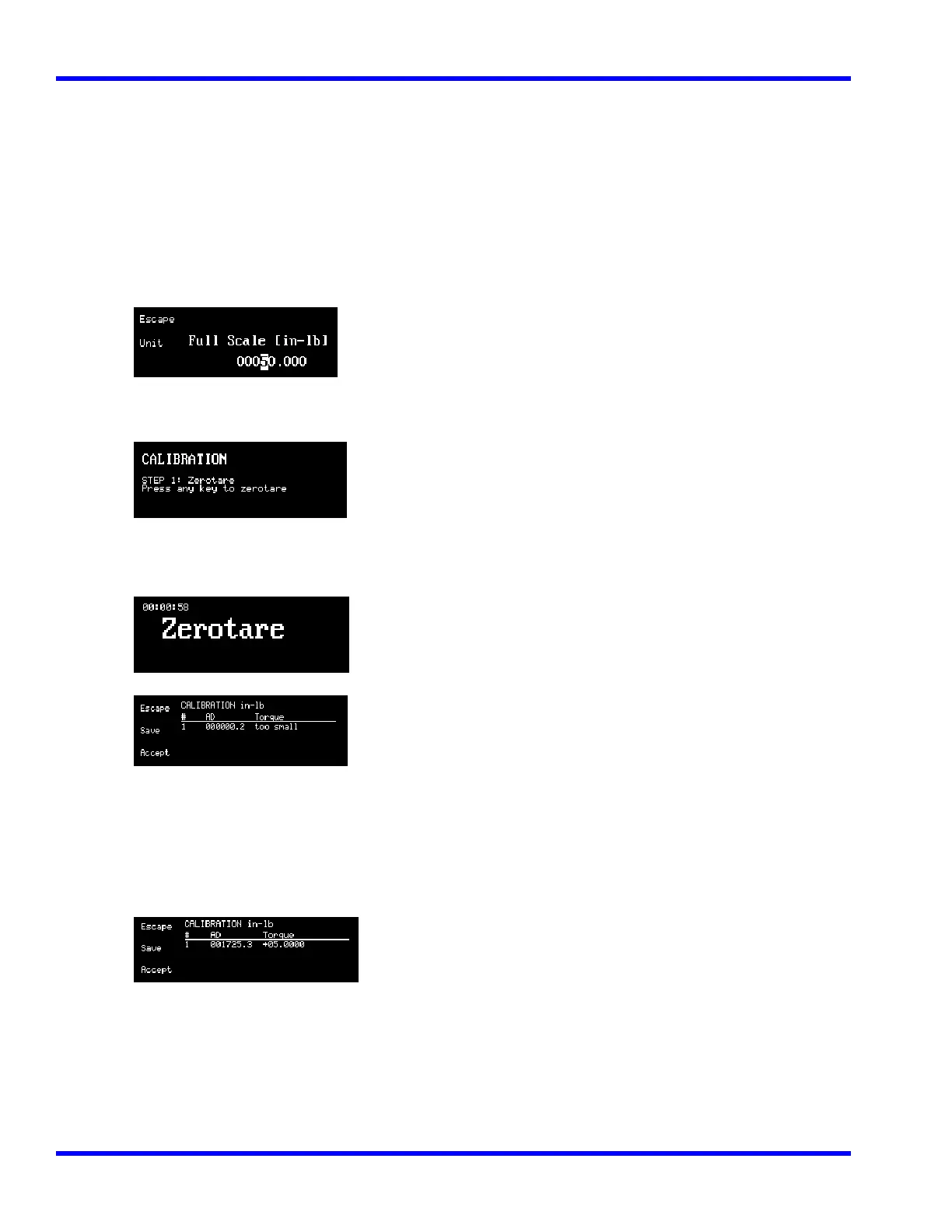
10. Using the Up (↑) and Down (↓) Cursor keys, enter the Full Scale value for the 4-in-1 transducer to calibrate.
Possible values are:
1 = 50 in. lb.
2 = 400 in. lb.
3 = 1000 in. lb.
4 = 250 ft. lb.
( For 4 in 1 Transducers display shows : CHECKING TRANSDUCER.)
Apply torque to one of the transducers until “ Full Scale UNITS shows on display.
Note: Example graphics are for 50 in-lb transducer.
11. Press ENTER (↵).
12. Press any key to initiate Zerotare. The LCD displays:
then:
13. Apply torque using the precision arm, hanger or certified weights listed as calibration point 1 in the
calibration check point table in this chapter. When the reading is stable, push and hold the Up (↑) or Down
(↓) Cursor Keys to get the correct torque value reading. Repeat the procedure for points 2, 3, 4, and 5 of the
same table as shown below:
Apply 10% Torque = 5 in.lb
5-9



 To Next Page