CALIBRATION CHAPTER 5
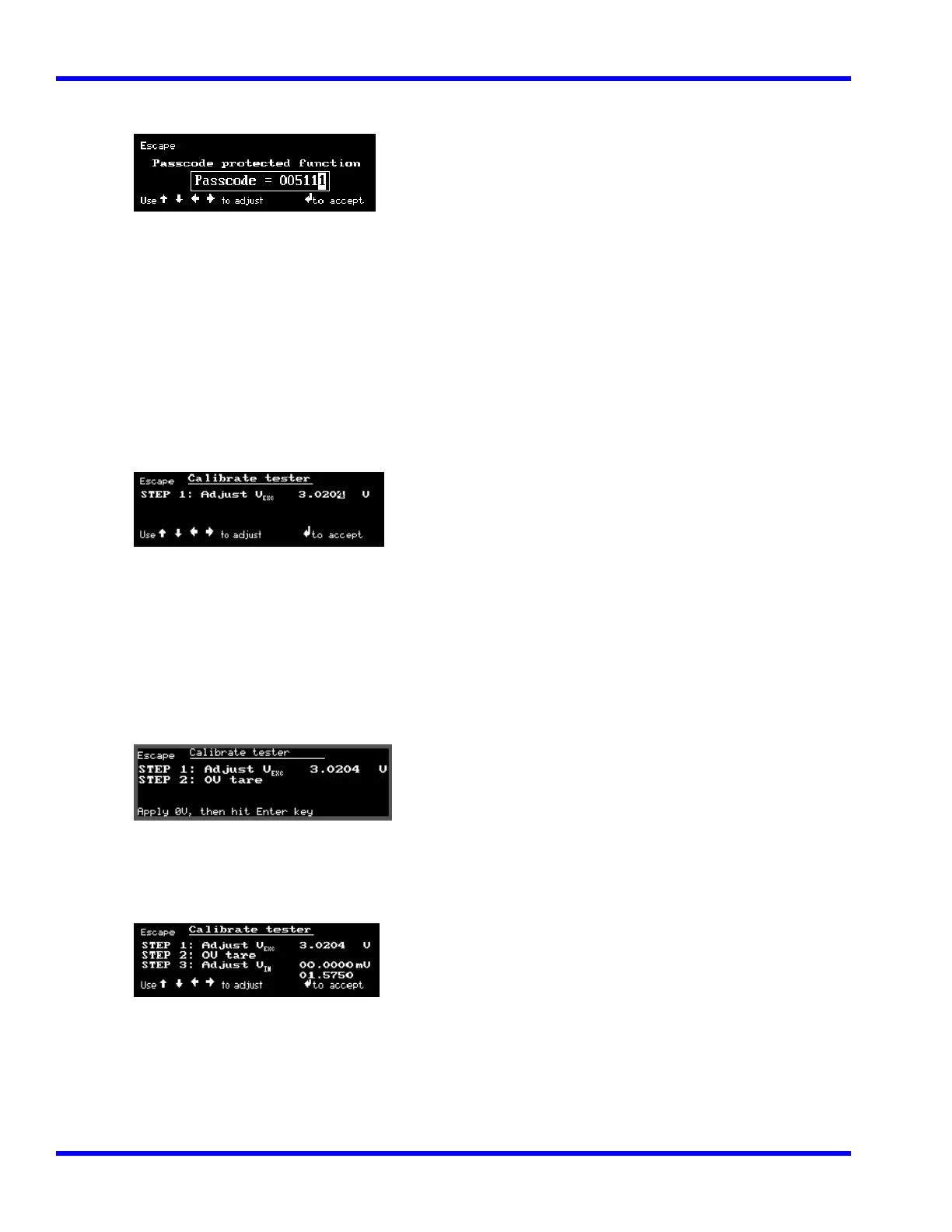
4. Enter the following code into the display using the Cursor Keys:
5111. Then press
( Left (←), Right (→) to select digit ; Up (↑), Down (↓) = increment/decrement value ;
Enter (↵) to accept )
Calibrate tester
Using a laboratory millivolt meter, measure the voltage across pin 2 (ground) and 19 (Gage
Excitation) of the calibration fixture.
The display reads:
Example:
3.0211 volts
Program the measured voltage into the SURETEST Base Unit using the Cursor Keys. (Use Up (↑),
Down (↓), Left (←) and Right (→) Cursor Keys to match the SURETEST display to the millivolt-
meter). Then Press ENTER (↵) to accept.
5. Next, the display reads:
Short pins 5 and 6 together on the calibration fixture. Then hit Enter (↵) key.
6. Next, the display reads:
Remove the short between pins 5 and 6 of the calibration fixture.
Using a laboratory millivolt meter, measure the voltage across pins 5 and 6.
5-12



 To Next Page