Need help?
Do you have a question about the CDN TM15 and is the answer not in the manual?
Instructions for setting time, starting, stopping, and handling the countdown alarm and count-up feature.
Instructions for setting time, starting, stopping, and handling the count-up timer.
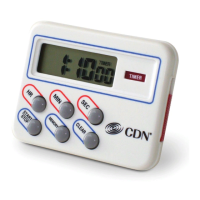
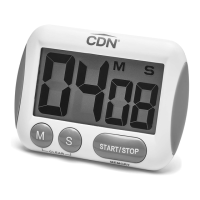
The CDN Model TM15 Extra Big Digit Timer is a versatile and user-friendly device designed for precise time management, offering both countdown and count-up functionalities. Its primary function is to help users track time accurately, whether for cooking, experiments, or other timed activities, with a maximum capacity of 100 minutes by seconds.
The timer operates with a clear, extra-large digit display, making it easy to read the time at a glance. It features a loud and long alarm that signals the end of a timed period, ensuring that users are alerted even from a distance. The alarm sounds for 60 seconds and then automatically stops, though the timer continues to flash and count up. Users can stop the alarm and the count-up function by pressing the START/STOP button, which also recalls the last set count.
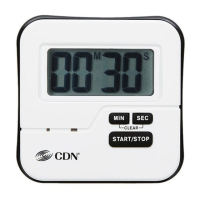
The device supports both countdown and count-up modes. In countdown mode, users can set a desired time using the MIN and SEC buttons. Pressing and holding these buttons allows for fast advancement of the time. Once the time is set, pressing the START/STOP button initiates the countdown, with "M" and "S" flashing on the display to indicate active timing. The countdown can be interrupted and resumed by pressing the START/STOP button again. When the countdown reaches 00:00, the alarm sounds, and the timer automatically switches to count-up mode, continuing to track time past zero. To reset the timer to 00:00 when it is stopped, both MIN and SEC buttons must be pressed simultaneously.
In count-up mode, the timer starts from 00:00 and tracks elapsed time. To initiate count-up, first ensure the timer is stopped and reset to 00:00 by simultaneously pressing both MIN and SEC buttons. Then, pressing the START/STOP button begins the count-up, with "M" and "S" flashing. Similar to countdown mode, the count-up can be paused and resumed using the START/STOP button. To reset the count-up timer to 00:00, both MIN and SEC buttons should be pressed simultaneously.
The CDN TM15 timer is designed for convenience and ease of use. Its "extra big digit" display is a key feature, providing excellent readability. The timer includes a "last count recall" function, which is useful for repeating common timing tasks without needing to re-enter the time. The ability to "count up after zero" in countdown mode ensures that users are aware of how much time has passed since the alarm first sounded, which can be critical in certain applications.
For mounting flexibility, the timer offers a "3-way mounting" system: a magnet for attaching to metallic surfaces, a stand for tabletop use, and a loop for hanging. This versatility allows the timer to be placed in various locations, adapting to different environments and user preferences. The device is constructed from "food-safe ABS plastic," making it suitable for kitchen use and ensuring durability. The timer comes with a battery and instructions included, allowing for immediate use upon purchase. A note advises users to remove a sticker from the display before use, indicating attention to detail in user experience.
Maintaining the CDN TM15 timer is straightforward, focusing on basic care to ensure longevity and optimal performance. The device is powered by a 1.5V AAA battery. Users are advised to "replace battery when LCD becomes dim or alarm level declines," which serves as a clear indicator for battery replacement. The battery installation process is simple: remove the battery cover by sliding it in the direction of the arrow, install one 1.5V AAA battery observing polarity, and then replace the cover until it clicks shut. A brief alarm sounds upon battery installation, confirming the device is powered on.
To ensure the product's durability, users are instructed to "avoid exposing your timer to extreme temperatures, water or severe shock." This caution helps prevent damage to the internal components and the display. Additionally, it is important to "avoid contact with any corrosive materials such as perfume, alcohol or cleaning agents," as these substances can degrade the plastic or affect the electronic components. For cleaning, the timer should be "wiped clean with a damp cloth," which is a gentle method that prevents damage from harsh chemicals or excessive moisture. These maintenance guidelines are designed to help users preserve the functionality and appearance of their timer over time.
 General
| Type | Digital Timer |
|---|---|
| Display | LCD |
| Audible Alarm | Yes |
| Battery Backup | No |
| Mounting | Magnet, Clip, Stand |
| Battery | 1 x AAA |
| Timer Modes | Count down |

 To Next Page