English - 21 -
ξξξξξξξ¬ξξξξξξξξξξξξξξξξξξξξξξξξξξ
ξξξξξξξξξξξξξξξξξξξξξξ
ξξξξξξξξξξξξξξξξξξξξξξξξξξξξξ
ξ¨ξξξξξξξξξξξ³ξξξξξξξξξξͺξξξξξξξξξξξξξξξ
ξξξξξξξ―ξξξξξ·ξΉξ
ξξξξξξξ·ξξξξξξξξξξξξξ―ξξξξξ·ξΉξξξξξξξξξξξξξξξξξξξξξξξξξξξ
the Exit button or highlight the Live TVξξξξξξξξξξξξξξ
Appsξξξξξ ξξξ ξξξξξ«ξξξξ ξΆξξξξξξ ξξξξξξξξξξ OK. For
ξξξξξξξξξξξξξξξξ ξξξξLive TVξ ξξξξξξξξξ ξ
ξξξξξξξξξξξ ξξξ
the Home tab on the Home Screen and the row with
ξξξξξξξξξξξξξξξ
ξξξξξξξξξξξFavourite Apps. In order
ξξξξξξξξξξξξξξξ¨ξξξξξξξξξξξ³ξξξξξξξξξξͺξξξξξξξξξξξξξξξ
Guide button on the remote.
Use the directional buttons to navigate through
ξξξξ ξξξξξξξξξξ ξξξξξξξ ξΌξξξ ξξξξ ξξξξ ξξξξ ξΈξξξ§ξξξξ
directional buttons or Programme +/- buttons to
ξξξξξξξξξξξξξξξξξξξξξξξξξξξξξξξξξξξξξξξξξξξξξξξξξ΅ξξξξξ
Left directional buttons to select a desired event of
ξξξξξξξξξξξξξξξξξξξξξξξξξξξξξξξξξξξξ¬ξξξξξξξξξ
ξξξξξξξξξξξξξ
ξξξξξξξξξξξξξξξξξξξξξξξξξξξξξξξξξξξξξξξξξξξξξξξξξξξξξξξξ
ξξξξξξξξξξξξξ
ξξξξξξξξξξξξξξξξξξξ
ξξξξξξξξξξξξξ
ξξξξξξξξξξξξ
on the screen.
Press Blueξ ξ
ξξξξξξ ξξξ ξΏξξξξξ ξξξξ ξξξξξξξξ ξ§ξξξ ξξξ ξξξξ
ξξξξξξ ξξξξξξξξ ξξξξΏξξξξξ ξξξξξξξξ ξξξξ ξξξξ ξΏξξξ ξξξξξξξ ξξξ
ξξξξξξξξξξξξξξξξξξξξξξξξξξξ³ξξξξξYellow button to see
detailed information on the highlighted event. You can
also use the Red and Green buttons to see events
ξξξξξξξξξξξξ ξξξξ ξξξξ ξξξξξξξξξξξ·ξξξ ξξξξξξξξξξξξξξξ ξ
ξξ
assigned to the coloured buttons on the remote when
they are available. Follow the on-screen information
for accurate button functions.
Press the Record button to add a timer for the
ξξξξξξξξξξξξ ξξξξξξ ξξξ ξξξξ ξξξξξξξ ξΌξξξ ξξξξ ξξξΏξξξ ξξξξ
ξξξξξξξξξξξξξξξξξξξ
ξξξξξξξξξξξξξξSchedule typeξξξξξξξξ
as Reminder or RecordξξξΊξξξξξξξξξξξξξξξξξξξξξξξξξ
ξξξξξξξξξξξξξξGreen button. The timer will be added
to the schedule list. You can access the schedule list
from the Recordξξξξξξξξξξ―ξξξξξ·ξΉξξξξξξ
ξ·ξξξξξξξξξξξξξξξξξξ
ξξξξξξξξξξξξξξξDTVξξξξξξξξξξξξξξ
is blocked from the Settings>Channel>Parental
Controls>Inputs Blockedξξξξξξξξξξ―ξξξξξ·ξΉξξξξξξξξξ
on Home Screen.
Connecting to the Internet
ξΌξξξξξξξξξξξξξξξξξξξ¬ξξξξξξξξξξξξξξξξξξ·ξΉξξξ
ξξξξξξξξξξξξξ
ξξξξξξξξξ
ξξξξξ
ξξξξξξξξξξξξξ¬ξξξξξξξξξξξξξξξξξξξξξξΏξξξξξ
ξξξξ ξξξξξξξξ ξξξξξξξξξ ξξξ ξξξξξξ ξξξ ξξξξξξ ξξ ξξξξξξξξ ξξξ
ξξξξξξξξξξ ξξξξξξξξ ξξξξ ξξξξξξξξξ ξξξξξξξξξξξξξξ ξ·ξξξξξ
ξξξξξξξξξξξξξξ
ξξξξξξΏξξξξξξξξξξξSettings>Network &
Internet menu. You can also highlight the Connected/
ξ±ξξξξ¦ξξξξξξξξξξξξξξξξξξξξξξ«ξξξξξξξξξξξξξξξξξξξξξOK
to access this menu. For further information refer to
Network & Internet section under the title of Settings.

Wired Connection
ξ¦ξξξξξξξξξξξξξ·ξΉξξξξξξξξξξξξξξξξξξξξξξξξξξξξξξ¨ξξξξξξξξ
ξξξ
ξξξξξ·ξξξξξξξξξξξ―ξ€ξ±ξξξξξξξξξξξξξξξξξξξξξξξξξξξξξξξξ·ξΉξ
The status of the connection under the Ethernet
section in the Network & Internet menu will change
from Not connected to Connected.
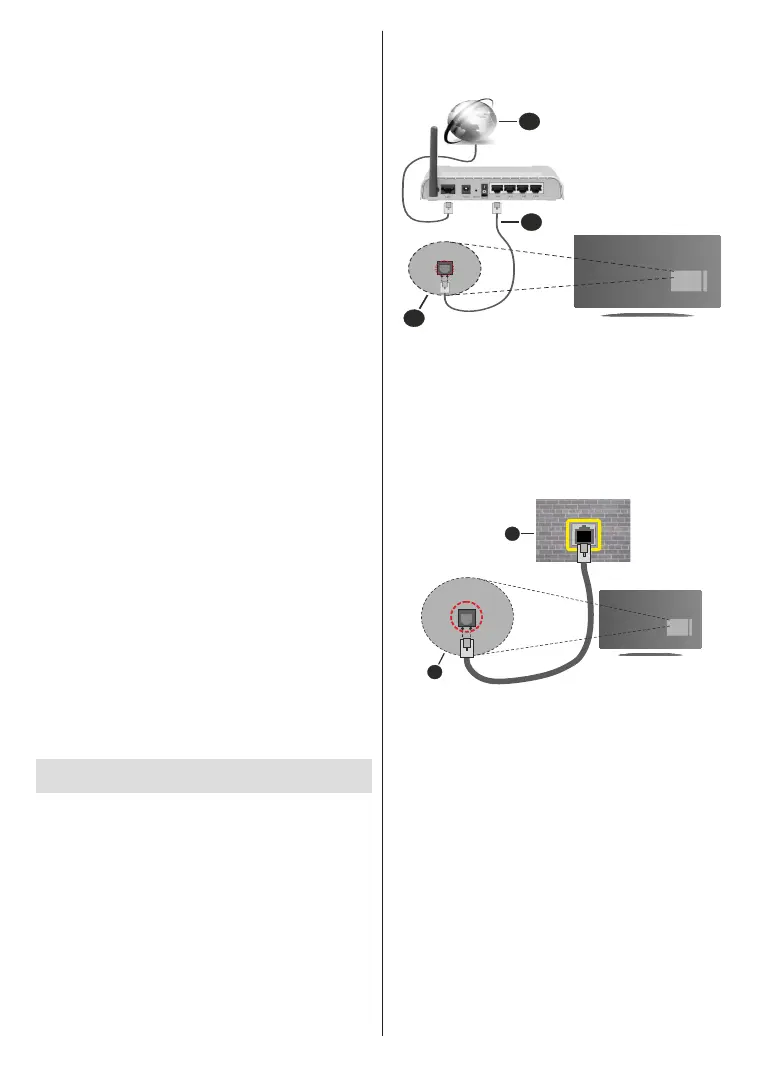
1. Broadband ISP connection
2. ξ―ξ€ξ±ξξEthernetξξξξξ
ξξ
3. ξ―ξ€ξ±ξξξξξξξξξξξξξξξξξξξξξξξξξξξξξξξξ·ξΉ
ξΌξξξξξξξξξ ξ
ξξξξ
ξξξ ξξξξξξξξξξξξξξξξξ·ξΉξ ξξξξξ ξξξξξξξξ
ξξξξξξξξξξξξξξξξξξξξξξξξξξξξξξξξξξξξξξΆξξξξξξΏξξξξξξξξξξ
ξ¬ξξξξξξξξξξξξξξξξξξξξξξξξξξξξξξξξξξξ·ξΉξξξξξξξξξξξξξξξξξ
network using an Ethernet cable.
1. Network wall socket
2. ξ―ξ€ξ±ξξξξξξξξξξξξξξξξξξξξξξξξξξξξξξξξ·ξΉ
Wireless Connection
A wireless LAN modem/router is required to connect
ξξξξξ·ξΉξξξξξξξξξ¬ξξξξξξξξξξξξξξξξξξξξξξ―ξ€ξ±ξξ
Highlight Wi-FiξξξξξξξξξξξξξξξNetwork & Internet menu
ξξξξξξξξξξOK to enable wireless connection. Available
ξξξξξξξξξξξξξξξ
ξξξξξξξξξξξΆξξξξξξξξξξξξξξξξξξξξOK to
connect. For more information refer to Network &
Internet section under the title of Settings.