BAKE&FRY 2500 TOUCH/WHITE
45
ENGLISH
- Insert the new bulb.
- Rotate the light cover clockwise to tighten it.
Warning
- Make sure to unplug the device and allow it to cool completely before replacing the light.
-
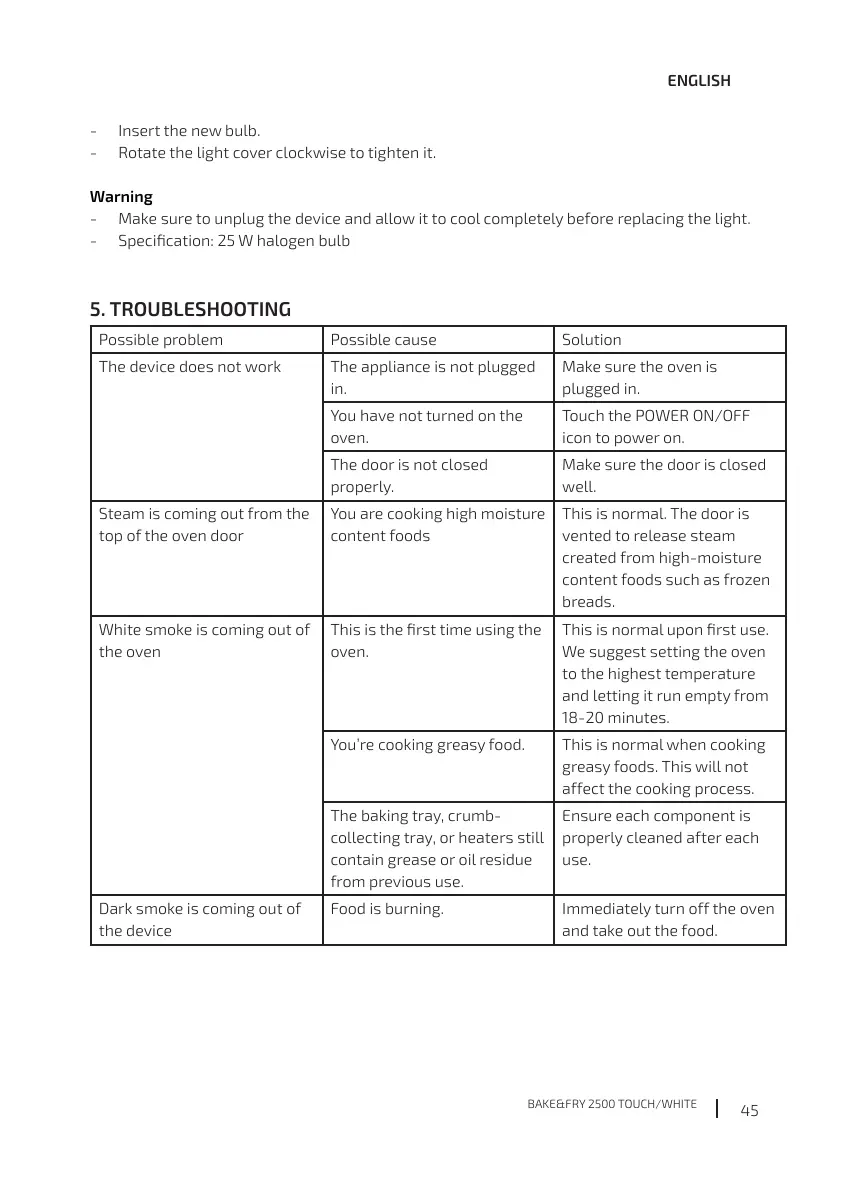
5. TROUBLESHOOTING
Possible problem Possible cause Solution
The device does not work The appliance is not plugged
in.
Make sure the oven is
plugged in.
oven.
icon to power on.
The door is not closed
properly.
Make sure the door is closed
well.
Steam is coming out from the
top of the oven door
content foods
This is normal. The door is
vented to release steam
created from high-moisture
content foods such as frozen
breads.
White smoke is coming out of
the oven
oven.
We suggest setting the oven
to the highest temperature
and letting it run empty from
18-20 minutes.
This is normal when cooking
greasy foods. This will not
affect the cooking process.
The baking tray, crumb-
collecting tray, or heaters still
contain grease or oil residue
from previous use.
Ensure each component is
properly cleaned after each
use.
Dark smoke is coming out of
the device
Immediately turn off the oven
and take out the food.




 To Next Page