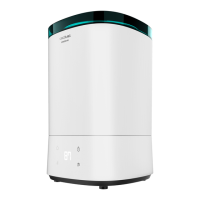
BREEZECARE 3500 WARMBREEZECARE 3500 WARM
3635
2. PARTS AND COMPONENTS
Fig. 1.
1. Top cover
2. Mist block cover
3. Handle frame
4. Handle
5. Water tank
6. Sensor
7. Power cord
8. PTC heating
9. Transducer PCB
10. Control panel
11. Air outlet
12. Base
13. Buoy
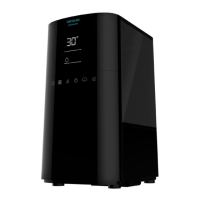
Fig. 2.
1. Display
2. On/o
3. Max./Min.
4. Humidity
5. Timer
6. Warm water mist
3. BEFORE USE
Take the product out of the box.
Remove all packaging material and save the original box.
Make sure all parts and components are included and in good conditions. If any visible signs
of damage are observed, contact the Technical Support Service immediately.
4. OPERATION
Note: The ideal relative humidity level for human comfort is between 45 % and 65 %. Excess
humidity shows up in the form of condensation on cold surfaces or cold walls in the room. To
measure the room’s humidity correctly, use a hygrometer.
Relative humidity in dierent environments suitable for people:
Bedroom, living room: 45-65 % RH
Patient’s room: 40-55 % RH
Room with computer, experiment equipment: 45-60 % RH
Room with piano: 40-60 % RH
Museum, exhibition hall, and library: 40-50 % RH
Place the device on a flat surfa e.
Take out the top cover, fil the water tank and then put the top cover back.
Place the water tank on the main base.
Plug the device to a power supply. The display will light up and the device will beep. After 1
second, the display will turn off andthe device will enter standby mode.
Press on/o, the device will start working under mist mode at level 2. The blue light indicator
will turn on. The control panel will display the current humidity and then will display Mist
mode level 2 after 15 seconds. One minute later, it will display current humidity and back to
Mist mode again repeatedly.
Mist speed
While the display shows current humidity, press the Max./Min. button to check the current
mist speed. Press repeatedly to set the desired speed. There are 3 dierent settings.
Constant humidity
When the LED display is showing current humidity, press the Humidity symbol.
The humidity level can be set from 30 % RH to 90 % RH.
Every time the symbol is pressed, it will be increased by 5 %.
When it reaches 90 %, press again and the display will show “Co”. Do not operate the device
for 3 seconds to cancel the humidity setting function.
Note: If the target humidity is higher than the current humidity, the humidificationfunction
will work.
When the set humidity is 16 % RH higher than current humidity, the device will operate at mist
level 3.
When the set humidity is 10 % RH ~ 15 % RH higher than current humidity, the device will
operate at mist level 2.
When the set humidity is 1 % RH ~ 9 % RH, the device will operate at level 1.
When the target humidity is lower than the current humidity, the device will enter standby
mode.
Note: The mist speed cannot be adjusted under constant humidity function.



 To Next Page