51
Robot operation
App and Remote control
- You can control the cleaning modes from the mobile app or from the remote control.
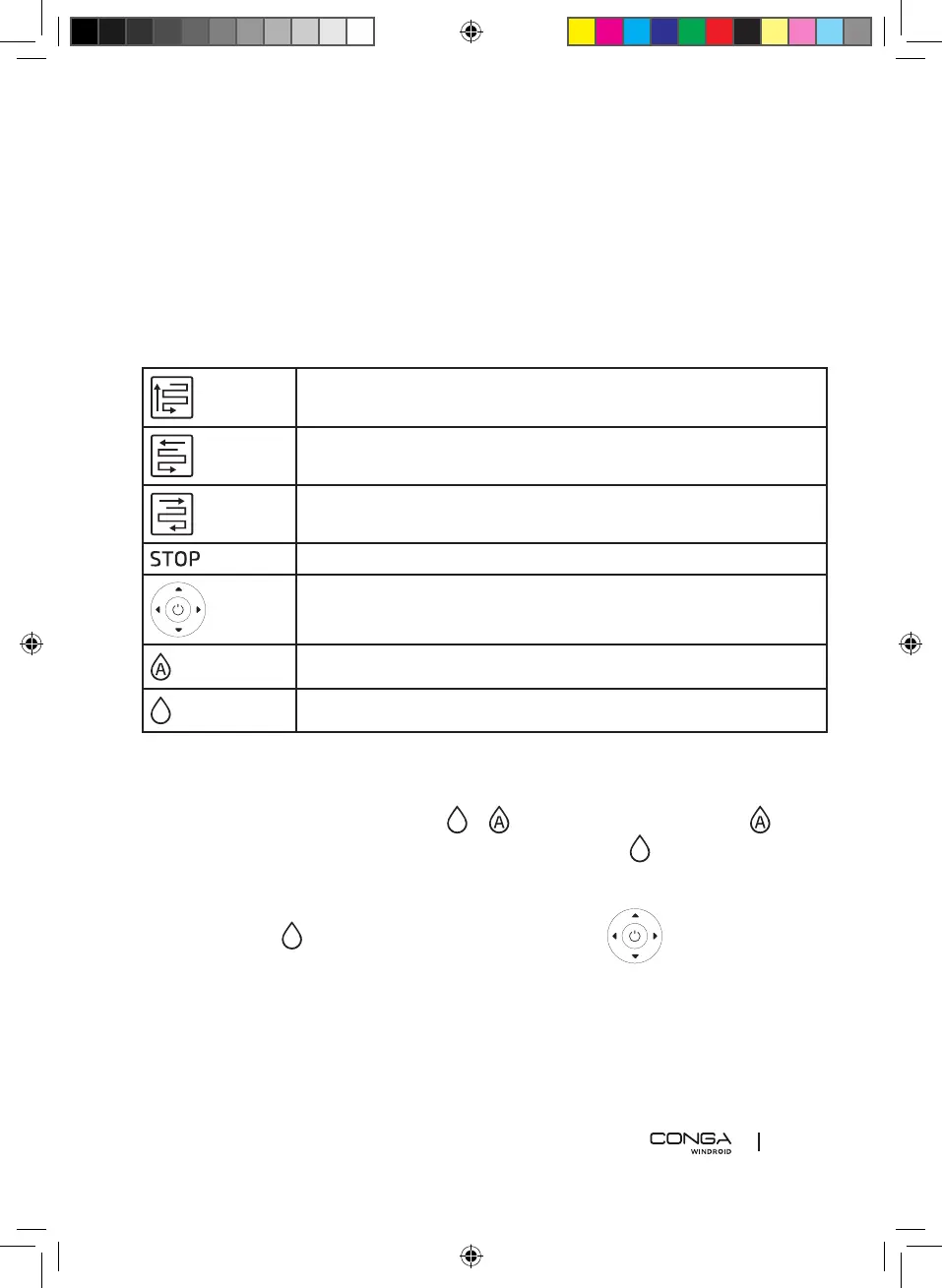
- Next, you will see the functions of every icon you will nd.
- (Remember the icon presentation can slightly vary between the app and the remote
control).
Automatic cleaning mode up and down
Automatic cleaning mode left and down
Automatic cleaning mode right and down
Pause/Start
Manual mode: up, down, left, right
Automatic spraying mode (every 3 seconds)
Manual spraying mode.
Dry mode
The machine can operate in every mode without activating the spraying.
Spraying mode
- To start the spraying you need to press or . If you select the automatic mode , the
robot will spray every 3 seconds. If you select the manual mode , you can press every
time you want the robot to spray.
Manual mode operation
- You must press every time you want the robot to spray.
- You must also indicate the route you want the robot to follow.
Automatic mode
You can choose between 3 route modes:


 To Next Page