ENGLISH
16 SURFACE PRECISION 9400/9450 FULL HEALTHY
BODY ANALYSIS MODE
This mode calculates body fat, hydration, muscle and bone mass, visceral fat, recommended
calorie intake and Body Mass Index (BMI).
Setting up parameters
It is important to insert correct data in order to ensure accurate measurements. The device can
save up to 10 user’s data.
1. Switch on the device by pressing the SET button.
2. LCD display will show “0.0”. Hold SET button for 3 seconds in order to start up
parameter input mode.
3. User code will start ashing. Press SET button repeatedly until the desired user
number appears, then press SET to conrm.
4. Gender symbol will start ashing. Press SET button to select gender, then press SET
to conrm.
5. Height digits will start ashing. Use the arrows to increase or decrease height and
then press SET to conrm height.
6. Age digits will start ashing. Use the arrows to increase or decrease and press SET
to conrm age.
NOTE:
- If during parameter setting the device remains idle for more than 6 seconds, set
parameters will be saved and LCD display will show “0.0”. Body analysis mode is
now operating.
- If during parameter setting LCD display shows “0”, hold SET button for 3 seconds to
re-enter parameter input mode.
- Remember your user number for next time to avoid repeating the parameter input
process.
Starting body analysis
In order to ensure accuracy, remember to remove shoes and socks before stepping on the scale.
1. Step on the scale.
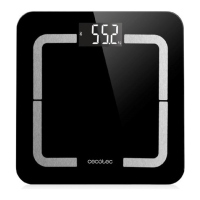
2. Place your feet on the contact areas and remain still.
3. Do not get off the scale until the LCD display shows the test results.
EXAMPLE:
1. Press SET button to switch on the device.
2. Press SET button to select user number or reset parameters.
3. When the desired user number is ashing, tap on the scale. The LCD display will show “0.0”.
4. Step gently on the scale. Make sure your feet are correctly placed on the contact areas.
5. After showing weight, the scale will start analysing. Do not step off the scale until the LCD
display show the test results.



 To Next Page