6
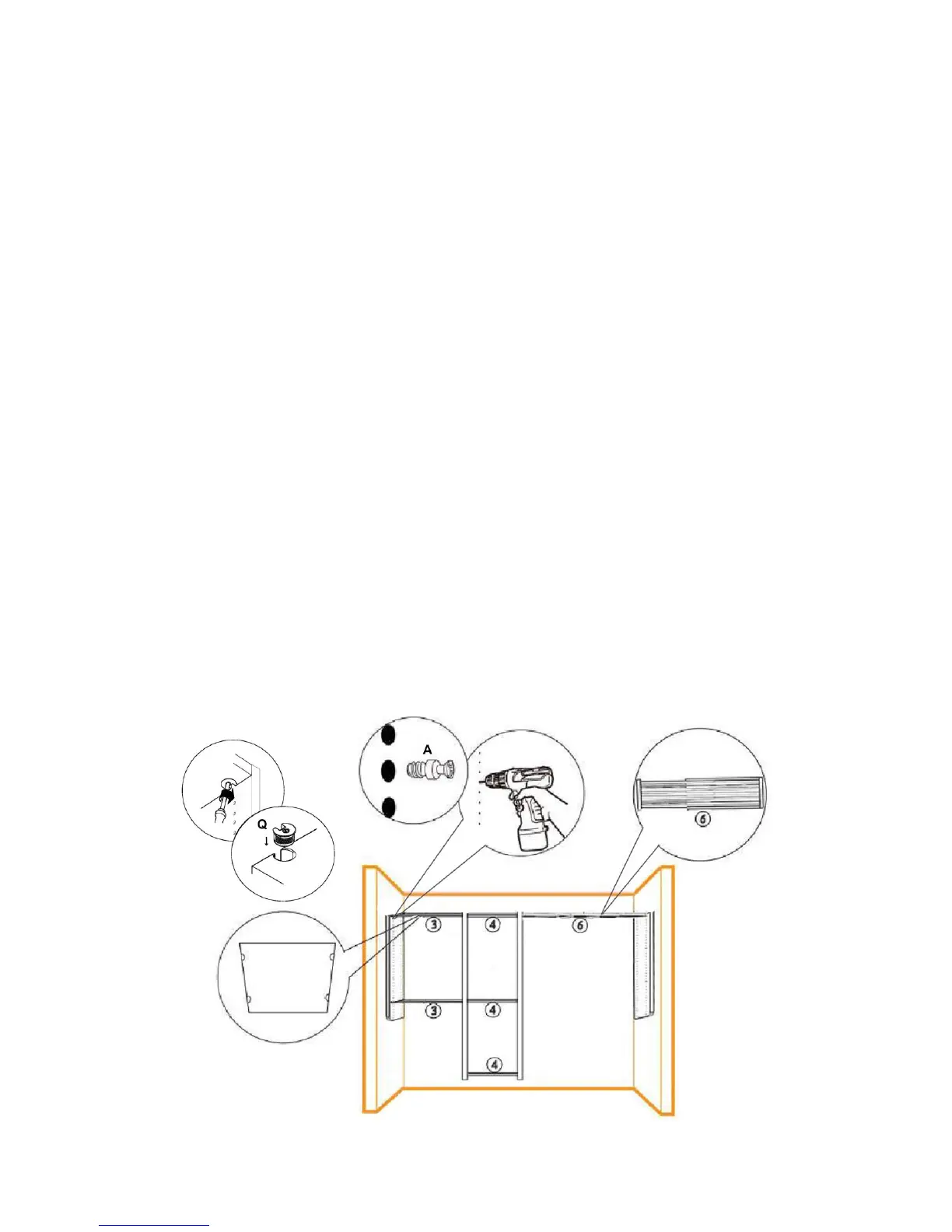
Insert Rafix Connector (Q) into shelf holes with the openings facing outward. Do
this for all shelves (3), (4) and (6).
Mount Rafix Connector Bolt (A) on the first holes from top of left Wall Panel (1)
and left Tower Panel (2) using Phillips or Power screwdriver. Top holes are used for
flat top shelving.
Place one 24” Shelf (3) onto the Rafix Connector Bolts. Lock the Rafix Connector
Bolt (A) with Rafix Connectors (Q) by inserting the screwdriver into the Rafix
connector Hole and turning Clockwise.
Repeat the steps for all shelves with Rafix Connectors:
- Mount the 2nd 24” shelf (3) 6 holes from bottom up on left Wall Panel (1);
- Mount the Top 18” Shelf with Rafix Connector (4) on the first holes from top
between both Tower Panels (2);
- Mount 2nd 18” Shelf with Rafix Connector (4) at the same level of 2nd 24”
shelf (3);
- Mount the 3rd 18” Shelf with Rafix Connector (4) 2 holes from bottom up;
- Mount the Adjustable Shelf (6) between right Tower Panel (2) and right Wall
Panel (1), pull or push to adjust the shelf width to the desired Length.
Hint:
- Rafix Connector Bolt (A) can be mounted in different holes depending on customer’s desired
shelf locations.


 To Next Page