page 3page 10
TORQUE MEASUREMENTTORQUE MEASUREMENT
Comport signal
8 data, 2 stop, no parity. Baud Rate: 19,200 bps.
Output Connector
USB A/B cable
Peak Data Output Format
[CAN] _ _ _ [SO] [value] _ [SI] [unit] [CR]
[CAN]: ASCII control code 24
_: Space (code 32)
[SO]: ASCII control code 14
[value]: Output data with sign and decimal point. Plus sign
represents for CW torque and minus sign for CCW.
[Value] always occupy six locations and empty
locations will be filled with spaces.
[SI]: ASCII control code 15
[unit]: N*m _ _ _=N
.
m
kgf*cm = kg
.
cm
lb*in _ = lb
.
in
[CR]: ASCII control code 13 (Carriage Return)
Continuous Output Data Format
[CAN] [value] [CR]
1
2
3
4
5
6
7
8
9
10
11
12
13
14
15
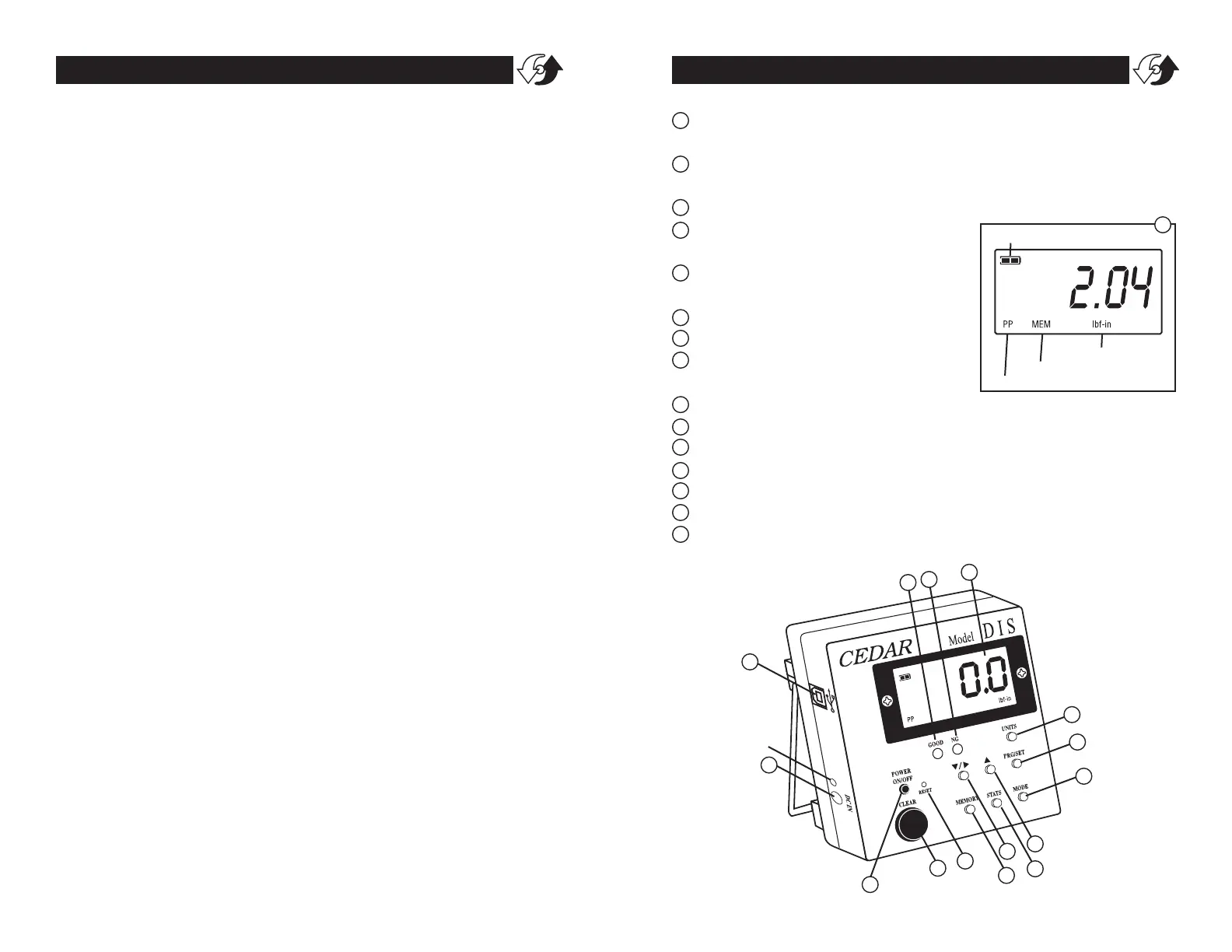
POWER Press to turn on, press again to turn off (click once, do
not hold). After 10 minutes of non-use the unit shuts off.
MODE Select Real Time, PP (Peak), PD (Peak Down) or C
(Continuous Output mode)
CLEAR Reset display to zero and send data to memory
LCD display Displays torque value,
battery icon, mode & units.
Unit Select units (lbf-in, kgf-cm, N-
cm, & N-m).
GOOD/C Mode Indicator
NG Indicator
DOWN/SHIFT Change values or
numeric places
UP Change values or options
PRG/SET Enter programming mode or enter values
MEMORY Display memory locations and data
STATS Display statistics; number of records, Max, Min, and Ave
DC IN AC charger/adapter receptacle
RESET System reset button
USB port Send data to computer via USB cable
BATTERY ICON
MODE INDICATOR
MEMORY STATUS
UNITS INDICATOR
4
1
2
3
4
5
6
7
8
9
10
11
12
13
14
15
CHARGE
LIGHT


 To Next Page