Please charge the CEECOACH and the
Jabra BT 2047 headset. If the battery is too
low, pairing might not be possible.
1
Turn on your CEECOACH device first.
Then press the talk button (o) until
the LED starts flashing.
2
Set CEECOACH into pairing-mode by
pressing the plus button (+) and the
minus button (-) simultaneously until
the LED flashes yellow.
3
Turn on the BT 2047 Bluetooth
®
headset.
This headset is automatically in pairing-
mode when turned on for the first time.
Please press the Answer/End button to
turn it on until the Bluetooth
®
indicator
flashes blue. In case you want to set the
BT 2047 in pairing-mode again at a later
date, press the Answer/End button for
5 seconds.
4
The pairing between CEECOACH and the
headset is finished in a few seconds.
You can see that the pairing has been
successful when CEECOACH flashes again
in the initial color.
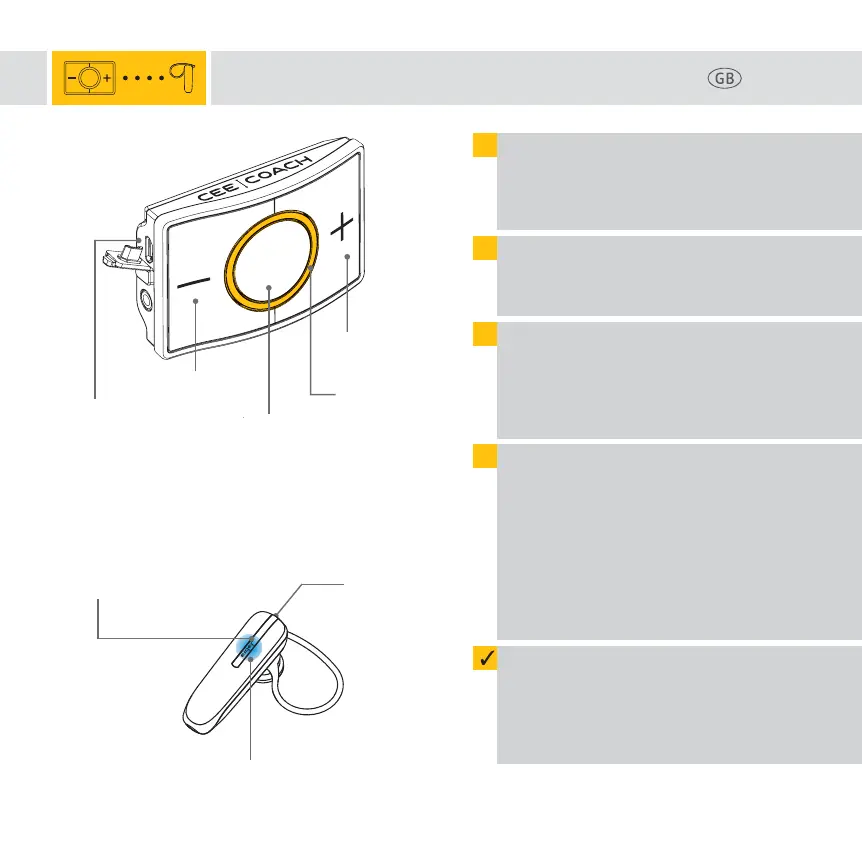
USB-charging port
(Charging)
Plus button (+)
Talk button (o)
LED light ring
(flashes yellow in
pairing-mode)
Minus button (-)
Page 2
Pairing CEECOACH 2 with jabra bt 2047
Bluetooth
®
indicator
(flashes blue in pairing-mode)
Answer/End button
jabra bt 2047
USB-
charging port



 To Next Page