Charging - Additional Safety Rules
Know Your Product
Input:
120V~240V AC 50/60Hz 35W
Output:
18V DC 1.5A
Charging time: 1 Hour
Specifications
Charging - Specification and Know Your Product
4.1
1. Before using the charger (Handle Dock), read
all the instructions and cautionary markings on
the charger and battery pack (POWERhandle)
as well as the instructions on using the battery
pack.
2. This charger is designed for indoor use only.
Do not charge your batteries outdoors.
3. DANGER: Do not allow any liquid to come
into contact with the charger. There is a danger
of electric shook.
4. The charger is not intended for any use other
than charging the exact type of rechargeable
battery pack as supplied with the charger. Any
other use may result in the risk of fire, electric
shook or electrocution.
5. To reduce the risk of an electric shook, unplug
the charger from the power supply before
attempting to clean it.
6. Do not disassemble the charger. Take it to an
authorised service center when service or repair
is required. Incorrect re-assembly may result in
the risk of fire, electric shock or electrocution.
7. Do not pull on the lead of the charger to
disconnect it from the power source. Do not
carry the charger by the cable. Protect the cable
from sharp objects, heat and oil; have it replaced
if damaged.
4.2
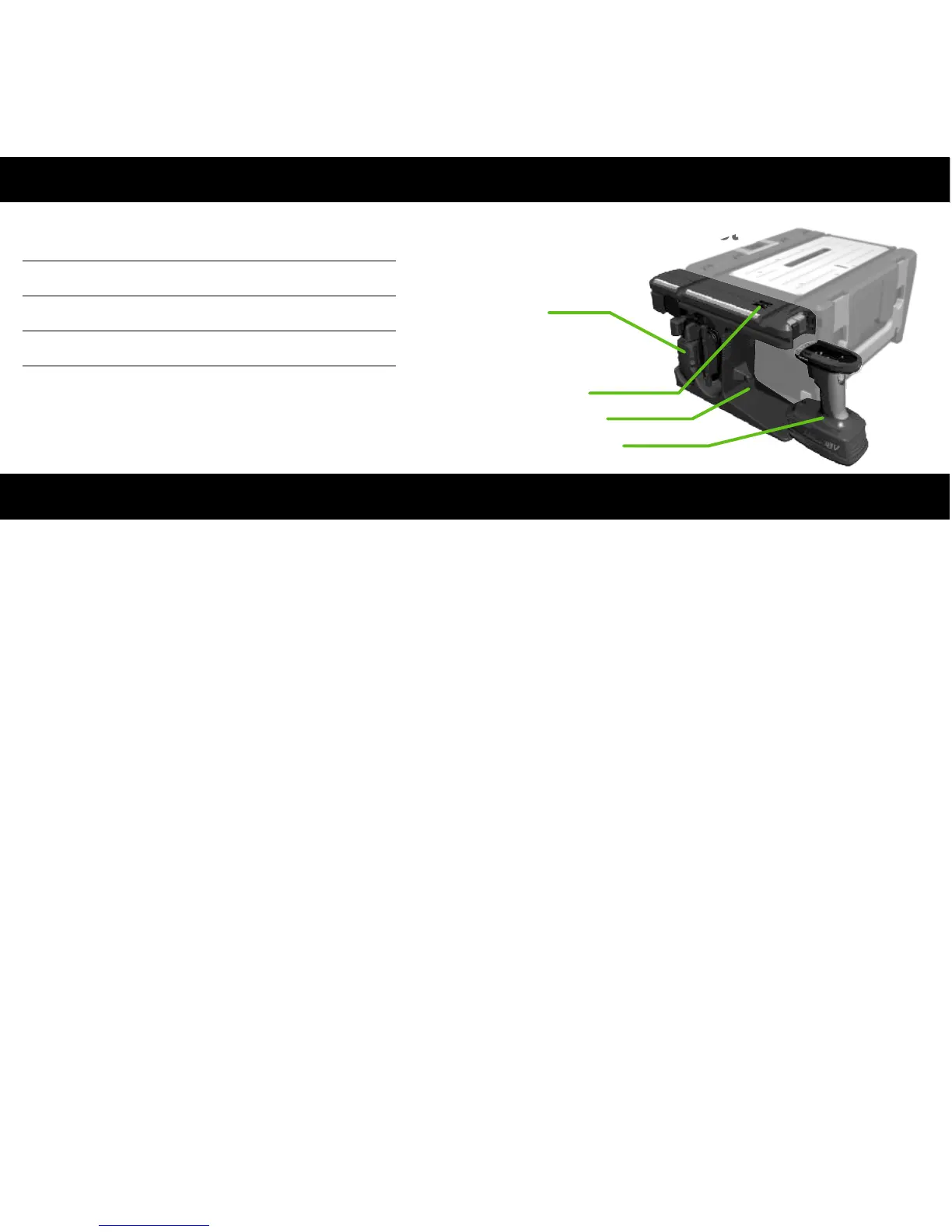
Secondary
Charger
Point(SCP)
Charger Dock
POWERhandle
LED Display
1 Hour charge times are based on the
1.5Ah POWERhandle, Larger Capacity
batteries will have longer charge times
Charging Dock - Operating Instructions
4.3
The POWERhandle has been shipped in a low
charge condition. You should charge the battery
fully before use.
WARNING. Do not throw used POWERhandles
into a fire or water; it could cause an explosion!
NOTE. It is necessary to slide down the product
release latch in order to remove the
POWERhandle from the charger dock, or from
the tools.
To charge the POWERhandle slide it into the
charger dock; the rails of the POWERhandle
should be aligned with the rails of the charger
dock. Slide the battery down until it “clicks” into
position. Connect the mains plug to a suitable
mains outlet.
LED’s on the top of the charger dock
will display the battery’s condition.
When the red LED is on, the case is
correctly connected to the mains
power. A green flashing LED means
fast charging. When the green LED is
on, the POWERhandle is fully charged.
NOTE. The RED LIGHT may flash when a hot
battery is or
.
. The battery could take
up to an 1 hour to cool to the optimal charging
temperature.
attached for charging
The battery will not charge whilst the red light is
flashing; the Battery is undergoing a cooling off
period to protect their life
when you
press the stop button while using the product in
bench mode This is normal and you can
continue using your product while its
performance is still normal (DO NOT run the
battery completely flat).
Plugged
Charging
Full
Charging
Error
Battery
Hot


 To Next Page