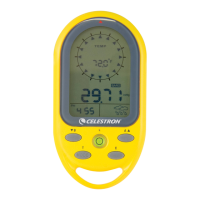
1. Cardinalpointwhenthecompassin
thenorthdirection
2. Directionarrow
3. Temperatureappearswhennotincompassmode
4. Lowbatteryindicator
5. AppearswheninAltimeter(Altitude)mode
6. Indicatesmaximumaltitude
7. IndicatesthedisplayformatofDayandMonth
8. AM/PM
9. Year
10. Keypadislocked
11. Appearswhensealevelpressureisshown
12. AppearswheninBarometer(airpressure)mode
13. Unitsofairpressure
14. Unitsofaltitudeappearinaltitudemode
15. Weatherforecast
16. AppearswheninAlarmmode
17. Appearswhenalarmisactivated
LcD DispLay
2
SeT up
•2PCSCR2032lithiumbatteriesareincluded.Whenbattery
islow,thebatterylowicon( )willbeon.Useasmall
screwdrivertoremovethescrewsofthebatterycover,
removethebatterieswithathinknifeorscrewdriver,place
thepositive(+)sideofthebatteriesupward,andthenreplace
thescrews.
Main FuncTionS and operaTionS
•PresstheMODEkeytoswitchmodebetweenClock,Date,YearandAlarmClock.
•PressA/▲,B/▼,Cbuttonstoswitchbetween:
Altimeter mode BArometer mode CompAss mode
1
2
3
4
5
6
7
8
9
10
11
12
13
14
15
1617



 To Next Page