EasyManua.ls Logo

Celestron CN-16 - User Manual

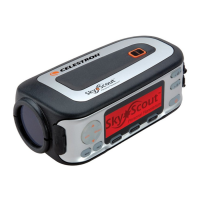
Celestron CN-16
2 pages
Print Icon
To Next Page IconTo Next Page
Loading...
Question and Answer IconNeed help?

Do you have a question about the Celestron CN-16 and is the answer not in the manual?

Summary

NexStar-i Telescope Attachment

Prepare Telescope Optical Tube

Remove short screws from the rear cell of the optical tube.

Install Mounting Bracket

Place mounting bracket over rear cell holes and tighten.

Secure GPS Unit to Bracket

Slide GPS unit onto mounting bracket tabs until it clicks.

Connect GPS to Telescope

Plug GPS cord into the telescope's Auxiliary port.

CGE Equatorial Mount Attachment

Attach Strap to Tripod Leg

Attach the included Velcro mounting strap to one of the tripod legs.

Secure GPS Unit to Bracket

Slide GPS unit onto mounting bracket tabs until it clicks.

Connect GPS to Electronics Panel

Plug GPS cord into the telescope's electronics panel.

Summary

NexStar-i Telescope Attachment

Prepare Telescope Optical Tube

Remove short screws from the rear cell of the optical tube.

Install Mounting Bracket

Place mounting bracket over rear cell holes and tighten.

Secure GPS Unit to Bracket

Slide GPS unit onto mounting bracket tabs until it clicks.

Connect GPS to Telescope

Plug GPS cord into the telescope's Auxiliary port.

CGE Equatorial Mount Attachment

Attach Strap to Tripod Leg

Attach the included Velcro mounting strap to one of the tripod legs.

Secure GPS Unit to Bracket

Slide GPS unit onto mounting bracket tabs until it clicks.

Connect GPS to Electronics Panel

Plug GPS cord into the telescope's electronics panel.

Celestron CN-16 Specifications

General IconGeneral
BrandCelestron
ModelCN-16
CategoryGPS
LanguageEnglish

Related product manuals