1
BAS – Celestron CPC 9.25 Telescope User Guide
This is a brief guide to seng-up and observing with the Celestron CPC 925 Schmi Cassegrain
telescope.
The Safety of You and the Telescope
The telescope is very heavy. And, its storage box is very heavy and awkward to li and place into (or
remove from) vehicles.
BAS strongly recommended any liing of the telescope and its storage box be performed by two
people. Also, the removal of the telescope from the box and placement on the tripod should only be
aempted by two people.
The storage box has wheels and detachable “wheel barrow” handles for easier movement. Or, the
simple rope handle can be substuted for the wheel barrow handles.
Telescope Components
To use the telescope, you will need:
• CPC 9.25 telescope
• Tripod and center support bracket
• Hand controller
• Charged 12v baery and telescope power cable
• Finderscope
• Visual back and diagonal mirror eyepiece holder
• Eyepieces
• A planetarium app (SkySafari or similar app) on a mobile device is also recommended
• Dew shield
Seng Up the telescope
Tripod and aaching the telescope
Place the tripod on rm ground and fully spread the legs. Adjust the length of one, or more, legs if
necessary to level the tripod top. Use the bubble level in the tripod top as the levelling guide.
Ensure the tripod posioning pin is poking up above the top of the tripod (this pin is used to inially
center the telescope on the tripod top).
Before aempng to li the telescope into place, make sure the opcal tube is pointed in the
downward posion aiming at the telescope base (where all the electronics aachment sockets are).

 Need help?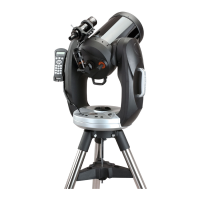



 To Next Page
 General