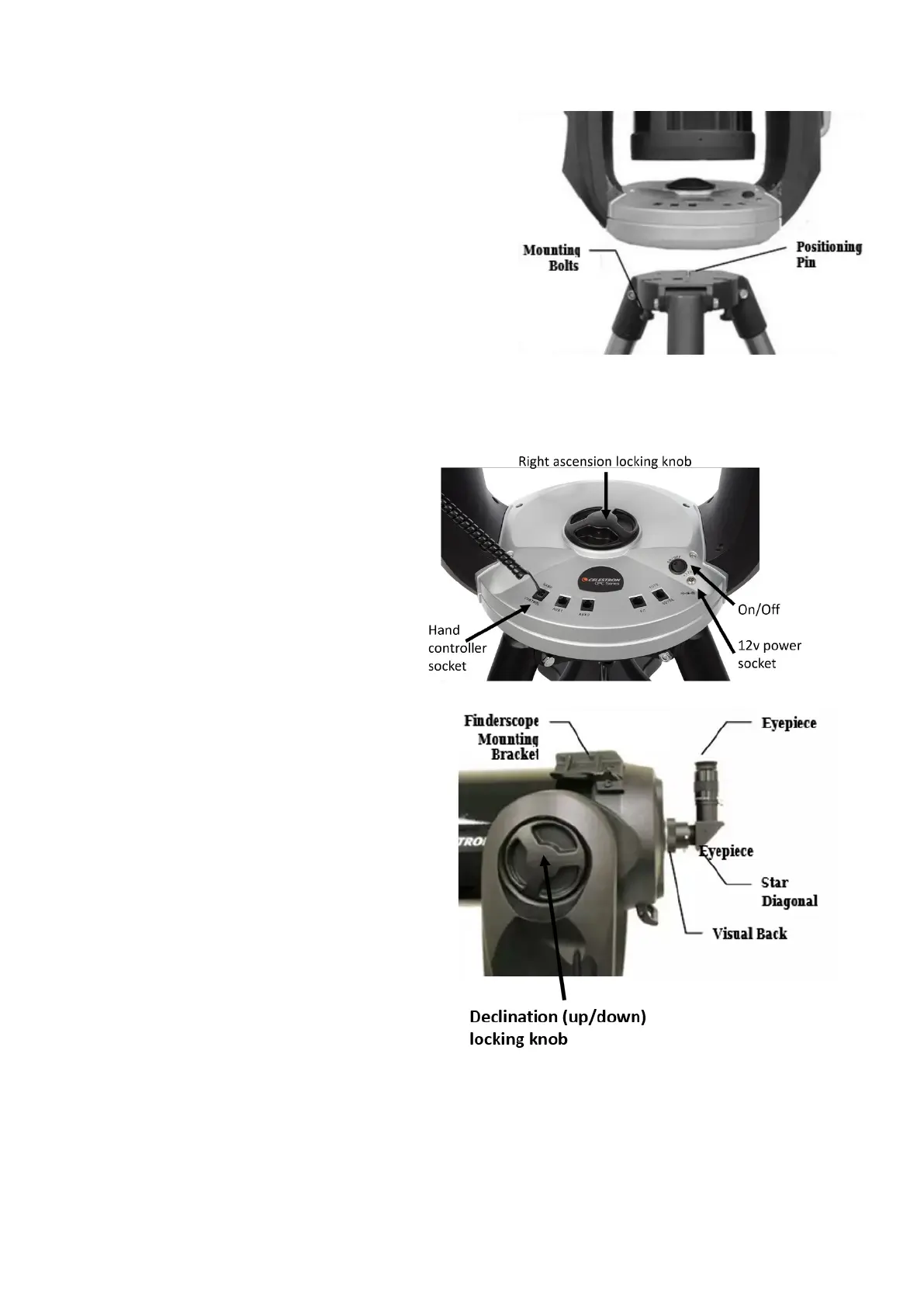
2
Li (two-person li is strongly recommended) the
telescope from its storage box and place the telescope
base on the tripod top. Maintain a very rm grip on the
telescope. The tripod posioning pin needs to slip into a
hole in the boom of the telescope base. You should
feel the telescope “clunk” down about 1cm when
properly centered on the pin. Maintain a rm hold on
the telescope side handle (the telescope is sll at risk of
falling to the ground). Slowly rotate the telescope base
on the tripod top unl you feel another “clunk” as the
telescope base matches the locaon of the three
mounng bolts that are on the under-side of the tripod head. Screw the three bolts into the
telescope base. The telescope is now aached to the tripod and no longer at risk of falling.
Aaching components to the telescope
Aach the hand controller and 12v
baery power cable.
On the le-side “shoulder” of the
telescope there is a large three-spoked
circular knob moulded into the telescope
fork arm. This is the declinaon
(up/down movement) knob. It
locks/unlocks the free movement of the
opcal tube in the up/down range of
moon. Unscrew the knob and lt the
opcal tube to aim the from corrector plate
lens toward the sky. Reghten the knob.
In the center of the telescope base is a similar
knob (right ascension locking knob) that allows
the telescope to be rotated. If you wish, you
can unscrew this knob and turn the telescope
to face a dierent direcon – and then
reghten the knob.
(Once you have completed the star alignment
procedure (explained below), do not unscrew
either of these knobs to move the telescope to
point in a dierent direcon. If you do so, you
will mess up the star alignment and the
telescope will no longer be able to nd the
objects you ask it to point to.)
Aach the nderscope, visual back and star diagonal
The nderscope is held in a quick-release bracket. Slide this bracket onto the nderscope mounng
bracket on the top of the telescope. Tighten the two bracket aachment screws.




 To Next Page