8 I ENGLISH
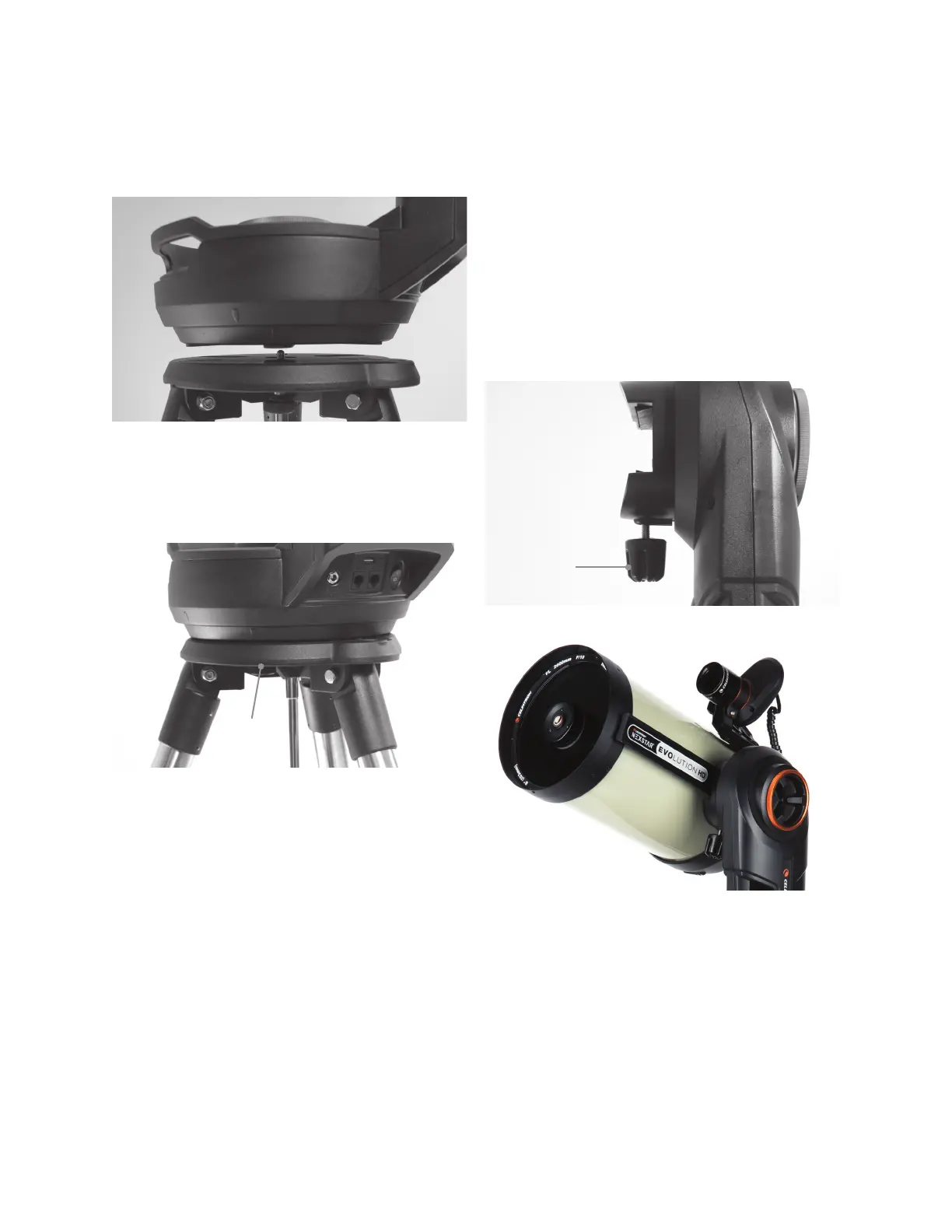
Attach the Mount to the Tripod
1. Position the fork arm mount over the center post on the
tripod head. Do not let go of the mount until it has registered
with the center post. The mount should not wobble.
2. With the mount resting on the tripod head, rotate the
mount until the three mounting sockets align. The sockets
will click into place, indicating they are aligned.
3. Thread the three captive mounting bolts from underneath
the tripod head into the bottom of the telescope base.
Attach the Telescope to the Mount
1. Loosen the orange altitude clutch lock knob and rotate the
altitude axis until the quick release knob faces downward.
2. Tighten the altitude clutch lock knob.
3. Loosen the quick release knob a couple of turns to allow
room for the dovetail on the telescope optical tube.
4. Slide the telescope optical tube into the quick release slot
from the back side of the telescope. The fork arm should
be on the left side of the optical tube. For correct balance,
position the telescope so that you can read the “Evolution”
nameplate. If you choose to add different accessories to
your telescope, you can rebalance it later.
1 of 3
Mounting Bolds
Quick Release
Knob







 To Next Page