EasyManua.ls Logo

Celestron Regal M2 - Eyecup Adjustment; Changing Magnification; Focusing

Celestron Regal M2
11 pages
Print Icon
To Next Page IconTo Next Page
To Previous Page IconTo Previous Page
Loading...
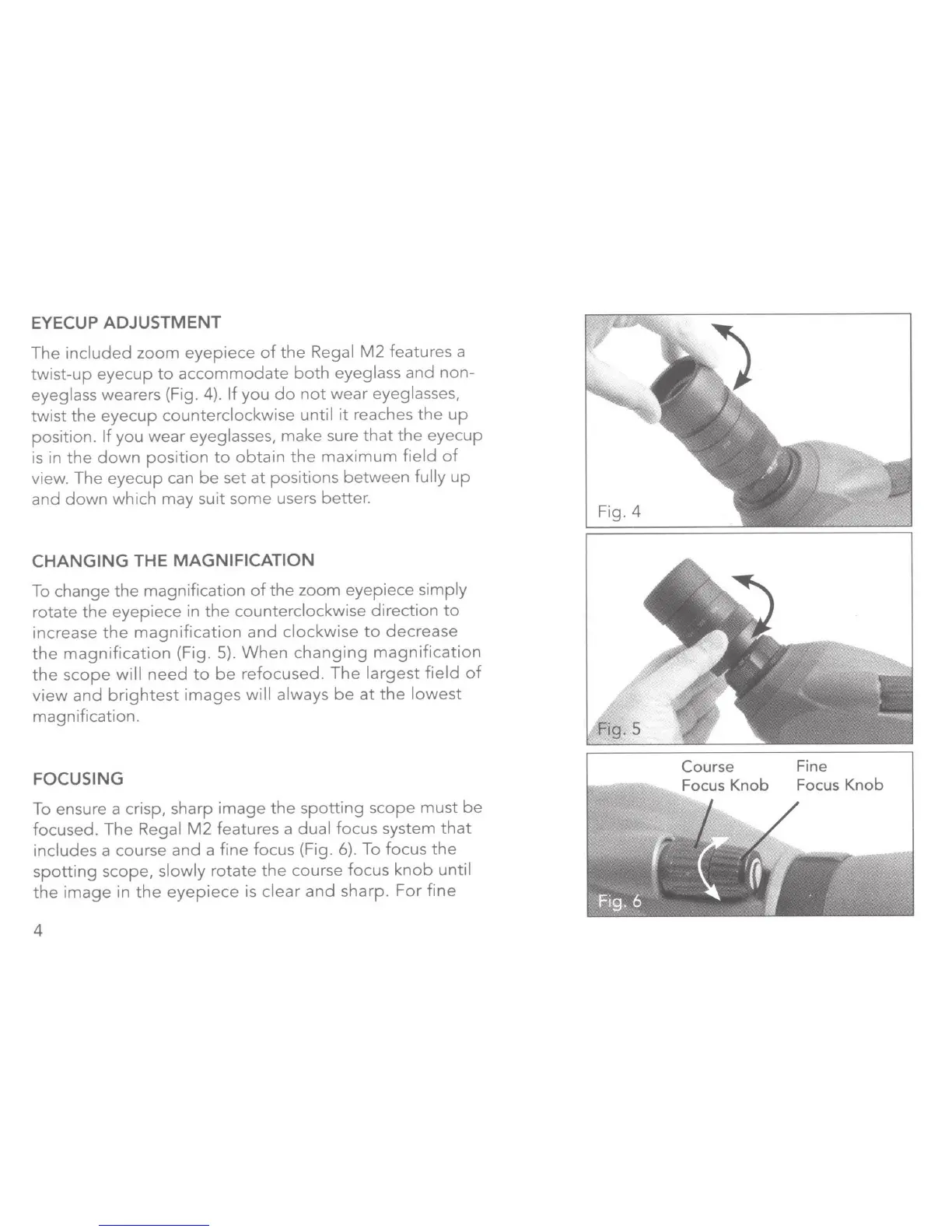
EYECUP ADJUSTMENT
The
included
zoom
eyepiece
of
the
Regal
M2
features
a
twist-up
eyecup
to
accommodate
both
eyeglass
and
non-
eyeglass wearers (Fig.
4).
If
you
do
not
wear
eyeglasses,
twist
the
eyecup
counterclockwise
until
it
reaches
the
up
position.
If
you
wear
eyeglasses,
make
sure
that
the
eyecup
is in
the
down
position
to
obtain
the
maximum
field
of
view.
The
eyecup
can
be
set
at
positions
between
fully
up
and
down
which
may
suit
some
users better.
CHANGING
THE
MAGNIFICATION
To change
the
magnification
of
the
zoom
eyepiece
simply
rotate
the
eyepiece
in
the
counterclockwise
direction
to
increase
the
magnification
and
clockwise
to
decrease
the
magnification
(Fig. 5).
When
changing
magnification
the
scope
will
need
to
be
refocused.
The
largest
field
of
view
and
brightest
images
will
always
be
at
the
lowest
magnification.
FOCUSING
To ensure a crisp, sharp
image
the
spotting
scope
must
be
focused.
The
Regal
M2
features
a
dual
focus
system
that
includes
a course
and
a
fine
focus (Fig. 6). To
focus
the
spotting
scope,
slowly
rotate
the
course
focus
knob
until
the
image
in
the
eyepiece
is
clear
and
sharp.
For
fine
4
Fig. 4
Fine
Focus
Knob

Related product manuals