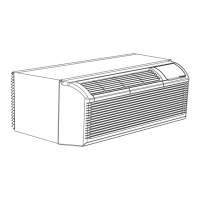
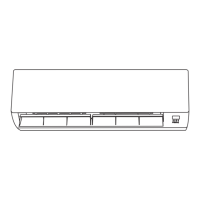
This document is a user manual for a Célierá Split Wall-Mounted Air Conditioner, covering models KFR-51GW/Ga and KFR-66GW/Ga. It provides essential information for installation, operation, and maintenance of the unit.
Function Description:
The Célierá air conditioner is a split wall-mounted unit designed for cooling and heating rooms. It operates by absorbing heat from the outdoor air and transferring it indoors for heating, or removing heat from indoors for cooling. The unit offers various operation modes including AUTO, COOL, DRY, HEAT, and FAN, allowing users to select the desired climate control. It features an indoor unit with an air return grid, air filter, air outlet, and adjustable airflow fins (left/right and up/down), and an outdoor unit with an air inlet and air discharge vent. A wireless remote controller is provided for convenient operation, allowing users to set temperature, fan speed, operation mode, and timer functions. An emergency operation key is also available on the indoor unit for basic on/off control if the remote controller is unavailable.
Important Technical Specifications:
- Models: KFR-51GW/Ga, KFR-66GW/Ga
- Power Source: 240V, 60Hz, 1 phase
- Minimum Circuit Ampacity: 20A
- Connecting Wires Specification: 14 AWG, VW-1 (or THHW), copper core, 105°C. Set screw diameter is 4 mm.
- Temperature Setting Range:
- HEAT mode: 64°F-88°F (16°C-31°C)
- COOL mode: 64°F-88°F (16°C-31°C)
- Defrosting Function: Automatic mode, stopping heating operation for 5-10 minutes when outdoor temperature is low and humidity is high to prevent frosting on the heat exchanger.
- Restart Protection: After shutdown, the unit cannot be restarted for 3 minutes to protect the microcomputer.
Usage Features:
- Operation Modes: AUTO, COOL, DRY, HEAT, FAN. The AUTO mode automatically selects the operation mode based on room temperature.
- Temperature Adjustment: Users can set the desired room temperature within the specified range using the remote controller.
- Airflow Direction Control:
- Up/Down: Adjustable using the "OUT FLAP" button on the remote controller, with multiple fixed positions and an AUTO swing option.
- Left/Right: Adjustable using the "IN FLAP" button for continuous swing or fixed direction.
- Fan Speed Control: Multiple fan speed settings (Lo, Mid, Hi, AUTO) can be selected using the "FAN SPEED" button.
- Timer Functions:
- ON Timer: Allows setting a specific time for the unit to start operation.
- OFF Timer: Allows setting a specific time for the unit to stop operation.
- Programming Timer: ON and OFF timers can be used in combination.
- Sleep Mode: Reduces operation sound and adjusts room temperature for comfortable sleep. In cooling mode, the room temperature is gradually raised; in heating mode, it is gradually lowered.
- Remote Controller: Wireless remote with an LCD display showing selected mode, temperature, fan speed, and time. Signals are sent by pointing the controller towards the indoor unit, with an audible confirmation upon successful reception.
- Emergency Operation: A button on the indoor unit allows basic on/off control if the remote controller is unavailable.
Maintenance Features:
- Pre-Season Check:
- Inspect intake and outlet vents for obstructions.
- Check installation stand for corrosion or rust.
- Verify proper grounding.
- Ensure the air filter is clean.
- Connect to power source.
- Install batteries in the remote controller.
- During Operation Season (Regular Maintenance):
- Air Filter Cleaning: Recommended every two weeks. Remove the air filter screen, clean it with lukewarm water (approx. 86°F or 30°C), and air dry. Do not use boiling water, bake dry, or exert excessive force.
- Air Conditioner Cleaning: Use a soft, dry cloth or vacuum cleaner. For very dirty units, use a cloth soaked in neutral home-use detergent.
- Post-Operation Season (Long-Term Storage):
- Dry Interior: Operate the unit in fan status at 86°F (30°C) for about half a day to dry the interior.
- Power Disconnection: Stop operation, turn off the power switch, and pull out the plug for energy saving and safety during non-operational seasons.
- Clean and Install Air Filter: Ensure the filter is clean before storage.
- Clean Units: Clean both indoor and outdoor units.
- Remove Remote Controller Batteries: Take out batteries from the remote controller.
Safety Instructions and Precautions:
- Installation: Must be performed by professional technicians. Avoid installing where combustible gases might leak. Ensure an earth leakage-circuit breaker is installed and the unit is properly grounded. Check wire connections for looseness.
- Operation:
- Do not stop operation by operating the switch directly.
- Do not press, stretch, damage, heat, or modify the power line. If damaged, have it replaced by authorized personnel.
- Never use fuses with incorrect capacity or metal wires.
- Avoid direct sunlight and hot air entering the room during cooling.
- Minimize heat generation during cooling.
- Do not use combusting apparatuses in the air-conditioned room.
- Avoid placing insecticides, paints, or flammable sprays near or directly on the unit.
- Ensure proper ventilation if using the air conditioner with combusting apparatuses.
- Cut off power supply before maintenance.
- Do not insert sticks or bars into air vents.
- Adjust air direction correctly for even room temperature.
- Avoid prolonged exposure to cool air.
- Do not clean the unit with water.
- Do not attach, hang, or stack articles on the unit.
- Check supporting structures regularly.
- Do not sit on the outdoor unit or place objects on it.
- Do not use hot water, gasoline, paint diluent, benzene, or polishing agents for cleaning.
- Troubleshooting: If the unit does not operate properly after basic checks, or if abnormal occurrences (e.g., burning smell, frequent fuse breaks, malfunction of TV/radio, abnormal noise, faulty operation after restart) occur, turn off power and contact the distributor immediately.
- Children: The appliance is not intended for use by young children or infirm persons without supervision. Young children should be supervised to ensure they do not play with the appliance.

 Need help?
 General

 To Next Page