BIO X6 User Manual v. 1.0 77
4.5.2 Droplet
The Droplet step allows you to choose to print one droplet per well and to use several
printheads in the same printing process.
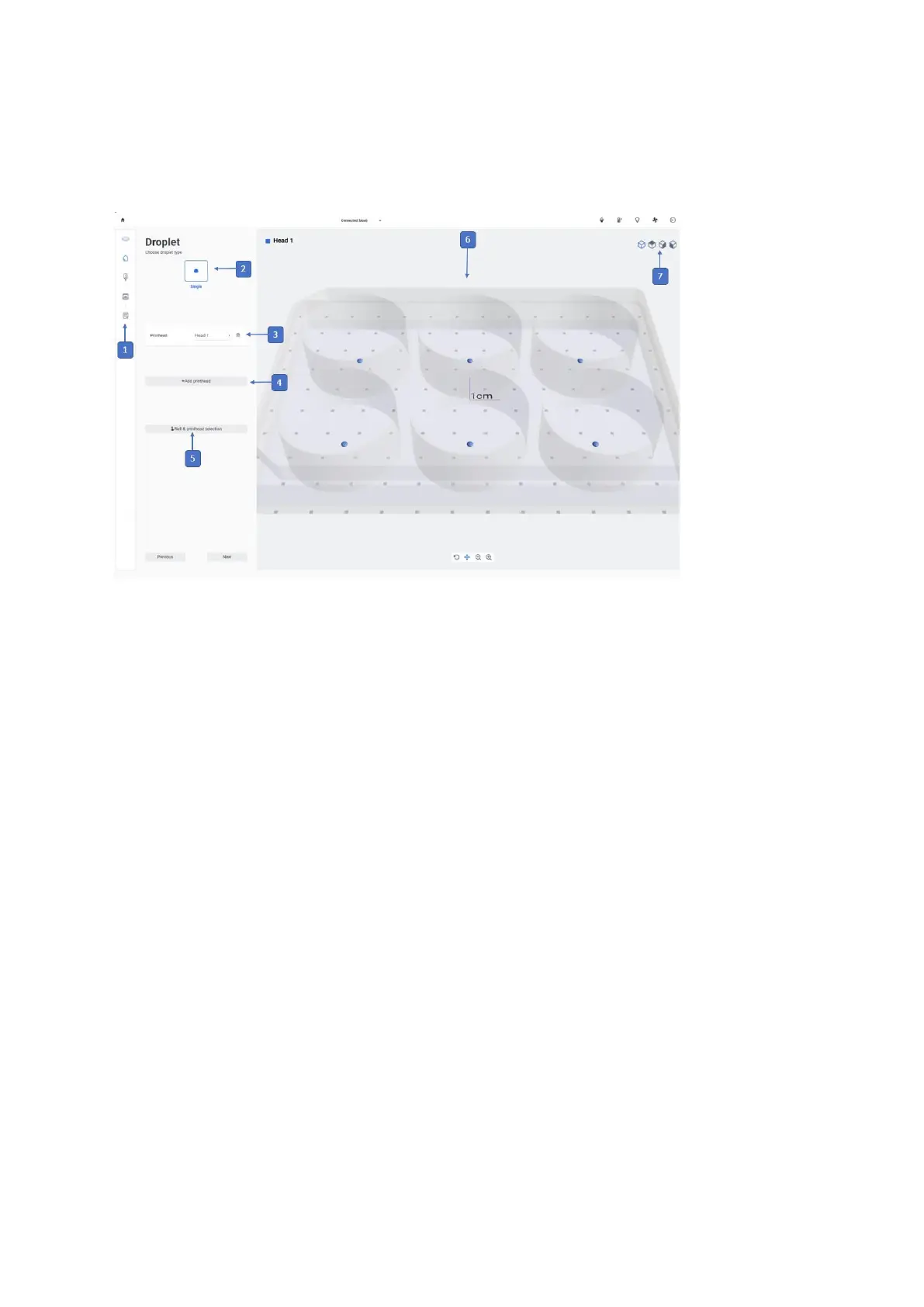
Figure 53 Overview of the Droplet step
1. Printing process navigation bar: This bar displays the steps of the overall
bioprinting process and highlights in blue the step you are currently in.
2. Select single droplet: With this feature you can select to print single droplet with one
printhead in each well.
3. Printhead type: Select the type of printhead you want to use. Different settings will
appear below depending on what type of printhead you select. Droplet printing is
compatible with Standard Pneumatic, Temperature-controlled, and Syringe Pump
printheads.
4. Add printhead: Tap to add another printhead to the bioprinting process.
5. Well selection: Tap to select which wells to print in and in what order. In case you
are using multiple printheads, you can also select which printhead is going to print on
which wells.
6. Preview: A preview of the well plate with the droplet print mode selected will be
displayed here. Different printheads will be displayed as different colors on the wells.
7. Face preview: Tap to rotate the preview and view it from different sides.


 To Next Page
 Loading...


