CONTROL PANEL (continued)
The heater can be operated by the controls located on the heater or with the remote control.
2. Oscillate Button – This button turns the heater oscillation function on and off.
3. On/Off Button – This button turns the heater on and off.
Note: the fan will run for up to 1 minute when you switch it off to cool the element, this is normal.
4. Heat Setting Button – This button sets the desired heat setting. Press the button once for low heat, twice
for high heat. Please note that when the heater is turned on it will automatically be on the “fan only”
mode until changed.
5. Timer Button – The timer function allows you to set the length of operation from 1 hour - 8 hours. On any
heat or fan setting press this button to set a desired time for the unit to operate before turning off
automatically (i.e. if you would like the heater to run for 4 hours and then turn off , press the Timer Button
until the light below the 4 is displayed on the control panel and the unit will run for 4 hours then turn off).
6. Note: Buttons 1 & 6 have no function on this model.
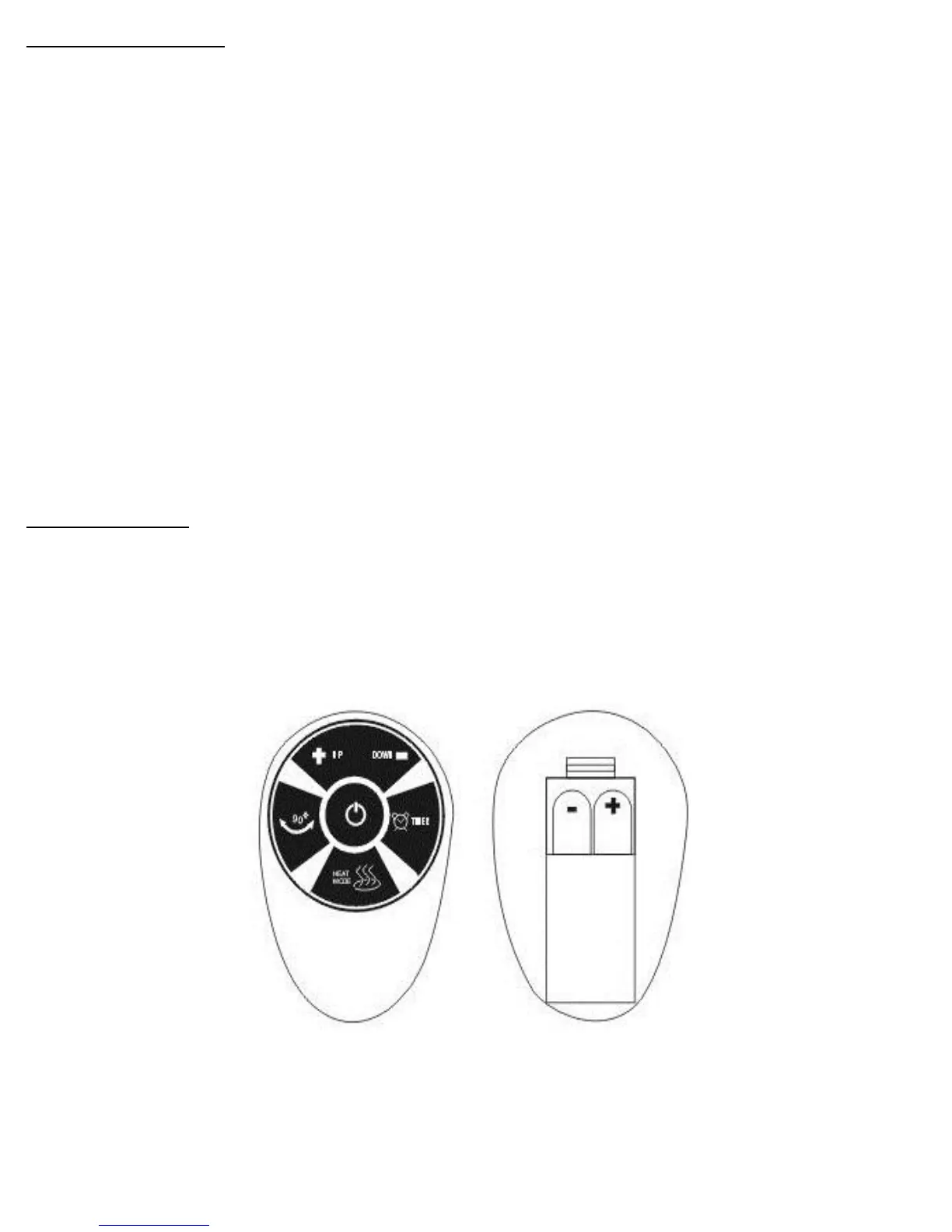
Remote control
Install two “AAA”(not included) batteries as shown below.
All the functions performed with the remote control work identically to the manual controls.
IMPORTANT! NEVER COVER THIS HEATER!



 To Next Page