Operating your Fan
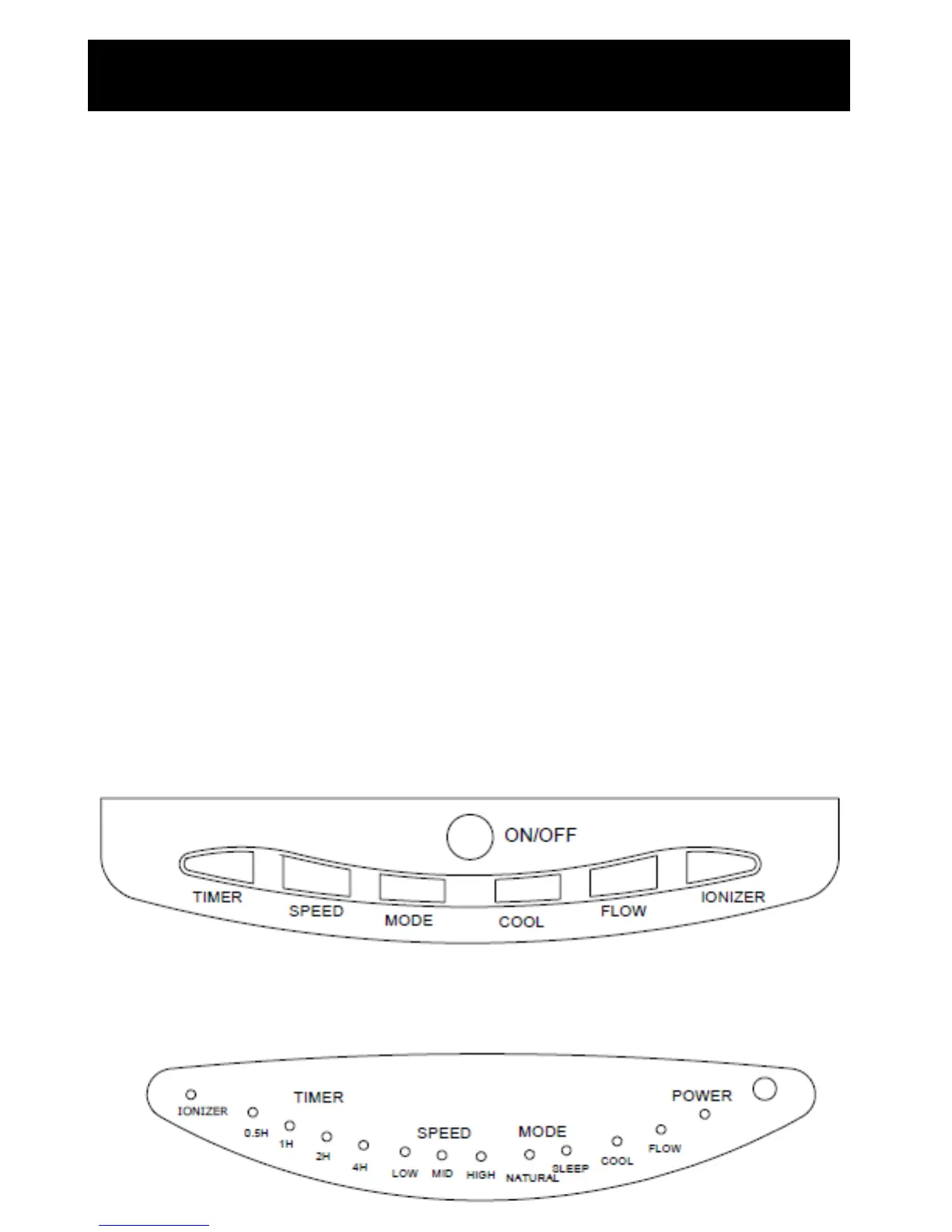
Fan control
Place the Fan on a dry, level and sturdy
surface. Plug the power cord into the socket.
ON/OFF
Press the ON/OFF button and the cooler
begins to operate. It will automatically start on
high speed. Press the ON/OFF button again
to turn the unit off.
Oscillation
Press the Flow button once, indicator light will
illuminate, air cooler begins to swing
horizontally and blow cool air. Press again
swing is off, air cooler stops swinging, but
continues to blow air. You can also push the
lever on the edge of the grill vertically by
hand, to adjust the height the air gets blown
out at.
Speed
Press Speed button to change wind speed
from “High-Medium-Low” in turn, the light will
illuminate to show which setting you have
chosen.
Timer
Press Timer Button once and the timer will be
set for 0.5hr. Continue to press the timer
button until the desired time to shut off is
selected (max 7.5hrs). E.g. If 0.5hr and 1.0hr
lights are on at the same time, it means the
timer is set to turn off after 1.5hrs. If no lights
are showing the unit is in manual mode and
will work continuously.
Cool
Press Cool Button once, indicator light will
illuminate, air cooler begins to blow
temperature air, press again, air cooler works
on a normal condition.
Mode
There are 3 types of air flow which can be
selected to meet your needs. Press once,
Natural to select natural mode. The unit will
blow air at different speeds to simulate a
natural wind flow. Press again to switch to
Sleep which will provide a gentler wind. You
can still select the wind speed from “High-
Medium-Low”.
Ionizer
Press Ionizer button and the units ioniser will
switch on to help purify the air. Press again to
turn off the ionisation function.


 To Next Page